

ScreenHush- Focus & Sleep
ScreenHush- Focus & Sleep is made and published by kangkang zhu. AppBrain is an independent app data site and isn't affiliated with kangkang zhu. The app name, icon, screenshots and description belong to kangkang zhu and are shown as published on the App Store.
AppBrain's verdict
- Last updated
- October 6, 2026
Rankings
App Store top chartsApp Store Rankings for ScreenHush- Focus & Sleep
Competitors
Similar apps and more from kangkang zhuMore from kangkang zhu

Releases
Updates seen on the App Store- Version
- 1.3.0
- Launched
- June 2026
No changelog data
User feedback
Ratings and reviews on the App StoreComments on ScreenHush- Focus & Sleep for iOS
We don't have enough comments to show example comments. Please check back later.
Technology
Found in the app by AppBrain- Price
- Free
- App size
- 8.83 MB
- Content rating
- Everyone
Technologies used by ScreenHush- Focus & Sleep
About the app and developer
About ScreenHush- Focus & Sleep
ScreenHush- Focus & Sleep is an utilities app developed by kangkang zhu.
User Ratings
The app has no ratings yet.
App Information
ScreenHush- Focus & Sleep is freely available from the App Store. The app size is 8.83 MB. The latest version available is 1.3.0. The last update was on October 6, 2026.
Technical Requirements
The app has a content rating of Everyone. The app has been available on the App Store since June 2026.
Developer information for kangkang zhu
Address:
Frequently asked questions about ScreenHush- Focus & Sleep
Is ScreenHush- Focus & Sleep free?
Yes. ScreenHush- Focus & Sleep is free on the App Store.
Is ScreenHush- Focus & Sleep still available?
Yes. ScreenHush- Focus & Sleep is on the App Store, and the last update we saw was on October 6, 2026.
How large is ScreenHush- Focus & Sleep?
ScreenHush- Focus & Sleep is 8.83 MB.
Is ScreenHush- Focus & Sleep suitable for children?
App Store rates the content of ScreenHush- Focus & Sleep as suitable for everyone.
Who made ScreenHush- Focus & Sleep?
ScreenHush- Focus & Sleep was developed by kangkang zhu. It is listed in the utilities category on the App Store.
Store listing
By kangkang zhu, from the App Store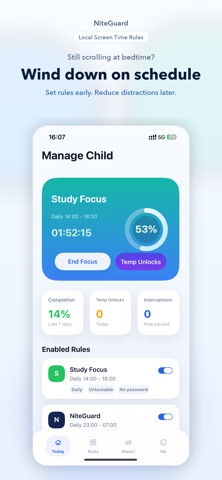


Description by kangkang zhu Written by the developer, not by AppBrain. Click to read.
Is your child still watching short videos or playing games when it is time for bed?
Trying to set clearer phone boundaries for homework or bedtime without monitoring private content?
NightWard is a local screen time rule manager built with Apple Screen Time capabilities. Set family or personal rules, choose the apps, categories, or websites you want to limit, and reduce distractions when the rule is active.
Use it for these scenarios:
- Protect bedtime and homework routines: create clearer phone agreements for games, short videos, social apps, and entertainment websites.
- Manage family routines on this device: protect important rules with a local admin password and help children know when phone time starts and ends.
- Manage yourself: set bedtime, study, work, or morning focus rules to reduce distracting apps and websites.
What you can do:
- Choose family mode or personal mode.
- Start from built-in rule templates.
- Set one-time, daily, weekday, weekend, or custom-day rules.
- Create overnight schedules such as 10:00 PM to 7:00 AM.
- Choose the limited apps, categories, or websites through the Apple system picker.
- Optionally prevent app installation, app removal, and in-app purchases for family rules.
- Configure temporary unlocks for necessary moments.
- Review local 7-day reports for completion, unlocks, and interruptions.
- Upload and restore your configuration through iCloud when you choose to.
Key features:
- Family and personal modes in one app.
- Templates for bedtime, homework, exam week, weekend entertainment, study focus, work focus, and morning focus.
- Flexible schedules with custom days and overnight time ranges.
- User-selected app, category, and website limits.
- Temporary unlocks with 15-minute or 20-minute options and daily quotas.
- Local admin password for protected family rules.
- Local 7-day reports with completion rate, temporary unlocks, interruptions, and suggestions.
- User-initiated iCloud configuration backup and restore.
- Simplified Chinese, Traditional Chinese, and English.
Privacy and boundaries:
- No account required.
- No remote parental control or device pairing.
- No messages, browsing content, photos, contacts, location, or call records collected.
- The limited scope is selected by you through the Apple system picker.
- Rules, admin password status, and reports are primarily stored on this device.
- iCloud configuration upload and restore are started by you.
- Crash diagnostics are used for stability and are not used for advertising tracking.
NightWard does not replace system-level parental supervision and does not promise to stop every workaround. It focuses on a practical boundary: set the rule before the hard moment, reduce distractions when the time comes, and keep temporary flexibility when needed.
Terms of Use (EULA): https://www.apple.com/legal/internet-services/itunes/dev/stdeula/
Privacy Policy: https://gavinkangdeveloper.github.io/saveapp/privacy-en.html