



AppBrain's verdict
- Last updated
- November 13, 2026
- Size
- 8.25 MB
User feedback
Ratings and reviews on the App StoreComments on Screenline Teleprompter for iOS
We don't have enough comments to show example comments. Please check back later.
Store listing
By Kevin Chaves, from the App StoreDescription by Kevin Chaves Written by the developer, not by AppBrain. Click to read.
Screenline is a calm, focused teleprompter for iPad and Mac, with companion controllers for iPhone, iPad, and Apple Watch.
MAKE IT COMFORTABLE
Choose your pace, typography, reading width, margins, guide, and eyeline. Use a countdown, add cue markers, and rehearse at your own speed. Adjust horizontal and vertical mirroring for your setup.
KEEP YOUR SCRIPTS ORGANIZED
Create and edit scripts, organize them in folders, find a passage, and arrange a Run of Show. Keep important work backed up with the available export and backup tools.
CONTROL FROM NEARBY
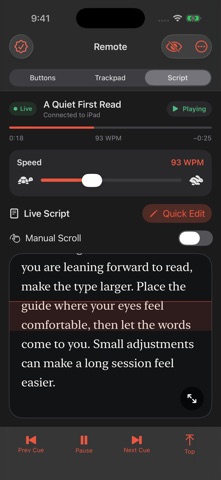
Connect an approved iPhone or iPad controller to the iPad or Mac host. Adjust speed with a slider, scroll or scrub with the trackpad, follow a readable live script preview, and make a Quick Edit without moving the host device. With a single script selected in the host library, phone Play can open it directly.
APPLE WATCH COMPANION
Play or pause, move between cues, and use the Digital Crown to scroll or adjust speed. The Watch relays through its paired iPhone: Screenline must stay open on the unlocked phone and connected to the host. The Watch does not connect directly to an iPad or Mac.
PRODUCTION TOOLS
Full Access unlocks unlimited scripts and prompt time, import and export formats, recording, clean external output, presets, Runs of Show, remote hosting, and controller mapping. Compatible Bluetooth or USB game controllers can use custom button assignments, including hold-to-adjust speed.
VOICE FOLLOW
On supported devices running iOS, iPadOS, or macOS 26 or later, on-device speech recognition can follow your spoken script. A supported language and an initial speech-asset download are required.
LOCAL BY DESIGN
No Screenline account, ads, tracking SDK, or developer-operated script server. Scripts are stored locally. Approved controllers receive the script and live session information needed for remote tools. Local prompting and remote control do not require internet access; keep Wi-Fi and Bluetooth enabled for nearby connections. Private iCloud library sync is not enabled in this release.
Free to try. Full Access is a one-time in-app purchase, not a subscription. Available features and output options depend on your device, permissions, and accessories. iPhone is the companion controller; iPad and Mac host the teleprompter. Apple Watch requires the paired iPhone relay.
Safety and technology
Found in the app by AppBrain- Price
- Free
- App size
- 8.25 MB
- Content rating
- Everyone
Technologies used by Screenline Teleprompter
Releases
Updates seen on the App Store- Version
- 1.0.1
- Launched
- November 2026
No changelog data
Alternatives
Similar apps and more from Kevin ChavesMore from Kevin Chaves


Rankings
App Store top chartsApp Store Rankings for Screenline Teleprompter
About the app and developer
About Screenline Teleprompter
Screenline Teleprompter is a productivity app developed by Kevin Chaves.
User Ratings
The app has no ratings yet.
App Information
Screenline Teleprompter is freely available from the App Store. The app size is 8.25 MB. The latest version available is 1.0.1. The last update was on November 13, 2026.
Technical Requirements
The app has a content rating of Everyone. The app has been available on the App Store since November 2026.
Screenline Teleprompter is made and published by Kevin Chaves. AppBrain is an independent app data site and isn't affiliated with Kevin Chaves. The app name, icon, screenshots and description belong to Kevin Chaves and are shown as published on the App Store.
Developer information for Kevin Chaves
Address: