Download Android Apps and Games
AppBrain
  • Apps
  • Apps being viewed right now Trending apps today Most popular apps All-time most downloaded apps Top rated apps
  • Intelligence ▾
    Intelligence overview → Track any Android app or your whole market
    Track & analyze
    Keyword Tracker & OptimizerTrack & improve Play rankings App Performance ReportOne-off PDF for any app StatisticsFree Android & Play market stats
    Promote your app
    Featured Apps App Links
  • Intelligence
  • Pricing
  • Dashboard
  • Sign up
  • Log in
Last updated on: 2026-08-14
App Store Apps > Utilities > Screens for Organizations
Screens for Organizations icon

Screens for Organizations

5.8.10
Edovia Inc.
5.00
1 reviews
$199.99

Screens for Organizations Screenshot 1 of 10
Screens for Organizations Screenshot 2 of 10
Screens for Organizations Screenshot 3 of 10
Screens for Organizations Screenshot 4 of 10
Screens for Organizations Screenshot 5 of 10
Screens for Organizations Screenshot 6 of 10
Screens for Organizations Screenshot 7 of 10
Screens for Organizations Screenshot 8 of 10
Screens for Organizations Screenshot 9 of 10
Screens for Organizations Screenshot 10 of 10
Download from the App Store

About Screens for Organizations

Screens for Organizations is an overall app developed by Edovia Inc..

How many times has Screens for Organizations been downloaded?

What is the rating of Screens for Organizations?

Screens for Organizations is rated 5.00 out of 5 stars, based on one rating ratings.

Is Screens for Organizations free?

Screens for Organizations costs $199.99 to download. The APK download size is 48.01 MB. The latest version available is 5.8.10. The last update was on July 6, 2026.

What are the requirements for Screens for Organizations?

The app has a content rating of Everyone. The app has been available on Google Play October 2024.

Description
Screens for Organizations: Remote Computer Control for Schools and Businesses

Control your Mac, Windows PC, Linux PC, or Raspberry Pi effortlessly from any location—be it a classroom, office, or even across the globe. Screens for Organizations is your dependable remote desktop solution, designed for institutions that value speed, security, and reliability, offering seamless control over multiple devices.

With Screens for Organizations, remote access is at your fingertips, tailored for educational and business environments. Here’s why it’s the ideal choice for your organization:

Connect from Anywhere

Install Screens Connect on your Mac or Windows PC to gain remote access from anywhere. Your computers are now within reach wherever you are. Screens for Organizations fully integrates with Tailscale, making remote connections to Linux PCs and Raspberry Pi devices seamless.

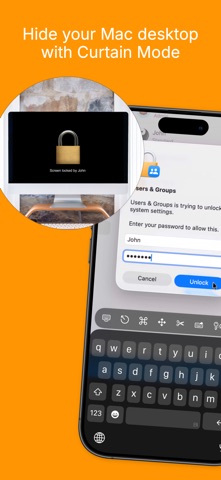
Curtain Mode

Maintain privacy during sessions with Curtain Mode, which masks the remote Mac’s display. Ideal for classrooms and shared workspaces, this feature keeps your activity discreet.

Secure Connections

Screens provides secure access to your computers. Enable Remote Login on your Mac or configure SSH for Windows, Linux, or Raspberry Pi. For enhanced security, Screens also supports SSH key authentication.

Effortless Login

With automated password entry, connecting to your remote computer is fast and hassle-free. Save time with a seamless login experience.

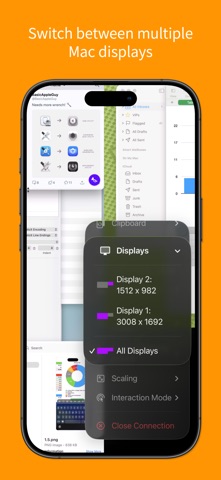
Display Selection

Choose the display you want on multi-screen Macs or show them all. Screens remembers your choice for each session.

Clipboard Sharing

Synchronize text, URLs, images, and more between local and remote clipboards. Keep everything in sync without interruption.

Session Selection

When someone is using a remote Mac, Screens allows you to either share their session or start a new one, giving you control over access.

Raspberry Pi 5 Compatibility

Screens supports Bookworm and WayVNC with RSA-AES authentication, ensuring fast, reliable performance.

Shortcuts Toolbar

Boost productivity with easy access to your favorite shortcuts through a scrollable toolbar.

External Input Devices Support

Use your Magic Keyboard or any compatible external keyboard and pointing device for a seamless, intuitive control experience.

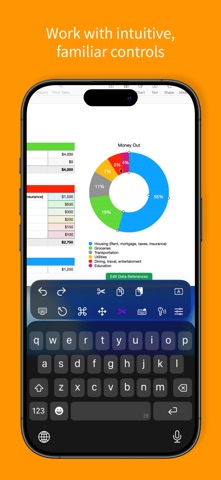
Easy to Use

Screens for Organizations offers familiar, intuitive controls, ensuring a consistent experience across iOS, Mac, and Vision Pro devices.

Assist Students and Staff

With the free Screens Assist utility (Mac), support your team by troubleshooting issues, updating apps, and more, making tech support simple.

Other Features

- Adaptive and Full display quality
- Observe or control the remote computer
- iCloud Synchronization
- Full URL Schemes Support
- Secure access with Touch ID and Face ID
- And much more!

Special Requirements

- A VNC Server like UltraVNC or TightVNC is needed for Windows connections.
- Windows, Linux PCs, and Raspberry Pi support text and URL sharing.
- Due to VNC protocol limitations, Screens does not support audio.
- Screens Connect requires macOS 10.11 or later for Mac, Windows 7 SP1 or later for PCs, and a free Screens ID.
- Screens does not support remote connections initiated from a PC.

Screens for Organizations is your trusted tool for secure, reliable remote control, whether in a classroom, office, or beyond. Empower your organization with seamless access and control.
Show more Show less

More data about Screens for Organizations

Price $199.99
Rating 5.00 based on a single rating
Ranking Not ranked
Version 5.8.10
App download size 48.0 MB
Suitable for Everyone

More from Edovia Inc.

Screens: VNC Remote Desktop icon Screens: VNC Remote Desktop
Edovia Inc.
4.6
$19.99
2.2K ratings
Screens 5: VNC Remote Desktop icon Screens 5: VNC Remote Desktop
Edovia Inc.
4.5
Free
530 ratings
TouchPad icon TouchPad
Edovia Inc.
4.7
$4.99
149 ratings
NumPad. icon NumPad.
Edovia Inc.
3.0
$4.99
30 ratings
Motorist: Car Maintenance icon Motorist: Car Maintenance
Edovia Inc.
4.5
Free
29 ratings
Screens 4 icon Screens 4
Edovia Inc.
0.0
$29.99

Changelog of Screens for Organizations

No changelog data

Developer information for Edovia Inc.

Edovia Inc.

Address:

Share Screens for Organizations

Comments on Screens for Organizations for iOS

We don't have enough comments to show example comments. Please check back later.

App Store Rankings for Screens for Organizations

This app is not ranked

Technologies used by Screens for Organizations

Today's trending apps Apps other people are watching Top new apps Apps on sale Popular Overall
More hot apps 🔥

Back to top
AppBrain Intelligence premium content

Subscribe now to get full and unlimited access to AppBrain Intelligence. You'll have access to:

  • App Intelligence dashboard (performance timeline, competitor comparison, country rankings, insight cards)
  • Detailed ranking data per app
  • Full timeline per developer
  • Device market shares data per country
  • Unlimited keyword tracking
1 Month

$75/mo
(billed every month)

SAVE 0%
Subscribe
3 Months

$65/mo
($195 billed every 3 months)

SAVE 13%
Subscribe
1 Year

$57.50/mo
($690 billed every year)

SAVE 23%
Subscribe
Each subscription will automatically renew 3 days before the expiration date for the same time period. Subscriptions can be cancelled at any time before the renewal.

AppBrain is a directory focused on discovering great apps and games. We give statistics, rankings and search options that Google Play and the App Store don't have. All trademarks are owned by their respective owners. AppBrain doesn't offer APKs or binaries, and always lets users install the official version from Google Play or the App Store.

More apps

  • Top Android apps being viewed
  • Pixl8 · Pico-8 Game Player
  • Toilet Rush Simulator 3D
  • D-day for Android

Android Statistics

  • Android statistics
  • Google Play Developer stats
  • Trending Android Apps
  • Top popular Apps
  • Buy the best Android phone

About AppBrain

  • Contact
  • Privacy
  • Documentation
  • DMCA takedowns
  • Articles
  • Blog
  • Android Interstitial Ads: Best practices to optimize your app's earnings
© 2010-2026 - AppBrain