

Screenshot & Link - Keeply
Screenshot & Link - Keeply is made and published by sang woon kim. AppBrain is an independent app data site and isn't affiliated with sang woon kim. The app name, icon, screenshots and description belong to sang woon kim and are shown as published on the App Store.
AppBrain's verdict
- Last updated
- September 8, 2026
Rankings
App Store top chartsApp Store Rankings for Screenshot & Link - Keeply
Competitors
Similar apps and more from sang woon kim


Releases
Updates seen on the App Store- Version
- 2.5.0
- Launched
- March 2026
No changelog data
User feedback
Ratings and reviews on the App StoreComments on Screenshot & Link - Keeply for iOS
We don't have enough comments to show example comments. Please check back later.
Technology
Found in the app by AppBrain- Price
- Free
- App size
- 73.1 MB
- Content rating
- Medium
Technologies used by Screenshot & Link - Keeply
About the app and developer
About Screenshot & Link - Keeply
Screenshot & Link - Keeply is a productivity app developed by sang woon kim.
User Ratings
The app has no ratings yet.
App Information
Screenshot & Link - Keeply is freely available from the App Store. The app size is 73.10 MB. The latest version available is 2.5.0. The last update was on September 8, 2026.
Technical Requirements
The app has a content rating of Medium Maturity. The app has been available on the App Store since March 2026.
Developer information for sang woon kim
Address:
Frequently asked questions about Screenshot & Link - Keeply
Is Screenshot & Link - Keeply free?
Yes. Screenshot & Link - Keeply is free on the App Store.
Is Screenshot & Link - Keeply still available?
Yes. Screenshot & Link - Keeply is on the App Store, and the last update we saw was on September 8, 2026.
How large is Screenshot & Link - Keeply?
Screenshot & Link - Keeply is 73.10 MB.
Is Screenshot & Link - Keeply suitable for children?
App Store gives Screenshot & Link - Keeply a medium maturity rating, so it is not meant for young children.
Who made Screenshot & Link - Keeply?
Screenshot & Link - Keeply was developed by sang woon kim. It is listed in the productivity category on the App Store.
What are the best alternatives to Screenshot & Link - Keeply?
People looking at Screenshot & Link - Keeply also look at these productivity apps: 回味-图片收藏·视频收藏·链接整理·书签管理·稍后看·收藏夹, ToDough: Bake & To-Do List, ツンドク - 後で読むリンク保存&ブックマーク管理, TasteShelf, Daylit - Daily Planner.
Store listing
By sang woon kim, from the App Store



Description by sang woon kim Written by the developer, not by AppBrain. Click to read.
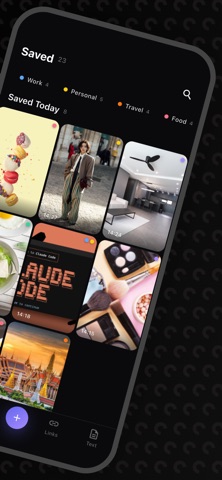
Screenshots piling up on your phone, links you saved but can't find again. Keeply keeps them tidy.
[ Automatic screenshot organizing ]
Open the app and your gallery's screenshots load automatically. No need to hunt them down one by one — just add tags and notes right away.
[ Search text inside screenshots ]
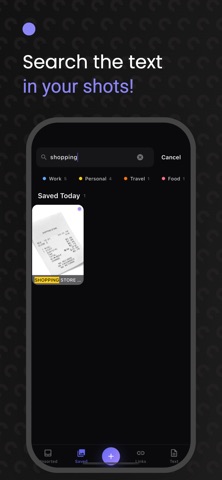
Keeply automatically recognizes the text in your saved screenshots (OCR). Even without a note, you can search by words you saw on screen and find them instantly. Existing screenshots are processed automatically too.
[ Tap links, phone numbers & emails ]
Keeply finds links, phone numbers, and emails inside your screenshots. Open a link, place a call, or write an email — all in one tap.
[ Save links with previews ]
Paste a link and Keeply pulls in preview details like the title and image automatically. Manage them with tags and notes, just like screenshots.
[ Quick sorting with tags ]
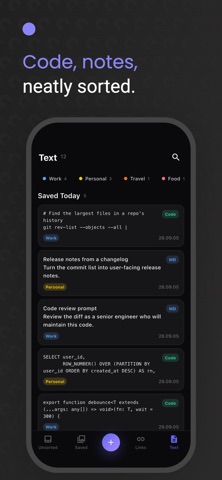
Create your own tags to organize screenshots and links however you like. Find them again later with a single tag.
[ Add notes ]
Leave a note on each item so you never forget why you saved it.
[ Copy image ]
Copy a saved screenshot to the clipboard and paste it anywhere.
[ Offline ]
All your data stays on your device. Organize and search even without a network.
Tidy up your digital space with Keeply today.