

Screenshot Organizer: ShotBox
Screenshot Organizer: ShotBox is made and published by MEHMET CANKER (TR). AppBrain is an independent app data site and isn't affiliated with MEHMET CANKER (TR). The app name, icon, screenshots and description belong to MEHMET CANKER (TR) and are shown as published on the App Store.
AppBrain's verdict
- Last updated
- August 26, 2026
Rankings
App Store top chartsApp Store Rankings for Screenshot Organizer: ShotBox
Competitors
Similar apps and more from MEHMET CANKER (TR)Alternatives to Screenshot Organizer: ShotBox


More from MEHMET CANKER (TR)


Releases
Updates seen on the App Store- Version
- 1.8
- Launched
- June 2026
No changelog data
User feedback
Ratings and reviews on the App StoreComments on Screenshot Organizer: ShotBox for iOS
We don't have enough comments to show example comments. Please check back later.
Technology
Found in the app by AppBrain- Price
- Free
- App size
- 31.1 MB
- Content rating
- Everyone
Technologies used by Screenshot Organizer: ShotBox
About the app and developer
About Screenshot Organizer: ShotBox
Screenshot Organizer: ShotBox is a productivity app developed by MEHMET CANKER (TR).
What is the rating of Screenshot Organizer: ShotBox?
Screenshot Organizer: ShotBox has no ratings yet.
Is Screenshot Organizer: ShotBox free?
Screenshot Organizer: ShotBox is free. The app size is 31.14 MB. The latest version available is 1.8. The last update was on August 26, 2026.
What are the requirements for Screenshot Organizer: ShotBox?
The app has a content rating of Everyone. The app has been available on the App Store since June 2026.
Developer information for MEHMET CANKER (TR)
Address:
Store listing
By MEHMET CANKER (TR), from the App Store


Description by MEHMET CANKER (TR) Written by the developer, not by AppBrain. Click to read.
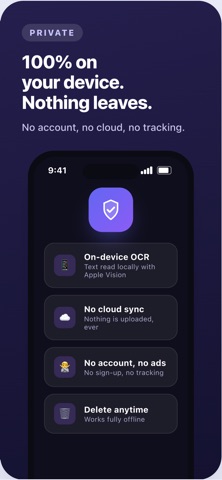
Everything runs on your device. No account, no sign-up, nothing uploaded.
WHY YOU'LL LOVE IT
• Instant text search — find any screenshot by the words inside it
• On-device OCR — text is read locally with Apple's Vision engine
• Smart categories — receipts, travel, shopping, work, links and more, sorted for you
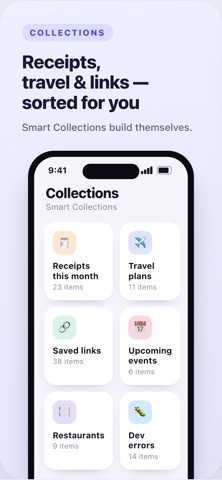
• Smart Collections — "Receipts this month", "Travel plans", "Saved links" build themselves
• One-tap actions — add dates to your calendar, set reminders, copy details, open maps, call numbers
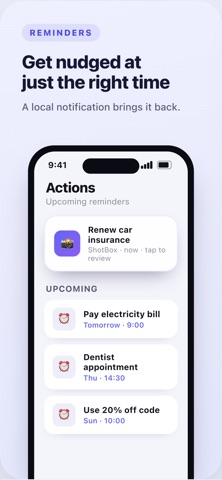
• Reminders — set a reminder on any screenshot and get a notification right on time; tap to jump straight back to it
• Detected details — prices, dates, addresses, order numbers and links pulled out automatically
PRIVATE BY DESIGN
• Your screenshots never leave your device
• No cloud sync, no tracking, no ads
• Delete everything indexed anytime
• Works fully offline
PREMIUM (optional)
Unlock unlimited indexing and analysis, advanced actions, smart collections, data export & backup, and Smart AI summaries.
Stop scrolling endlessly through your camera roll — Screenshot Organizer remembers everything for you.
Subscriptions auto-renew unless cancelled at least 24 hours before the period ends; your Apple ID is charged for renewal. Manage or cancel anytime in your account settings. Terms of Use and Privacy Policy are available in the app.