

Screenshot Vault
Screenshot Vault is made and published by Saptak Sen. AppBrain is an independent app data site and isn't affiliated with Saptak Sen. The app name, icon, screenshots and description belong to Saptak Sen and are shown as published on the App Store.
AppBrain's verdict
- Last updated
- July 14, 2025
- Size
- 10.4 MB
User feedback
Ratings and reviews on the App StoreComments on Screenshot Vault for iOS
We don't have enough comments to show example comments. Please check back later.
Store listing
By Saptak Sen, from the App Store


Description by Saptak Sen Written by the developer, not by AppBrain. Click to read.
Stop losing valuable information buried in your camera roll. Screenshot Vault uses cutting-edge AI to transform your screenshots into an organized, searchable knowledge base.
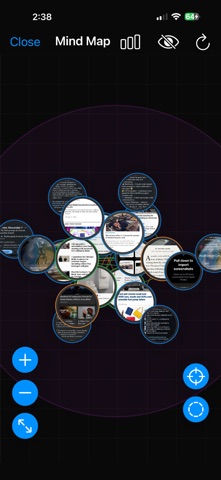
AI-Powered Mind Maps
Watch your screenshots come alive with intelligent mind maps that reveal hidden connections between your content. Our AI analyzes relationships between people, places, and concepts, creating visual maps that help you discover patterns you never knew existed.
Lightning-Fast OCR Text Extraction
Extract text from any screenshot instantly. Whether it's a receipt, article, or document, our advanced OCR technology converts images to editable text with incredible accuracy. Copy, search, and organize text content effortlessly.
Smart Entity Recognition
Automatically identify and categorize:
• People & Organizations - Names, companies, brands
• Places & Addresses - Locations, landmarks, addresses• Objects & Products - Items,
products, visual elements
• Dates & Times - Events, appointments, deadlines
• Contact Information - Phone numbers, emails, URLs
• Financial Data - Prices, currencies, transactions
Conversational Voice Search
Find anything with natural language. Just speak: "Show me screenshots about restaurants in Seattle" or "Find receipts from last month" - our AI understands and delivers precise results instantly.
Effortless Organization
• Auto-Import - Pull screenshots directly from your Photos app
• Smart Categorization - AI automatically organizes by content type
• Advanced Filters - Search by date, location, text, or visual elements
• Batch Operations - Select, share, and manage multiple screenshots
Beautiful Glass Design
Experience premium iOS design with our stunning Glass Design System. Featuring:
• 120fps ProMotion animations for silky-smooth interactions
• Adaptive layouts that look perfect on every iPhone and iPad
• Dark Mode support with intelligent theme adaptation
Intelligent Background Processing
All AI processing happens seamlessly in the background. Import your screenshots and watch as Screenshot Vault automatically:
• Extracts and analyzes text content
• Identifies objects and scenes
• Generates semantic tags
• Creates mind map relationships
Technical Excellence
• iOS 17+ - Built with the latest iOS technologies
• Privacy-First - All processing happens on your device
• Lightning Performance - Optimized for speed and efficiency
• Universal App - Perfect for iPhone and iPad
Perfect For:
• Students - Organize class materials and research
• Professionals - Manage receipts, documents, and references• Researchers - Connect
ideas across multiple sources
• Content Creators - Catalog inspiration and references
• Anyone who takes screenshots and wants to find them later
What Makes Us Different
Unlike simple photo organizers, Screenshot Vault understands your content. Our AI doesn't just store your screenshots - it comprehends them, connects them, and transforms them into actionable knowledge.
Start Your Journey
Transform your screenshot chaos into organized clarity. Download Screenshot Vault today and discover the power of AI-enhanced screenshot management.
---
Ready to revolutionize how you manage screenshots? Your intelligent screenshot vault awaits.
---
Requires iOS 17.0 or later. Compatible with iPhone and iPad.
Download Screenshot Vault - Where Screenshots Become Knowledge.
Safety and technology
Found in the app by AppBrain- Price
- $5.99
- App size
- 10.4 MB
- Content rating
- Everyone
Technologies used by Screenshot Vault
Releases
Updates seen on the App Store- Version
- 1.3
- Launched
- July 2025
No changelog data
Alternatives
Similar apps and more from Saptak SenMore from Saptak Sen

Rankings
App Store top chartsApp Store Rankings for Screenshot Vault
About the app and developer
About Screenshot Vault
Screenshot Vault is a productivity app developed by Saptak Sen.
User Ratings
The app has no ratings yet.
App Information
Screenshot Vault costs $5.99. The app size is 10.38 MB. The latest version available is 1.3. The last update was on July 14, 2025.
Technical Requirements
The app has a content rating of Everyone. The app has been available on the App Store since July 2025.
Developer information for Saptak Sen
Address:
Frequently asked questions about Screenshot Vault
Is Screenshot Vault free?
No. Screenshot Vault costs $5.99 on the App Store.
Is Screenshot Vault still available?
Yes. Screenshot Vault is on the App Store, and the last update we saw was on July 14, 2025.
How large is Screenshot Vault?
Screenshot Vault is 10.38 MB.
Is Screenshot Vault suitable for children?
App Store rates the content of Screenshot Vault as suitable for everyone.
Who made Screenshot Vault?
Screenshot Vault was developed by Saptak Sen. It is listed in the productivity category on the App Store.