

ScreenSpy: See PC/Mac Screen
ScreenSpy: See PC/Mac Screen is made and published by App Machine SIA. AppBrain is an independent app data site and isn't affiliated with App Machine SIA. The app name, icon, screenshots and description belong to App Machine SIA and are shown as published on the App Store.
AppBrain's verdict
- Rating on App Store
- 5.00
- 5 ratings
- Last updated
- September 30, 2026
It doesn't have enough ratings yet to judge what users think.
Rankings
App Store top chartsApp Store Rankings for ScreenSpy: See PC/Mac Screen
Competitors
Similar apps and more from App Machine SIAAlternatives to ScreenSpy: See PC/Mac Screen





More from App Machine SIA


Releases
Updates seen on the App Store- Version
- 1.14.1
- Launched
- January 2025
No changelog data
User feedback
Ratings and reviews on the App StoreComments on ScreenSpy: See PC/Mac Screen for iOS
We don't have enough comments to show example comments. Please check back later.
Technology
Found in the app by AppBrain- Price
- Free
- App size
- 33.6 MB
- Content rating
- Everyone
Technologies used by ScreenSpy: See PC/Mac Screen
About the app and developer
About ScreenSpy: See PC/Mac Screen
ScreenSpy: See PC/Mac Screen is an utilities app developed by App Machine SIA.
User Ratings
ScreenSpy: See PC/Mac Screen is rated 5.00 out of 5 stars. The rating is based on 5 ratings.
App Information
ScreenSpy: See PC/Mac Screen is freely available from the App Store. The app size is 33.59 MB. The latest version available is 1.14.1. The last update was on September 30, 2026.
Technical Requirements
The app has a content rating of Everyone. The app has been available on the App Store since January 2025.
Developer information for App Machine SIA
Address:
Store listing
By App Machine SIA, from the App Store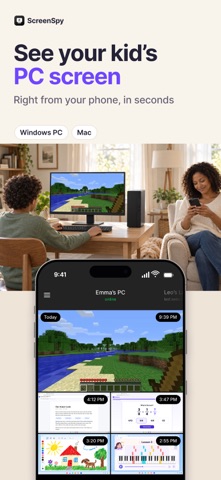



Description by App Machine SIA Written by the developer, not by AppBrain. Click to read.
Is your child doing homework or playing games? Instead of guessing, tap once and see the actual screen of their Windows PC or Mac in a few seconds.
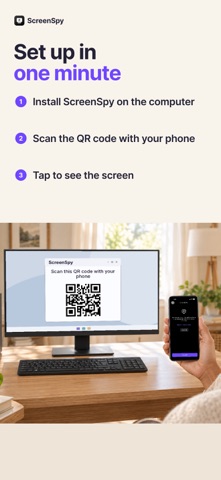
◆ How it works
1. Install the free ScreenSpy app on the computer: open screenspy.app on the PC or Mac
2. Scan the QR code on the computer screen with this app
3. Tap "Take a screenshot" whenever you want to check
◆ What you get
• A screenshot of your kid's PC or Mac screen on demand, from anywhere
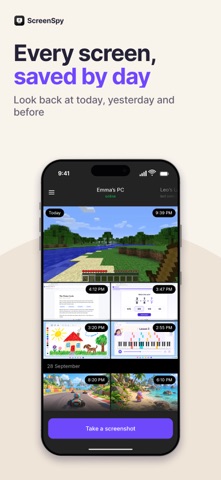
• Screenshot history grouped by day
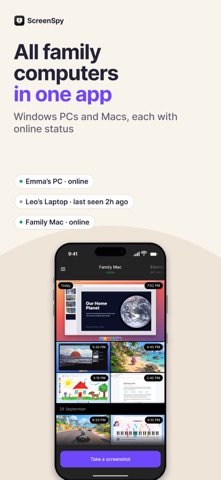
• Several computers in one app, each with online status
• Access for the other parent: connect a second phone to the same computers
• Works over the internet, so you don't need to be home or on the same Wi-Fi
• Nothing to install on your kid's phone
◆ Made for parents
ScreenSpy is a parental control tool for family computers. Use it only on computers you own or manage, and let your children know it's installed.
◆ Subscription
ScreenSpy is free to download. Taking screenshots requires a subscription, and new subscribers can start with a free trial. Payment is charged to your Apple ID at confirmation of purchase. The subscription renews automatically unless it is cancelled at least 24 hours before the end of the current period. You can manage or cancel it in your App Store account settings.
Terms of use: https://screenspy.app/terms_of_use
Privacy policy: https://screenspy.app/privacy_policy