

ScreenVault: AI Screenshot org
ScreenVault: AI Screenshot org is made and published by STRUAN TALMADGE. AppBrain is an independent app data site and isn't affiliated with STRUAN TALMADGE. The app name, icon, screenshots and description belong to STRUAN TALMADGE and are shown as published on the App Store.
AppBrain's verdict
- Rating on App Store
- 1.00
- 1 ratings
- Last updated
- June 11, 2026
It doesn't have enough ratings yet to judge what users think.
Rankings
App Store top chartsApp Store Rankings for ScreenVault: AI Screenshot org
Competitors
Similar apps and more from STRUAN TALMADGEAlternatives to ScreenVault: AI Screenshot org


More from STRUAN TALMADGE

Releases
Updates seen on the App Store- Version
- 1.3
- Launched
- May 2026
No changelog data
User feedback
Ratings and reviews on the App StoreComments on ScreenVault: AI Screenshot org for iOS
We don't have enough comments to show example comments. Please check back later.
Technology
Found in the app by AppBrain- Price
- Free
- App size
- 18.0 MB
- Content rating
- Everyone
Technologies used by ScreenVault: AI Screenshot org
About the app and developer
About ScreenVault: AI Screenshot org
ScreenVault: AI Screenshot org is an utilities app developed by STRUAN TALMADGE.
What is the rating of ScreenVault: AI Screenshot org?
ScreenVault: AI Screenshot org is rated 1.00 out of 5 stars, based on one rating ratings.
Is ScreenVault: AI Screenshot org free?
ScreenVault: AI Screenshot org is free. The app size is 17.98 MB. The latest version available is 1.3. The last update was on June 11, 2026.
What are the requirements for ScreenVault: AI Screenshot org?
The app has a content rating of Everyone. The app has been available on the App Store since May 2026.
Developer information for STRUAN TALMADGE
Address:
Frequently asked questions about ScreenVault: AI Screenshot org
Is ScreenVault: AI Screenshot org free?
Yes. ScreenVault: AI Screenshot org is free on the App Store.
Is ScreenVault: AI Screenshot org still available?
Yes. ScreenVault: AI Screenshot org is on the App Store, and the last update we saw was on June 11, 2026.
How large is ScreenVault: AI Screenshot org?
ScreenVault: AI Screenshot org is 17.98 MB.
Is ScreenVault: AI Screenshot org suitable for children?
App Store rates the content of ScreenVault: AI Screenshot org as suitable for everyone.
How do people rate ScreenVault: AI Screenshot org?
ScreenVault: AI Screenshot org has one rating of 1.00 stars on the App Store.
Who made ScreenVault: AI Screenshot org?
ScreenVault: AI Screenshot org was developed by STRUAN TALMADGE. It is listed in the utilities category on the App Store.
What are the best alternatives to ScreenVault: AI Screenshot org?
People looking at ScreenVault: AI Screenshot org also look at these utilities apps: revoke cash, Block Spam Call & Fast Blocker, Casino Niagara Pocket Pass, ClawMe Personal Assistant, GlideGear: AI Teleprompter Pro.
Store listing
By STRUAN TALMADGE, from the App Store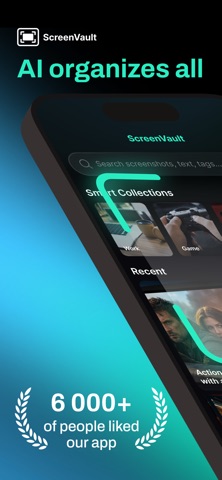



Description by STRUAN TALMADGE Written by the developer, not by AppBrain. Click to read.
ScreenVault uses AI to bring order to your photo library and help you find anything instantly.
You save restaurants, products, or movie recommendations — and then lose them in a sea of images.
ScreenVault turns that chaos into a clear, structured system.
How it works
Simply grant photo access — everything else happens automatically.
ScreenVault analyzes your screenshots, organizes them into smart categories, extracts text, and makes everything searchable in seconds.
No manual sorting. No extra effort. It just works.
Core Features
• Automatic classification
AI analyzes each screenshot and assigns it to one of 26 categories, including shopping, travel, finance, documents, and more
• Smart tags
Create your own tags or use AI suggestions based on your habits
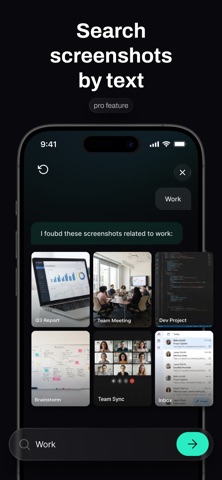
• Natural language search
Ask questions the way you think: “What movies did I save?” or “Show my receipts”
• Text recognition (OCR)
Text inside screenshots becomes fully searchable, regardless of language
• Content recognition
Detects movies, products, places, and events — not just categories
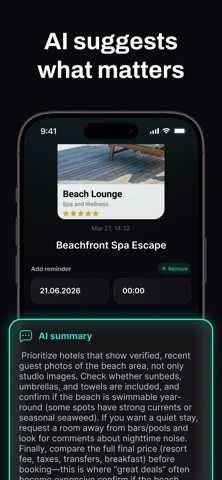
• AI descriptions
Each screenshot gets a clear, intelligent summary
• Privacy-first
Your photos stay on your device. Only essential data is processed
• Background processing
New screenshots are organized automatically without any action
• Reclassification
Run analysis again anytime with a single tap
Why ScreenVault
1. Understands queries in any language — no setup required
2. Finds not just categories, but specific movies, products, and places
3. Makes all screenshot text searchable
4. Adapts to your library and suggests personalized tags
5. Lets you search as naturally as you think
6. Works quietly in the background
7. Respects your privacy and keeps you in control
8. Uses a more detailed and precise classification system
9. Provides transparent results with confidence levels
10. Lets you easily refine and reprocess results
— Free vs Pro —
Free: 30 AI classifications and 5 AI chat searches (lifetime).
Pro Subscription unlocks:
• 2000 AI scans per month
• 100 AI chat searches per month
• Unlimited text recognition and content recognition
• Natural language search
• AI descriptions for all screenshots
• Smart reminders
Terms of Use (EULA): https://screenvault.pics/terms