AppBrain
AppBrain
  • Apps
  • Apps being viewed right now Trending apps today Most popular apps All-time most installed apps Top rated apps iPhone and iPad apps
  • Intelligence ▾
    Intelligence overview → Track any Android app or your whole market
    Track & analyze
    Keyword Tracker & OptimizerTrack & improve Play rankings App Performance ReportOne-off PDF for any app StatisticsFree Android & Play market stats
    Promote your app
    Featured Apps App Links
  • Intelligence
  • Pricing
  • Dashboard
  • Sign up
  • Log in
App Store Apps > Productivity > ScreenZen- Screen Time Control
ScreenZen- Screen Time Control icon

ScreenZen- Screen Time Control

by ScreenZen LLC · Productivity · Free
On the App Store since July 2021 · Data updated 2026-11-01

ScreenZen- Screen Time Control is made and published by ScreenZen LLC. AppBrain is an independent app data site and isn't affiliated with ScreenZen LLC. The app name, icon, screenshots and description belong to ScreenZen LLC and are shown as published on the App Store.

AppBrain's verdict

EstablishedLoved by users
Rating on App Store
4.86
52,925 ratings
Last updated
September 6, 2026
Size
159.0 MB

Users love it: 4.9 stars from 52,925 ratings. Its best ranking is #49 in Top Free, Productivity in Finland.

Official page on the App Store

User feedback

Ratings and reviews on the App Store

Comments on ScreenZen- Screen Time Control for iOS

We don't have enough comments to show example comments. Please check back later.

Store listing

By ScreenZen LLC, from the App Store
ScreenZen- Screen Time Control Screenshot 1 of 9
ScreenZen- Screen Time Control Screenshot 2 of 9
ScreenZen- Screen Time Control Screenshot 3 of 9
ScreenZen- Screen Time Control Screenshot 4 of 9
ScreenZen- Screen Time Control Screenshot 5 of 9
ScreenZen- Screen Time Control Screenshot 6 of 9
ScreenZen- Screen Time Control Screenshot 7 of 9
ScreenZen- Screen Time Control Screenshot 8 of 9
ScreenZen- Screen Time Control Screenshot 9 of 9
Screenshots by ScreenZen LLC, from the the App Store listing
Description by ScreenZen LLC Written by the developer, not by AppBrain. Click to read.
Multiple strategies to reduce your screentime

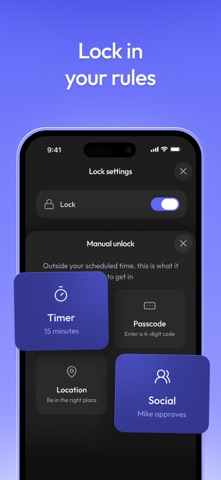
1. Delay before opening your app: A bit of time before choosing if you need to open your distracting app. You can have the wait time increase each time you open your app.

2. Interrupt your scrolling: Check your distracting apps for short periods of time so you don't get sucked in.

3. Set an app goal and optionally block when you reach your limit.

4. Configurable for different days of the week and time by app.

5. Messages like "Is this important" before opening your app.

6. See your screen time for only your distracting apps. Don't worry about Google Maps bloating up your time.

7. Strict block your apps: Either for time ranges, after a certain number of opens or ScreenTime.

8. Locks on Settings to prevent you from changing your settings when you want to open an app.

9. Breathing and other activities to encourage you not to need to open the app while waiting for it to unlock.

10. Streaks to encourage you not to exceed your limits or override your settings.
Official page on the App Store

Safety and technology

Found in the app by AppBrain
Price
Free
App size
159.0 MB
Content rating
Everyone

Technologies used by ScreenZen- Screen Time Control

Releases

Updates seen on the App Store
Version
4.0.0
Launched
July 2021

No changelog data

Alternatives

Similar apps and more from ScreenZen LLC

Alternatives to ScreenZen- Screen Time Control

Freedom: Screen Time Control icon Freedom: Screen Time Control
Eighty Percent Solutions
4.5
Free
6.1K ratings
one sec | screen time + focus icon one sec | screen time + focus
riedel.wtf apps S.L.
4.8
Free
23.8K ratings
Opal: Screen Time Control icon Opal: Screen Time Control
Opal OS
4.7
Free
90.7K ratings
AppBlock: Block Apps, Websites icon AppBlock: Block Apps, Websites
MobileSoft s.r.o.
4.6
Free
6.9K ratings
ClearSpace: Reduce Screen Time icon ClearSpace: Reduce Screen Time
clearspace
4.7
Free
8.9K ratings
BlockSite: Block Apps & Focus icon BlockSite: Block Apps & Focus
BlockSite LP
4.2
Free
6.2K ratings
Flipd: focus & study timer icon Flipd: focus & study timer
Flipd Apps
4.5
Free
7.0K ratings
Refocus: App Blocker & Lock icon Refocus: App Blocker & Lock
Labi, LLC
4.8
Free
11.8K ratings

Rankings

App Store top charts
Highest rank
#49
Chart
Top Free
Productivity
Country
Finland

App Store Rankings for ScreenZen- Screen Time Control

Top rankings

Rank Country Category List
87 Canada Productivity Top Free
49 Finland Productivity Top Free
70 Switzerland Productivity Top Free
70 Czech Republic Productivity Top Free
74 Netherlands Productivity Top Free
80 Austria Productivity Top Free
80 Norway Productivity Top Free
80 Poland Productivity Top Free
81 Belgium Productivity Top Free
89 Spain Productivity Top Free

Ranking history in Canada

About the app and developer

About ScreenZen- Screen Time Control

ScreenZen- Screen Time Control is a productivity app developed by ScreenZen LLC.

User Ratings

ScreenZen- Screen Time Control is rated 4.86 out of 5 stars. The rating is based on 53 thousand ratings.

App Information

ScreenZen- Screen Time Control is freely available from the App Store. The app size is 158.96 MB. The latest version available is 4.0.0. The last update was on September 6, 2026.

Technical Requirements

The app has a content rating of Everyone. The app has been available on the App Store since July 2021.

Developer information for ScreenZen LLC

ScreenZen LLC

Address:

Share ScreenZen- Screen Time Control

Popular Productivity Apps Apps other people are watching Top new apps Price drops on Google Play Today's trending apps
Freedom: Screen Time Control icon Freedom: Screen Time Control
one sec | screen time + focus icon one sec | screen time + focus
Opal: Screen Time Control icon Opal: Screen Time Control
AppBlock: Block Apps, Websites icon AppBlock: Block Apps, Websites
ClearSpace: Reduce Screen Time icon ClearSpace: Reduce Screen Time
BlockSite: Block Apps & Focus icon BlockSite: Block Apps & Focus
Flipd: focus & study timer icon Flipd: focus & study timer
Refocus: App Blocker & Lock icon Refocus: App Blocker & Lock
Overview Alternatives Reviews Rankings Technology
AppBrain Intelligence premium content

Subscribe now to get full and unlimited access to AppBrain Intelligence. You'll have access to:

  • App Intelligence dashboard (performance timeline, competitor comparison, country rankings, insight cards)
  • Detailed ranking data per app
  • Full timeline per developer
  • Device market shares data per country
  • Unlimited keyword tracking
1 Month

$75/mo
(billed every month)

SAVE 0%
Subscribe
3 Months

$65/mo
($195 billed every 3 months)

SAVE 13%
Subscribe
1 Year

$57.50/mo
($690 billed every year)

SAVE 23%
Subscribe
Each subscription will automatically renew 3 days before the expiration date for the same time period. Subscriptions can be cancelled at any time before the renewal.

AppBrain is an app data site, we track rankings, ratings, installs for all apps and games on Google Play and the App Store. AppBrain doesn't host app files or APKs, all install links go directly to the official store. All trademarks are owned by their respective owners.

More apps

  • Top Android apps being viewed
  • View Blessing Lions: Casino Slot
  • View Grow Tree: Earn & Money
  • THEOVIA

App statistics

  • Android statistics
  • Google Play Developer stats
  • Trending Android Apps
  • Trending iOS apps
  • Top popular Apps
  • Buy the best Android phone
  • Buy & sell app businesses

About AppBrain

  • Contact
  • Privacy
  • Documentation
  • DMCA takedowns
  • Blog
  • Android app Install tracking and attribution options for the AppBrain ad network
© 2010-2026 - AppBrain