

Script Rehearser
Script Rehearser is made and published by Engram Ltd. AppBrain is an independent app data site and isn't affiliated with Engram Ltd. The app name, icon, screenshots and description belong to Engram Ltd and are shown as published on the App Store.
AppBrain's verdict
Established- Rating on App Store
- 3.41
- 132 ratings
- Last updated
- October 13, 2026
Users are divided: 3.4 stars from 132 ratings.
Rankings
App Store top chartsApp Store Rankings for Script Rehearser
Competitors
Similar apps and more from Engram LtdAlternatives to Script Rehearser




Releases
Updates seen on the App Store- Version
- 7.0.221
- Launched
- February 2019
No changelog data
User feedback
Ratings and reviews on the App StoreComments on Script Rehearser for iOS
We don't have enough comments to show example comments. Please check back later.
Technology
Found in the app by AppBrain- Price
- Free
- App size
- 170.0 MB
- Content rating
- Everyone
Technologies used by Script Rehearser
About the app and developer
About Script Rehearser
Script Rehearser is a productivity app developed by Engram Ltd.
What is the rating of Script Rehearser?
Script Rehearser is rated 3.41 out of 5 stars, based on 130 ratings.
Is Script Rehearser free?
Script Rehearser is free. The app size is 169.97 MB. The latest version available is 7.0.221. The last update was on October 13, 2026.
What are the requirements for Script Rehearser?
The app has a content rating of Everyone. The app has been available on the App Store since February 2019.
Developer information for Engram Ltd
Address:
Store listing
By Engram Ltd, from the App Store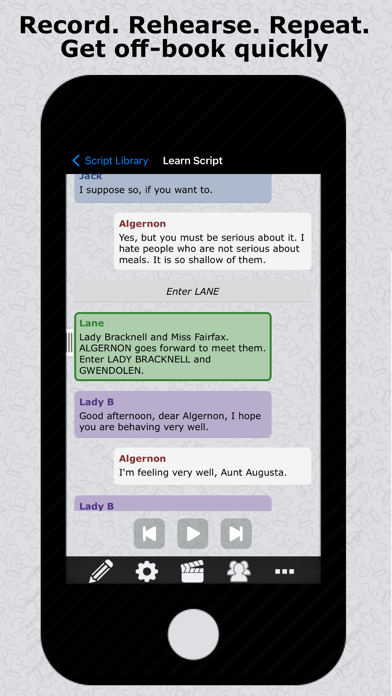


Description by Engram Ltd Written by the developer, not by AppBrain. Click to read.
Actors, TV personalities, business people, public speakers and students - learn your material more effectively with Script Rehearser. You can even practice English language conversation.
You can just start recording your own voice straight away. Or you can import your theater or movie script* or simply type in your lines. Script Rehearser will read them back to you whenever you want using its customizable options to prompt you. Optimize how you rehearse as you progress.
Features include:
• Record your own voice directly into the app, and have it automatically transcribed †
• Use digital voices for the other characters †
• Import a script from a PDF file ‡
• Import a script you've created on your PC or Mac, or just type it into your device
• Customize scripts with your own notes and stage directions
• Clearly distinguish your lines from others
• Show your lines; hide you lines; show the first letter of each word
• Play the whole script, or skip forward to your next cue
• Play other parts while you self-tape
• Share the recorded script †
• Choose light or dark color mode
• Designed for phones and tablets
Script Rehearser can be configured to support your personal learning style. For example:
• Listen Along: Script Rehearser speaks, you listen. You can play, pause, and jump forward to your next line or back to your previous one.
• Wait For Me: Script Rehearser pauses for each of your lines until you’re ready to continue
• Repeat for Confirmation: Script Rehearser leaves a gap for you to say the line, then automatically speaks the line for confirmation and carries on
• Run Through: Script Rehearser leaves a gap for you to say your line, then automatically carries on with the next line
† Pro Features
To enable us to continue developing the app, the following are Pro features:
• Recording your own voice
• Choosing which digital voice to use for each character
• Exporting a script
There’s a 30-day free trial of Pro features, with no sign-up required and no automatic conversion to a paid subscription. After this you can keep using everything you’ve done, even if you don’t subscribe.
Keep in contact:
• For news and updates follow us on Twitter: @ScriptRehearser
• Find us on Facebook: www.facebook.com/ScriptRehearser
• Join us on our forum: www.ScriptRehearser.com
‡ Note that for a PDF file to import it must contain the text of the script, not just pictures of the text. Some PDFs contain scanned images of the text rather than the text itself, and the app can't import these files as it needs the actual text to work with.
Terms of use can be found at https://www.apple.com/legal/internet-services/itunes/dev/stdeula/