

Scripture Memory: Your Text
Scripture Memory: Your Text is made and published by Jinwan Kim. AppBrain is an independent app data site and isn't affiliated with Jinwan Kim. The app name, icon, screenshots and description belong to Jinwan Kim and are shown as published on the App Store.
AppBrain's verdict
- Last updated
- September 10, 2026
Rankings
App Store top chartsApp Store Rankings for Scripture Memory: Your Text
Competitors
Similar apps and more from Jinwan KimAlternatives to Scripture Memory: Your Text


More from Jinwan Kim


Releases
Updates seen on the App Store- Version
- 1.0
- Launched
- September 2026
No changelog data
User feedback
Ratings and reviews on the App StoreComments on Scripture Memory: Your Text for iOS
We don't have enough comments to show example comments. Please check back later.
Technology
Found in the app by AppBrain- Price
- Free
- App size
- 5.10 MB
- Content rating
- Everyone
Technologies used by Scripture Memory: Your Text
About the app and developer
About Scripture Memory: Your Text
Scripture Memory: Your Text is a reference app developed by Jinwan Kim.
What is the rating of Scripture Memory: Your Text?
Scripture Memory: Your Text has no ratings yet.
Is Scripture Memory: Your Text free?
Scripture Memory: Your Text is free. The app size is 5.10 MB. The latest version available is 1.0. The last update was on September 10, 2026.
What are the requirements for Scripture Memory: Your Text?
The app has a content rating of Everyone. The app has been available on the App Store since September 2026.
Developer information for Jinwan Kim
Address:
Frequently asked questions about Scripture Memory: Your Text
Is Scripture Memory: Your Text free?
Yes. Scripture Memory: Your Text is free on the App Store.
Is Scripture Memory: Your Text still available?
Yes. Scripture Memory: Your Text is on the App Store, and the last update we saw was on September 10, 2026.
How large is Scripture Memory: Your Text?
Scripture Memory: Your Text is 5.10 MB.
Is Scripture Memory: Your Text suitable for children?
App Store rates the content of Scripture Memory: Your Text as suitable for everyone.
Who made Scripture Memory: Your Text?
Scripture Memory: Your Text was developed by Jinwan Kim. It is listed in the reference category on the App Store.
What are the best alternatives to Scripture Memory: Your Text?
People looking at Scripture Memory: Your Text also look at these reference apps: Memorize It: Scripture Memory, LiveTheWord, ReciteWell, Bible Quiz & Games · AgapePlay, Engrave: Scripture Memory.
Store listing
By Jinwan Kim, from the App Store


Description by Jinwan Kim Written by the developer, not by AppBrain. Click to read.
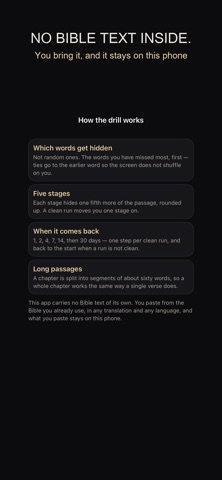
That sounds like less, and it is the whole point. If the translation you memorize in is missing from an app, or locked behind a subscription, that app is closed to you no matter how good the drill is. Here you paste the passage in yourself, from your own translation, and the drill works on exactly those words.
Paste any passage.
Copy a verse, a paragraph, or a whole chapter out of whatever Bible you use — printed, or the app already on your phone — and paste it in. Pick the book, chapter and verses from a table of all 66 books, so a reference that does not exist cannot be entered. Nothing is downloaded and nothing is looked up.
The words you miss.
Every drill records each word separately: how many times you were asked for it, and how many times it broke. The hidden words are chosen from that record, hardest first, with ties going to the earlier word so the screen does not shuffle on you. Most apps hide words at random or in order; the difference shows up around the fourth or fifth pass, when you keep landing on the same five words.
Five stages, and a clean run moves you on.
Each stage hides one fifth more of the passage. Finish a stage without a single miss and you move up and the passage comes back later: 1, 2, 4, 7, 14, then 30 days. Miss one and the interval goes back to the start — not as a punishment, just as an honest reading of where you are.
Any length.
A chapter is split into segments of about sixty words, so a long passage works the same way a single verse does. Nothing here is built for one verse at a time.
Where it breaks, in a list.
The words that keep failing are listed with the count beside them: five of seven tries, four of seven. That list is what you take back into the drill.
No account. No sign-in. No server.
Everything is on this phone, including the text you pasted. It is never uploaded, and it is never put into the card you share — that card carries the reference and the numbers, nothing else.
Languages: English, 한국어, 日本語, 繁體中文, Deutsch, Français, Español