We don't have enough comments to show example comments. Please check back later.
Store listing
By Karthik Sudharshan, from the App Store
Description by Karthik SudharshanWritten by the developer, not by AppBrain. Click to read.
Meet Scroll Sense’s new Focus Blocking system: a smarter, more human way to protect your attention when it matters most.
Most blockers force you into one rigid rule and hope you remember to turn it on. Scroll Sense does the opposite: it adapts to your real life. You can block apps around your goals, your focus sessions, and your sleep windows, with personalized rules that work automatically in the background.
Here’s what makes it different:
Goal-based blocking that actually follows your schedule Set a goal with a start and end time (like “Do AP Stats Homework, 4:00–6:00 PM”), choose exactly which apps should be blocked for that goal, and Scroll Sense enforces it automatically during that window. No getting distracted scrolling when you don't want to - Scroll Sense has got you covered, with one of the smartest blocking systems. No re-opening the app. No re-saving. No “did I turn it on?” anxiety.
Per-goal customization (not one-size-fits-all) Different goals need different boundaries. You can block one set of apps for “Deep Work,” another for “Family Time,” and something totally different for “Exercise.”
Pomodoro + Goals + Sleep + Main Focus, working together Instead of isolated features fighting each other, Scroll Sense combines them into one unified shielding engine. The app calculates what should be blocked right now based on all active contexts, then applies exactly that.
Built for real attention, not fake streaks Reduce decision fatigue and self-negotiation in vulnerable moments. You define your boundaries once, and Scroll Sense helps you keep them when your future self needs backup.
If you’ve ever told yourself “just 2 minutes” and lost hours, this feature is for you.
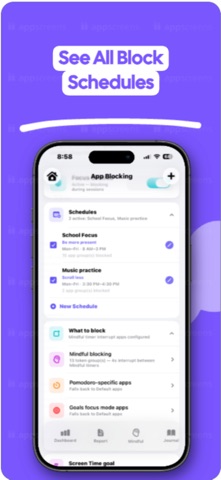
Main App Blocking as your default safety net Set a core block list once, and Scroll Sense uses it as your baseline protection when no specific override is needed. This gives you always-on guardrails for the apps that derail your day most often, without forcing you to constantly configure every scenario from scratch. Easily add new blocking schedules—maybe one for school focus, and one for winding down at night—and Scroll Sense applies the right protection at the right time, automatically. Your default block list stays in place as the foundation, while each schedule can target exactly what you need in that moment: social apps during study hours, games after bedtime, or anything else that pulls you off track. The result is protection that feels intentional, not rigid—you set it up once, turn schedules on when you need them, and get back hours of focus without babysitting your phone all day.
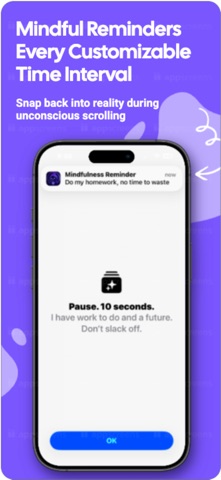
Mindful Awareness System - Want to scroll just for 30 minutes, but worry you will lose track of time and completely forget? Destroy mindless scrolling and snap yourself back into reality. At the end of a chosen interval, Scroll Sense blocks distracting apps for 4 seconds—enough to snap you out of mindless scrolling and not lose hours.
Sleep Blocking that protects your nights and mornings Set a bedtime boundary and let Scroll Sense automatically shield distracting apps during your sleep window. You can use separate weekday and weekend settings, so your rules match your real routine. It reduce late-night scrolling and protects sleep.
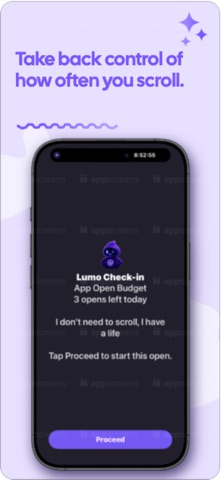
App Open Budget: A new way to stay in control of apps you open on autopilot. Instead of only blocking an app completely, App Open Budget lets you set how many times per day you can open it and how long each open can last. It also offers 5 short checks, if something important happens.
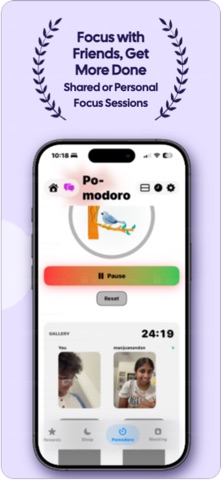
Pomodoro Blocking that starts with focus and ends with relief When a focus session begins, Scroll Sense can instantly block your selected distraction apps for that interval, then release them when the session ends. This destroys distractions during focus - when it matters most. This creates clear mental boundaries around work sprints.
Scroll Sense isn’t just blocking apps. It’s helping you reclaim your time-automatically, respectfully, and on your terms.
Safety and technology
Found in the app by AppBrain
Price
Free
App size
472.4 MB
Content rating
Medium
Technologies used by Scroll Sense - Take Control
Releases
Updates seen on the App Store
Version
4.0.2
Launched
January 2026
No changelog data
Rankings
App Store top charts
App Store Rankings for Scroll Sense - Take Control
This app is not ranked
About the app and developer
About Scroll Sense - Take Control
Scroll Sense - Take Control is a medical app developed by Karthik Sudharshan.
User Ratings
Scroll Sense - Take Control is rated 5.00 out of 5 stars. The rating is based on 10 ratings.
App Information
Scroll Sense - Take Control is freely available from the App Store. The app size is 472.43 MB. The latest version available is 4.0.2. The last update was on November 9, 2026.
Technical Requirements
The app has a content rating of Medium Maturity. The app has been available on the App Store since January 2026.
Scroll Sense - Take Control is made and published by
Karthik Sudharshan.
AppBrain is an independent app data site and isn't affiliated with Karthik Sudharshan.
The app name, icon, screenshots and description belong to Karthik Sudharshan and are shown as published on the App Store.
Each subscription will automatically renew 3 days before the expiration date for
the same time period. Subscriptions can be cancelled at any time before the renewal.