

scrollAlbum
scrollAlbum is made and published by hidenobu akiyoshi. AppBrain is an independent app data site and isn't affiliated with hidenobu akiyoshi. The app name, icon, screenshots and description belong to hidenobu akiyoshi and are shown as published on the App Store.
AppBrain's verdict
- Last updated
- August 26, 2026
Rankings
App Store top chartsApp Store Rankings for scrollAlbum
Competitors
Similar apps and more from hidenobu akiyoshiAlternatives to scrollAlbum


More from hidenobu akiyoshi


Releases
Updates seen on the App Store- Version
- 1.1
- Launched
- August 2026
No changelog data
User feedback
Ratings and reviews on the App StoreComments on scrollAlbum for iOS
We don't have enough comments to show example comments. Please check back later.
Technology
Found in the app by AppBrain- Price
- Free
- App size
- 75.3 MB
- Content rating
- Everyone
Technologies used by scrollAlbum
About the app and developer
About scrollAlbum
scrollAlbum is an entertainment app developed by hidenobu akiyoshi.
User Ratings
The app has no ratings yet.
App Information
scrollAlbum is freely available from the App Store. The app size is 75.29 MB. The latest version available is 1.1. The last update was on August 26, 2026.
Technical Requirements
The app has a content rating of Everyone. The app has been available on the App Store since August 2026.
Developer information for hidenobu akiyoshi
Address:
Frequently asked questions about scrollAlbum
Is scrollAlbum free?
Yes. scrollAlbum is free on the App Store.
Is scrollAlbum still available?
Yes. scrollAlbum is on the App Store, and the last update we saw was on August 26, 2026.
How large is scrollAlbum?
scrollAlbum is 75.29 MB.
Is scrollAlbum suitable for children?
App Store rates the content of scrollAlbum as suitable for everyone.
Who made scrollAlbum?
scrollAlbum was developed by hidenobu akiyoshi. It is listed in the entertainment category on the App Store.
What are the best alternatives to scrollAlbum?
People looking at scrollAlbum also look at these entertainment apps: QuickDiorama - make fantasy, MY 待ち時間 for ジャングリア(非公式), MANBOO公式アプリ, solAR - Solar System in AR, Fonts for iPhones - Keyboard.
Store listing
By hidenobu akiyoshi, from the App Store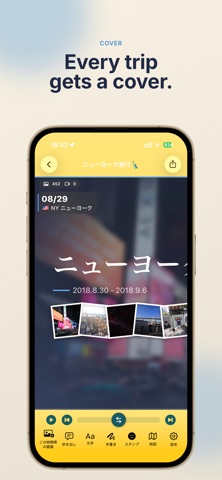




Description by hidenobu akiyoshi Written by the developer, not by AppBrain. Click to read.
Description
Scroll back through your trip.
ScrollAlbum arranges your travel photos and videos along a single long horizontal timeline that you scroll through side to side. When you're happy with it, export the whole thing as a video with background music.
JUST PICK THE DATES
Set the dates of your trip and the app gathers photos and videos from your library into a timeline. It starts with camera shots only, so screenshots and saved images don't get mixed in — you can add anything you want back by hand.
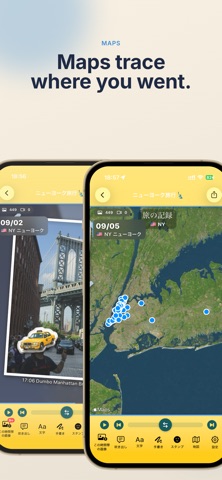
MAPS TRACE YOUR JOURNEY
Using location data, the app places circular maps at the spots you visited, plus route maps that follow how you moved. At the end of the trip you get a "trip record" grouping the places you stopped by country or by region. Maps can be drawn as line art, standard, or photo style.
DECORATE IT YOUR WAY
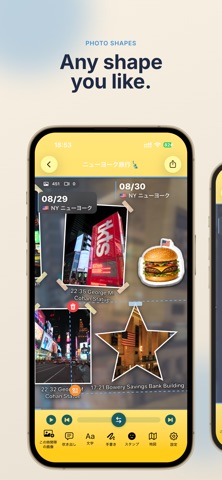
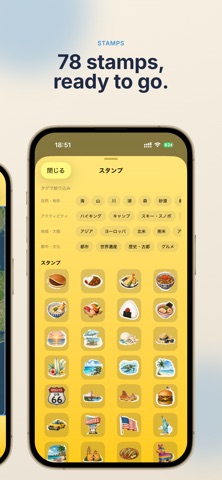
- 78 built-in stamps, placed automatically to match what's in the photo and the country you visited
- Washi tape, tilt, white borders, and ellipse / star / hexagon cutouts
- Text, speech bubbles, and freehand drawing with your finger or Apple Pencil (rainbow ink, outlines)
- Wallpapers and two themes, Cool and Pop, to change the overall mood
- Resize photos or cut out the subject
- Make your own stamps from your images (requires a one-time unlock)
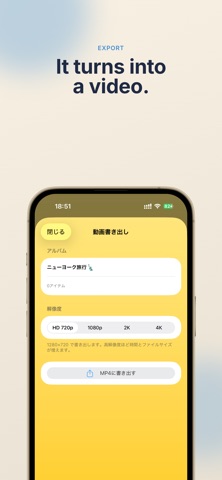
EXPORT AS A VIDEO
Your finished timeline exports as a video that scrolls from left to right. Choose HD 720p, 1080p, 2K, or 4K, preview and pick background music, and adjust the scrolling speed. Videos are exported as real moving footage, not still frames.
YOUR PHOTOS STAY AS THEY ARE
This app never deletes or rewrites your photos. You can rotate them or change favorites from here if you want to.
- The app shows ads. Unlocking the stamp features with a one-time purchase removes them.
- The first import may take a while because images are downloaded from iCloud. Wi-Fi is recommended.