

SD Backup: NAS & SFTP
SD Backup: NAS & SFTP is made and published by 小祯 汪. AppBrain is an independent app data site and isn't affiliated with 小祯 汪. The app name, icon, screenshots and description belong to 小祯 汪 and are shown as published on the App Store.
AppBrain's verdict
- Last updated
- September 4, 2026
Rankings
App Store top chartsApp Store Rankings for SD Backup: NAS & SFTP
Competitors
Similar apps and more from 小祯 汪Alternatives to SD Backup: NAS & SFTP





More from 小祯 汪


Releases
Updates seen on the App Store- Version
- 1.0
- Launched
- September 2026
No changelog data
User feedback
Ratings and reviews on the App StoreComments on SD Backup: NAS & SFTP for iOS
We don't have enough comments to show example comments. Please check back later.
Technology
Found in the app by AppBrain- Price
- Free
- App size
- 16.4 MB
- Content rating
- Everyone
Technologies used by SD Backup: NAS & SFTP
About the app and developer
About SD Backup: NAS & SFTP
SD Backup: NAS & SFTP is an utilities app developed by 小祯 汪.
User Ratings
The app has no ratings yet.
App Information
SD Backup: NAS & SFTP is freely available from the App Store. The app size is 16.44 MB. The latest version available is 1.0. The last update was on September 4, 2026.
Technical Requirements
The app has a content rating of Everyone. The app has been available on the App Store since September 2026.
Developer information for 小祯 汪
Address:
Store listing
By 小祯 汪, from the App Store
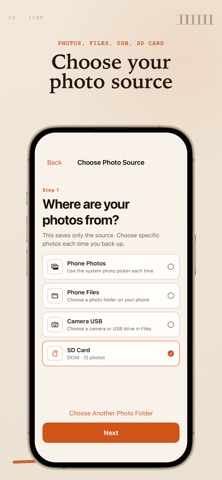

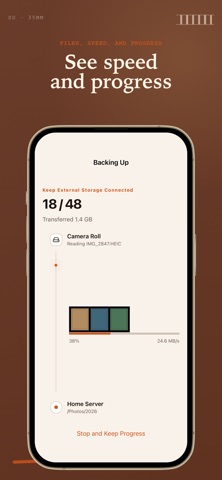
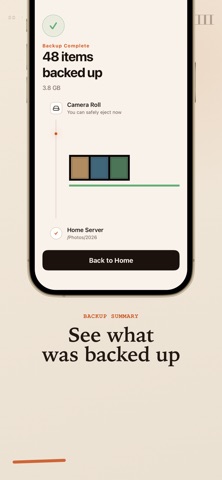
Description by 小祯 汪 Written by the developer, not by AppBrain. Click to read.
YOUR STORAGE, YOUR CHOICE
• Connect to an SFTP server or NAS with SFTP enabled
• Copy to a folder available through the Files app
• Select photos or work with folders from external storage
CLEAR TRANSFER STATUS
• Review items before starting
• Follow preparation and upload progress
• See completed, resumable, and attention-required states
• Confirm an SFTP server's host-key fingerprint when its identity changes
PRIVACY BY DESIGN
• No developer-operated cloud storage
• No account required
• No advertising or tracking
• SFTP passwords are stored in the Apple Keychain
• Files transfer directly between the locations you select
SD Backup is made for personal servers, home NAS devices, and private storage workflows.