It doesn't have enough ratings yet to judge what users think.
SDK85 is made and published by
Juergen Schuck.
AppBrain is an independent app data site and isn't affiliated with Juergen Schuck.
The app name, icon, screenshots and description belong to Juergen Schuck and are shown as
published on the App Store.
About SDK85
SDK85 is an overall app developed by Juergen Schuck.
User Ratings
SDK85 is rated 4.00 out of 5 stars. The rating is based on one rating ratings.
App Information
SDK85 is freely available from the App Store. The app size is 11.85 MB. The latest version available is 1.7.3. The last update was on November 5, 2025.
Technical Requirements
The app has a content rating of Everyone. The app has been available on the App Store since October 2025.
Description by Juergen Schuck(from the App Store)
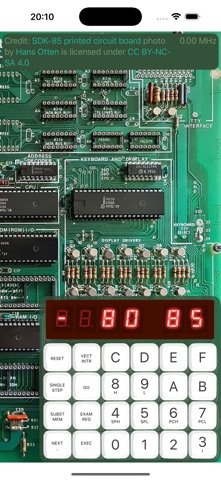
An emulator of the SDK-85 System Design Kit issued by Intel in the mid-seventies. The kit featured an 8085 micro processor, some basic IO chips, and a UI comprised of a hexpad and a six-digit seven-segment display. There was also a ROM plugged onto the board which contained a monitor program to enter and execute machine code on the 8085. The app emulates an 8085 and executes the monitor (shippment granted by Intel as long as the app is free and educational).
The original kit leveraged the serial IO pins of the 8085 to connect a TTY as a somewhat more comfortable alternative to the hexpad/ display UI used by the monitor on startup. A wipe-left gesture shifts in a simple terminal and the monitor switches to TTY mode.
To use the app one needs to get a copy of the original SDK-85 System Design Kit User‘s Manual (ask Google) and work it thru. Some knowledge of the 8085 and its instruction set is helpful as well, and being a boomer nerd who loved to program micro computers when young (and still does) is key.
Intel designed the monitor to run in a loop that keeps the CPU constantly busy (on a single thread). To prevent the battery from draining the app suspends executing after 15 seconds indicated by a slightly blurred display. Tapping the centered play-pause button resumes the monitor or any other program in execution. Timeout and a few other options can be changed in the app‘s entry in Settings.
Each subscription will automatically renew 3 days before the expiration date for
the same time period. Subscriptions can be cancelled at any time before the renewal.