

Sea Maps is made and published by APP ASPIRES. AppBrain is an independent app data site and isn't affiliated with APP ASPIRES. The app name, icon, screenshots and description belong to APP ASPIRES and are shown as published on the App Store.
AppBrain's verdict
- Rating on App Store
- 5.00
- 1 ratings
- Last updated
- August 26, 2026
It doesn't have enough ratings yet to judge what users think.
Rankings
App Store top chartsApp Store Rankings for Sea Maps
Competitors
Similar apps and more from APP ASPIRESMore from APP ASPIRES


Releases
Updates seen on the App Store- Version
- 1.09
- Launched
- November 2025
No changelog data
User feedback
Ratings and reviews on the App StoreComments on Sea Maps for iOS
We don't have enough comments to show example comments. Please check back later.
Technology
Found in the app by AppBrain- Price
- Free
- App size
- 105.7 MB
- Content rating
- Everyone
Technologies used by Sea Maps
About the app and developer
About Sea Maps
Sea Maps is a navigation app developed by APP ASPIRES.
User Ratings
Sea Maps is rated 5.00 out of 5 stars. The rating is based on one rating ratings.
App Information
Sea Maps is freely available from the App Store. The app size is 105.68 MB. The latest version available is 1.09. The last update was on August 26, 2026.
Technical Requirements
The app has a content rating of Everyone. The app has been available on the App Store since November 2025.
Developer information for APP ASPIRES
Address:
Store listing
By APP ASPIRES, from the App Store




Description by APP ASPIRES Written by the developer, not by AppBrain. Click to read.
Enjoy a free trial, then continue with a paid subscription to access all core features, including weather overlays, AIS vessel tracking, and advanced marine charts.
Sea Maps Features
-Core Navigation & Mapping
Interactive map with multiple map types (Water World, Satellite, Streets, Hybrid, Moonlight, Ocean Contours)
GPS location services with real-time user position tracking
Automatic region management and centering.
-Navigation & Compass
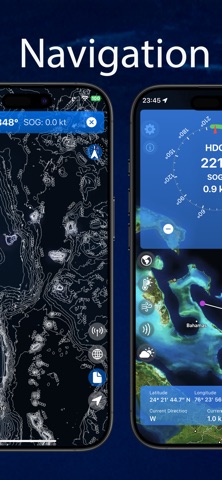
Full-screen compass display with magnetic heading indicator
Speed Over Ground (SOG) in real-time (knots)
Bearing to pin: Green arrow showing direction to dropped pin
Minimized heading view at top of screen
Track recording: Start/stop with map snapshots
Background location tracking
-Marker & Pin System
Dropped pin information popup with precise coordinates
Latitude/Longitude display in DMS format (Degrees, Minutes, Seconds)
Distance calculation from current location to pin
Ocean current data at pin location (speed & direction)
Sea surface temperature at pin location
Pin management & removal
Save custom markers with names and descriptions
-Marine Weather & Ocean Data
Sea Surface Temperature (SST) - Heat map with customizable temperature range (15-28°C)
Ocean Winds - Wind speed heat map with animated wind particles and direction indicators
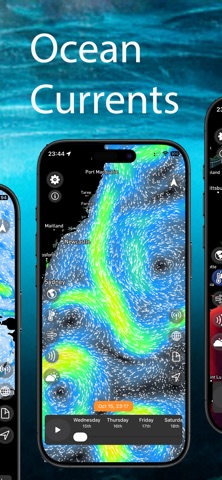
Ocean Currents - Current flow visualization with particle animation
Visible Satellite Imagery - Real-time satellite overlay
Wind Animation Timeline - Play/pause/scrub controls for wind data
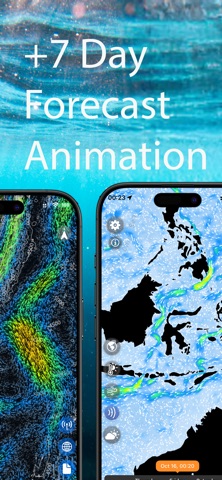
Marine Forecast System - 7-day weather forecast with tide, swell, wind, and ocean current charts
Weather Icons - Colour-coded weather conditions with moon phases
-AIS (Automatic Identification System)
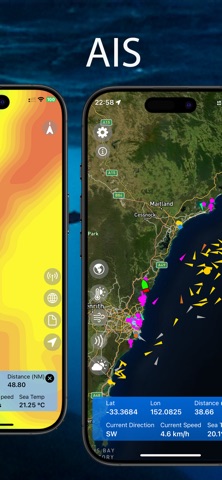
Real-time AIS vessel tracking and information
Detailed ship information popup with position, speed, heading
Ship type classification and categorisation
-Bathymetry & Charts
Bathymetry Overlay - Ocean depth contours with configurable visualisation
Navigation Aid Markers - Buoys, lights, and other maritime markers
Chart Data Caching - Local storage for offline access
-Safety & Monitoring
Anchor Alarm System - Geofencing with configurable radius (50m default)
Real-time Distance Monitoring - Continuous tracking from anchor point
Background Location Tracking - Continuous monitoring even when app is closed
Customizable Alarm Radius - Adjustable geofence size
Track Management - GPS route recording with timestamps and custom naming
Track Visualization - Display recorded routes on map
Map Snapshots - Capture track data with map images
-Settings & Customization
Map Type Selection - Grid-based interface for choosing map styles
Unit Conversions - Temperature (Celsius/Fahrenheit) and speed (Metric/Imperial)
Accessibility Support - Dynamic text sizing
-Subscription Details
Sea Maps requires an active subscription to access app features.
Pricing and duration are displayed in the app before purchase.
A free trial is available for new users.
Manage or cancel anytime through your App Store account settings.
-Terms and Policies
Privacy Policy
https://www.appaspires.com/privacy/privacy.pdf
Terms of Use
https://www.appaspires.com/terms/termsofuse.pdf