

Seacoast International School
Seacoast International School is made and published by Wisam Dazah. AppBrain is an independent app data site and isn't affiliated with Wisam Dazah. The app name, icon, screenshots and description belong to Wisam Dazah and are shown as published on the App Store.
AppBrain's verdict
- Rating on App Store
- 3.67
- 3 ratings
- Last updated
- September 8, 2026
It doesn't have enough ratings yet to judge what users think.
Rankings
App Store top chartsApp Store Rankings for Seacoast International School
Competitors
Similar apps and more from Wisam DazahAlternatives to Seacoast International School



More from Wisam Dazah


Releases
Updates seen on the App Store- Version
- 1.3.657
- Launched
- June 2025
No changelog data
User feedback
Ratings and reviews on the App StoreComments on Seacoast International School for iOS
We don't have enough comments to show example comments. Please check back later.
Technology
Found in the app by AppBrain- Price
- Free
- App size
- 42.8 MB
- Content rating
- Everyone
Technologies used by Seacoast International School
About the app and developer
About Seacoast International School
Seacoast International School is an education app developed by Wisam Dazah.
User Ratings
Seacoast International School is rated 3.67 out of 5 stars. The rating is based on 3 ratings.
App Information
Seacoast International School is freely available from the App Store. The app size is 42.78 MB. The latest version available is 1.3.657. The last update was on September 8, 2026.
Technical Requirements
The app has a content rating of Everyone. The app has been available on the App Store since June 2025.
Developer information for Wisam Dazah
Address:
Frequently asked questions about Seacoast International School
Is Seacoast International School free?
Yes. Seacoast International School is free on the App Store.
Is Seacoast International School still available?
Yes. Seacoast International School is on the App Store, and the last update we saw was on September 8, 2026.
How large is Seacoast International School?
Seacoast International School is 42.78 MB.
Is Seacoast International School suitable for children?
App Store rates the content of Seacoast International School as suitable for everyone.
How do people rate Seacoast International School?
Seacoast International School scores 3.67 out of 5 stars, from 3 ratings on the App Store.
Who made Seacoast International School?
Seacoast International School was developed by Wisam Dazah. It is listed in the education category on the App Store.
What are the best alternatives to Seacoast International School?
People looking at Seacoast International School also look at these education apps: New Royal School, OLIVE PUBLIC SCHOOL, JAYCEES SCHOOL-ERODE, SPJ MATRIC.HR.SEC.SCHOOL, ZION INTERNATIONAL SCHOOL-CBSE.
Store listing
By Wisam Dazah, from the App Store
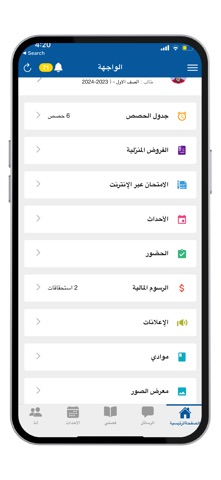


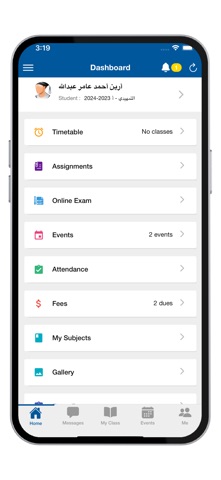

Description by Wisam Dazah Written by the developer, not by AppBrain. Click to read.
School administration, teachers, parents and students are integrated into one platform related to all student activities. The goal is to not only enrich the educational experience but also enrich the lives of parents and teachers.
Some important features of the application:
Announcements: The school administration communicates with parents, teachers and students simultaneously regarding important circulars. All users will receive notifications for these ads. Ads can contain attachments such as images, PDF, etc.,
Monthly, quarterly and final sheets and reports can be received through the application.
Messaging: School, teachers, parents and students communicate effectively with the messaging feature.
Broadcast: Messages are sent to a closed group about class activity, assignments, parent meeting, etc.
Events: All events such as exams, holidays, and fee due dates will be listed on the institution's calendar. You will be reminded immediately before important events. Our handy holiday list helps you plan your days in advance.
Features for parents:
Class Schedule for Students: You can now see your child's class schedule on the go. The weekly class schedule will help you organize your children's schedule effectively. You can see the current class schedule and upcoming class in the dashboard itself.
Attendance Report: You will be notified instantly when your child is marked absent for a day or class. Attendance report for the academic year is easily available with all the details.
Fees: All upcoming fee dues will be listed at events and you will be reminded with payment notifications when the due date approaches.
Features for teachers:
Teacher Schedule: No more shuffling through your notebook to find your next class. This app will show your upcoming class in the dashboard. The weekly class schedule will help you plan your day effectively.
Mark Attendance: You can mark attendance directly from the classroom using your mobile phone. It's easier than ever to mark absentees and access a class attendance report.
My Class: If you are a batch teacher, you can now mark your class attendance, access student profiles, class schedule, and subject list. This will make your day easier.
Please Note: If you have multiple students studying in our school and the school records have the same mobile number for all your students, you can switch the student profile in the app by clicking on the student name from the left slider menu and then toggle student profile.