




AppBrain's verdict
- Last updated
- November 16, 2026
- Size
- 145.1 MB
User feedback
Ratings and reviews on the App StoreComments on SecOps Engineer Exam Prep for iOS
We don't have enough comments to show example comments. Please check back later.
Store listing
By CHOI SEONGMIN, from the App StoreDescription by CHOI SEONGMIN Written by the developer, not by AppBrain. Click to read.
Continuing study on the web applies to the existing Google Cloud Professional Security Operations Engineer practice track. Added exams are studied in the iOS app. Access and progress remain separate for each exam.
Includes 2303 practice questions across 5 exams. The total combines the study-language counts stated for each exam below.
1. Google Cloud Professional Security Operations Engineer practice
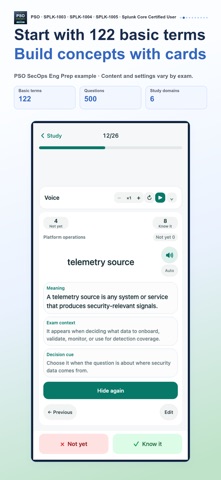
500 practice questions · 122 key terms
6 areas: Platform operations · Data management · Threat hunting · Detection engineering · Incident response · Observability
Languages: English, Japanese, Korean. Counts: English.
2. Splunk Core Certified User
303 practice questions · 110 key terms
8 areas: Splunk Basics · Basic Searching · Using Fields in Searches · Search Language Fundamentals · Using Basic Transforming Commands · Creating Reports and Dashboards · Creating and Using Lookups · Creating Scheduled Reports and Alerts
Languages: English, Korean, Japanese. Counts: English.
3. Splunk Advanced Power User
500 practice questions · 124 key terms
22 areas: 1.0 Exploring Statistical Commands · 2.0 Exploring eval Command Functions · 3.0 Exploring Lookups · 4.0 Exploring Alerts · 5.0 Advanced Field Creation and Management · 6.0 Working with Self-Describing Data and Files · 7.0 Advanced Search Macros · 8.0 Using Acceleration Options: Reports and Summary Indexing · 9.0 Using Acceleration Options: Data Models and tsidx Files · 10.0 Using Search Efficiently · 11.0 More Search Tuning · 12.0 Manipulating and Filtering Data · 13.0 Working with Multivalued Fields · 14.0 Using Advanced Transactions · 15.0 Working with Time · 16.0 Using Subsearches · 17.0 Creating a Prototype · 18.0 Using Forms · 19.0 Improving Performance · 20.0 Customizing Dashboards · 21.0 Adding Drilldowns · 22.0 Adding Advanced Behaviors and Visualizations
Languages: English.
4. Splunk Enterprise Certified Admin
500 practice questions · 130 key terms
17 areas: Splunk Admin Basics · License Management · Splunk Configuration Files · Splunk Indexes · Splunk User Management · Splunk Authentication Management · Getting Data In · Distributed Search · Getting Data In – Staging · Configuring Forwarders · Forwarder Management · Monitor Inputs · Network and Scripted Inputs · Agentless Inputs · Fine Tuning Inputs · Parsing Phase and Data · Manipulating Raw Data
Languages: English.
5. Splunk Cloud Certified Admin
500 practice questions · 140 key terms
13 areas: Splunk Cloud Overview · Index Management · User Authentication and Authorization · Splunk Configuration Files · Getting Data in Cloud · Forwarder Management · Monitor Inputs · Network and Other Inputs · Fine-tuning Inputs · Parsing Phase and Data Preview · Manipulating Raw Data · Installing and Managing Apps · Working with Splunk Cloud Support
Languages: English.
1. Learn the basic terms
Use flashcards for meanings, exam context and selection criteria; mark known or unfamiliar terms.
2. Practice and read the explanations
Practice by set, domain or difficulty, with answer/option explanations, unfinished/wrong filters, shuffle, timer and resume.
Practice in sets of 50 questions for each exam.
3. Review mistakes
Review bookmarks, recent/repeated errors, glossary reports, weak areas and study history.
4. Check readiness with a timed mock
Use the settings below; review results, domain scores and mistakes.
Mock questions / time limit (minutes), by exam: 1: 50 / 120; 2: 60 / 60; 3: 70 / 60; 4: 56 / 60; 5: 60 / 75
Tools that fit your study routine
Optional audio/autoplay reads terms and meanings with repeat/pause settings. Use a study calendar, weekly goals, reminders and themes.
Content, features, languages and paid access differ by exam. Check content and price before purchase.
This is an independent study aid, not an official, affiliated or endorsed app of any exam administrator or certification body. Exam names and trademarks belong to their respective owners.
Safety and technology
Found in the app by AppBrain- Price
- Free
- App size
- 145.1 MB
- Content rating
- Everyone
Technologies used by SecOps Engineer Exam Prep
Releases
Updates seen on the App Store- Version
- 1.0.14
- Launched
- July 2026
No changelog data
Alternatives
Similar apps and more from CHOI SEONGMINMore from CHOI SEONGMIN


Rankings
App Store top chartsApp Store Rankings for SecOps Engineer Exam Prep
About the app and developer
About SecOps Engineer Exam Prep
SecOps Engineer Exam Prep is an education app developed by CHOI SEONGMIN.
User Ratings
The app has no ratings yet.
App Information
SecOps Engineer Exam Prep is freely available from the App Store. The app size is 145.11 MB. The latest version available is 1.0.14. The last update was on November 16, 2026.
Technical Requirements
The app has a content rating of Everyone. The app has been available on the App Store since July 2026.
SecOps Engineer Exam Prep is made and published by CHOI SEONGMIN. AppBrain is an independent app data site and isn't affiliated with CHOI SEONGMIN. The app name, icon, screenshots and description belong to CHOI SEONGMIN and are shown as published on the App Store.
Developer information for CHOI SEONGMIN
Address: