

Secure-QR
Secure-QR is made and published by Christian Scheub. AppBrain is an independent app data site and isn't affiliated with Christian Scheub. The app name, icon, screenshots and description belong to Christian Scheub and are shown as published on the App Store.
AppBrain's verdict
- Last updated
- April 19, 2026
Rankings
App Store top chartsApp Store Rankings for Secure-QR
Competitors
Similar apps and more from Christian Scheub


Releases
Updates seen on the App Store- Version
- 1.2.1
- Launched
- December 2024
No changelog data
User feedback
Ratings and reviews on the App StoreComments on Secure-QR for iOS
We don't have enough comments to show example comments. Please check back later.
Technology
Found in the app by AppBrain- Price
- Free
- App size
- 9.91 MB
- Content rating
- High
Technologies used by Secure-QR
About the app and developer
About Secure-QR
Secure-QR is an utilities app developed by Christian Scheub.
User Ratings
The app has no ratings yet.
App Information
Secure-QR is freely available from the App Store. The app size is 9.91 MB. The latest version available is 1.2.1. The last update was on April 19, 2026.
Technical Requirements
The app has a content rating of High Maturity. The app has been available on the App Store since December 2024.
Developer information for Christian Scheub
Address:
Store listing
By Christian Scheub, from the App Store


Description by Christian Scheub Written by the developer, not by AppBrain. Click to read.
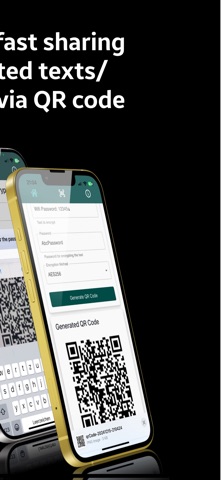
Secure QR is a powerful, privacy-focused QR code generator and scanner. With advanced cryptographic algorithms like AES256, TripleDES, Blowfish, and Rabbit, you can encrypt any text into a QR code for safe sharing or storing sensitive information securely.
Whether you're looking to store passwords, share confidential details, or scan encrypted QR codes, Secure QR offers a seamless, fast, and completely local & Open Source solution—ensuring your data never leaves your device.
Features:
- QR Code Generator with Encryption:
Transform your text securely into encrypted QR codes using cryptographic standards like AES256, TripleDES, Blowfish, or Rabbit encryption.
- QR Code Scanner with Decryption:
Scan any QR code and decrypt the hidden text with ease.
- Completely Local Application:
No cloud backups, servers, or online storage—your data stays private.
- Open Source Transparency:
Trustworthy and community-driven. View and contribute to our code on GitHub.
- Multiple Cryptographic Options:
Choose between AES256, TripleDES, Blowfish, or Rabbit encryption algorithms for advanced security.
- User-Friendly Interface:
Simple and intuitive design that makes encryption and decryption seamless for everyone.
Why Use Secure QR?
- Secure Password Storage:
Store sensitive passwords securely and generate encrypted QR codes for quick retrieval.
- Safe Data Sharing:
Share confidential notes, credentials, or other sensitive information without the risk of interception.
- Privacy First:
Secure QR prioritizes your privacy by processing everything locally on your device, without storing data online.
How It Works:
1. Enter any text you want to encrypt.
2. Choose your preferred cryptographic encryption method (AES256, TripleDES, Blowfish, Rabbit).
3. Generate a QR code and share it securely or store it locally.
To decode:
Open the app, scan the QR code, and decrypt the data with just one tap.
Open Source:
Secure QR is fully open-source to ensure transparency, security, and reliability. Join our community and contribute to the project. Check it out on GitHub.
Download Secure QR Now & Encrypt Your World Securely!