Download Android Apps and Games
AppBrain
  • Apps
  • Apps being viewed right now Trending apps today Most popular apps All-time most downloaded apps Top rated apps
  • Intelligence ▾
    Intelligence overview → Track any Android app or your whole market
    Track & analyze
    Keyword Tracker & OptimizerTrack & improve Play rankings App Performance ReportOne-off PDF for any app StatisticsFree Android & Play market stats
    Promote your app
    Featured Apps App Links
  • Intelligence
  • Pricing
  • Dashboard
  • Sign up
  • Log in
Last updated on: 2026-08-20
App Store Apps > Productivity > SeeLock: Focus Timer & Lock
SeeLock: Focus Timer & Lock icon

SeeLock: Focus Timer & Lock

2.2
Tomoki Uda
0.00
0 reviews
Free

SeeLock: Focus Timer & Lock Screenshot 1 of 7
SeeLock: Focus Timer & Lock Screenshot 2 of 7
SeeLock: Focus Timer & Lock Screenshot 3 of 7
SeeLock: Focus Timer & Lock Screenshot 4 of 7
SeeLock: Focus Timer & Lock Screenshot 5 of 7
SeeLock: Focus Timer & Lock Screenshot 6 of 7
SeeLock: Focus Timer & Lock Screenshot 7 of 7
Download from the App Store

About SeeLock: Focus Timer & Lock

SeeLock: Focus Timer & Lock is an overall app developed by Tomoki Uda.

How many times has SeeLock: Focus Timer & Lock been downloaded?

What is the rating of SeeLock: Focus Timer & Lock?

SeeLock: Focus Timer & Lock has no ratings yet.

Is SeeLock: Focus Timer & Lock free?

SeeLock: Focus Timer & Lock is free to download. The APK download size is 48.84 MB. The latest version available is 2.2. The last update was on August 17, 2026.

What are the requirements for SeeLock: Focus Timer & Lock?

The app has a content rating of Everyone. The app has been available on Google Play June 2026.

Description
◆◇ Lock your phone as easily as setting a timer ◇◆
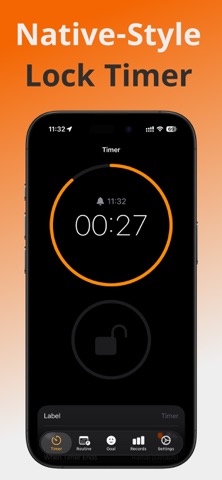
SeeLock is a phone lock app that feels instantly familiar,
because it works just like the built-in timer.
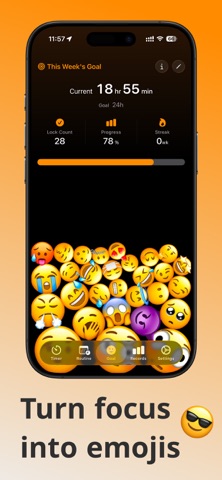
Your focused time turns into emoji balls that pile up on screen.

■ Features

◇ Native timer-style UI, easy for everyone ◇
There are plenty of app blockers out there,
but SeeLock is the world's first with a native timer-style UI.

Because the interface is already familiar, anyone can master it right away.
Just pick a duration and tap the lock button. Apps stay blocked only while the timer runs, then unlock automatically.

◇ Focused time becomes emoji balls ◇
Every lock of 5 minutes or more turns into a random emoji ball that stacks up on screen.

• The longer the lock, the bigger the ball — and past 120 minutes, the number of balls increases too
• Tilt your phone and the balls roll around with realistic physics
• Tap a ball anytime to look back at that focus session

Seeing this week's effort at a glance makes you want to collect more — and that turns focus into a habit.

◇ Routines (scheduled lock) ◇
Lock your phone during set hours of the day (e.g., 11:00 PM–7:00 AM) and block apps for the whole period.

• Pick days of the week to repeat automatically (e.g., weekday study hours, every night before bed)
• Locking starts and ends right on time, even when the app is closed

◇ Color-code with tags ◇
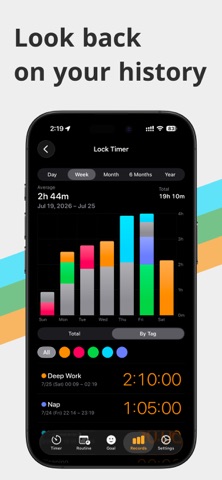
Add colored tags like “Study,” “Work,” or “Exercise” to your timers and routines.
Stacked charts by tag show exactly what you focused on and for how long.

◇ Make phone locking a habit ◇
Set a weekly lock-time goal (e.g., 4 hours 30 minutes) to keep yourself motivated every day.

• Weekly Goal: check your progress and streak at a glance — hit 100% and enjoy a confetti celebration
• Charts: view your lock time by day, week, month, 6 months, or year
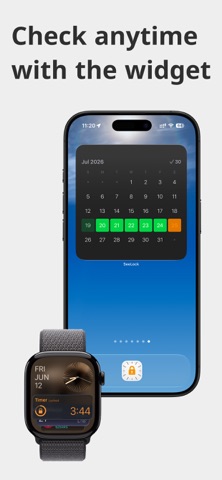
• Heatmap: see your daily records as shades on a calendar

Look back on your records and turn them into motivation going forward!

◇ Lockdown Mode & Ultimate Mode ◇
Prevent your lock timer from being interrupted, sharpen your daily focus, and get support toward reaching your goals.

• Lockdown Mode: prevents stopping the timer mid-session
• Ultimate Mode: Lockdown Mode + prevents bypassing the timer by deleting the app
• Passcode Lock: makes switching modes harder by requiring a passcode

◇ Check without opening the app ◇
Widgets and Live Activities let you stay on track without opening SeeLock.

• Widgets: see this week's goal progress and heatmap right on your Home Screen
• Live Activities: check the remaining time on the Lock Screen, in the Dynamic Island, and on Apple Watch

◇ And more ◇
• 50+ alarm sounds with haptic feedback that vibrates along with the melody
• 12 theme colors — the app icon changes to match your choice
• Save the apps you don't want blocked as “templates” and switch anytime

■ Recommended for
• Anyone who wants to lock their phone with simple controls
• Anyone who can't stop picking up their phone
• Anyone who wants to focus more on studying, exams, or work
• Anyone who enjoys building habits in a fun, game-like way
• Anyone who loves beautifully designed apps

Privacy Policy: https://clock-app.com/privacy
Terms of Use: https://clock-app.com/terms

Take control of your daily phone use with SeeLock, and make every day count!
Show more Show less

More data about SeeLock: Focus Timer & Lock

Price Free to download
Rating No ratings
Ranking Not ranked
Version 2.2
App download size 48.8 MB
Suitable for Everyone

Alternative downloads for the SeeLock: Focus Timer & Lock app

PocketToDo - Simple Tasks icon PocketToDo - Simple Tasks
IMAE Tasuku
0.0
Free
RepGate: Screen Time Blocker icon RepGate: Screen Time Blocker
BYNET
0.0
Free
思考整理カード icon 思考整理カード
SANWA Inc.
0.0
Free
WaveFlow icon WaveFlow
SANWA Inc.
0.0
Free
TOKUSOKU - TODO & Reminder icon TOKUSOKU - TODO & Reminder
UMI EBISUJIMA
0.0
Free
Stash: Save Posts, Watch Later icon Stash: Save Posts, Watch Later
Issei Ikeda
5.0
Free
1 ratings
Photo Binder icon Photo Binder
okashige0319
3.0
Free
2 ratings
MAMONAKU! icon MAMONAKU!
RYOTA SAITO
0.0
Free

Changelog of SeeLock: Focus Timer & Lock

No changelog data

Developer information for Tomoki Uda

Tomoki Uda

Address:

Share SeeLock: Focus Timer & Lock

Comments on SeeLock: Focus Timer & Lock for iOS

We don't have enough comments to show example comments. Please check back later.

App Store Rankings for SeeLock: Focus Timer & Lock

This app is not ranked

Technologies used by SeeLock: Focus Timer & Lock

Today's trending apps Apps other people are watching Apps on sale Popular Overall Top new apps
PocketToDo - Simple Tasks icon PocketToDo - Simple Tasks
RepGate: Screen Time Blocker icon RepGate: Screen Time Blocker
思考整理カード icon 思考整理カード
WaveFlow icon WaveFlow
TOKUSOKU - TODO & Reminder icon TOKUSOKU - TODO & Reminder
Stash: Save Posts, Watch Later icon Stash: Save Posts, Watch Later
Photo Binder icon Photo Binder
MAMONAKU! icon MAMONAKU!

Back to top
AppBrain Intelligence premium content

Subscribe now to get full and unlimited access to AppBrain Intelligence. You'll have access to:

  • App Intelligence dashboard (performance timeline, competitor comparison, country rankings, insight cards)
  • Detailed ranking data per app
  • Full timeline per developer
  • Device market shares data per country
  • Unlimited keyword tracking
1 Month

$75/mo
(billed every month)

SAVE 0%
Subscribe
3 Months

$65/mo
($195 billed every 3 months)

SAVE 13%
Subscribe
1 Year

$57.50/mo
($690 billed every year)

SAVE 23%
Subscribe
Each subscription will automatically renew 3 days before the expiration date for the same time period. Subscriptions can be cancelled at any time before the renewal.

AppBrain is a directory focused on discovering great apps and games. We give statistics, rankings and search options that Google Play and the App Store don't have. All trademarks are owned by their respective owners. AppBrain doesn't offer APKs or binaries, and always lets users install the official version from Google Play or the App Store.

More apps

  • Top Android apps being viewed
  • Dino Coloring World
  • Cyber Chirag Android App
  • Clicker Tank

Android Statistics

  • Android statistics
  • Google Play Developer stats
  • Trending Android Apps
  • Top popular Apps
  • Buy the best Android phone

About AppBrain

  • Contact
  • Privacy
  • Documentation
  • DMCA takedowns
  • Articles
  • Blog
  • Free webpage for your Android app
© 2010-2026 - AppBrain