

Seen | Web is made and published by Paran. AppBrain is an independent app data site and isn't affiliated with Paran. The app name, icon, screenshots and description belong to Paran and are shown as published on the App Store.
AppBrain's verdict
- Rating on App Store
- 1.00
- 1 ratings
- Last updated
- October 3, 2026
- Size
- 15.0 MB
It doesn't have enough ratings yet to judge what users think.
User feedback
Ratings and reviews on the App StoreComments on Seen | Web for iOS
We don't have enough comments to show example comments. Please check back later.
Store listing
By Paran, from the App Store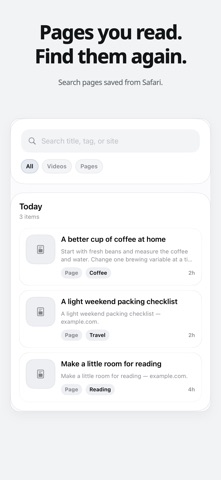

Description by Paran Written by the developer, not by AppBrain. Click to read.
Find them fast later.
Build your private web memory.
Seen | Web helps you save useful web pages from Safari, then find them again in seconds.
Key features
• Save useful pages from Safari
• Find saved pages fast
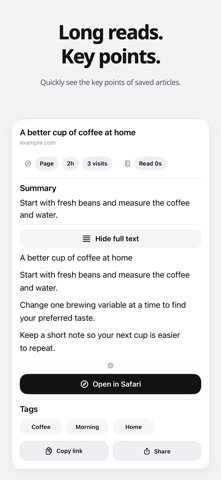
• View summaries, tags, and sites
• Sync privately through your iCloud account
• Works without sign-up or login
Privacy
Seen does not sell your data or store your saved pages on Paran servers. Your data stays on your device and can sync through your private iCloud account.
Seen Pro
• Unlimited saved pages
• Automatic Safari panel
• Private iCloud sync
• Ad-free detail opens
Useful for people who want to
• Find pages they meant to revisit
• Keep research and reference links organized
• Save useful pages without overthinking
• Build a private memory for the web
Support
help@paran.app
Privacy Policy
https://paran.app/seen/privacy/
Terms of Use
https://paran.app/seen/terms/
Safety and technology
Found in the app by AppBrain- Price
- Free
- App size
- 15.0 MB
- Content rating
- Everyone
Technologies used by Seen | Web
Releases
Updates seen on the App Store- Version
- 1.0.7
- Launched
- May 2026
No changelog data
Alternatives
Similar apps and more from ParanMore from Paran





Rankings
App Store top chartsApp Store Rankings for Seen | Web
About the app and developer
About Seen | Web
Seen | Web is a productivity app developed by Paran.
What is the rating of Seen | Web?
Seen | Web is rated 1.00 out of 5 stars, based on one rating ratings.
Is Seen | Web free?
Seen | Web is free. The app size is 14.97 MB. The latest version available is 1.0.7. The last update was on October 3, 2026.
What are the requirements for Seen | Web?
The app has a content rating of Everyone. The app has been available on the App Store since May 2026.
Developer information for Paran
Address:
Frequently asked questions about Seen | Web
Is Seen | Web free?
Yes. Seen | Web is free on the App Store.
Is Seen | Web still available?
Yes. Seen | Web is on the App Store, and the last update we saw was on October 3, 2026.
How large is Seen | Web?
Seen | Web is 14.97 MB.
Is Seen | Web suitable for children?
App Store rates the content of Seen | Web as suitable for everyone.
How do people rate Seen | Web?
Seen | Web has one rating of 1.00 stars on the App Store.
Who made Seen | Web?
Seen | Web was developed by Paran. It is listed in the productivity category on the App Store.