




AppBrain's verdict
- Last updated
- January 14, 2026
- Size
- 38.4 MB
User feedback
Ratings and reviews on the App StoreComments on Seeple for iOS
We don't have enough comments to show example comments. Please check back later.
Store listing
By Seeple Ltd, from the App StoreDescription by Seeple Ltd Written by the developer, not by AppBrain. Click to read.
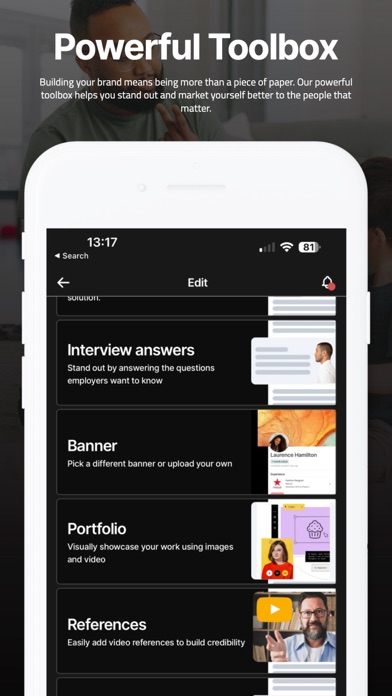
More than just a CV builder, Seeple gives you the tools to create a digital CV that reflects your skills, experiences, and personality, while also letting you download traditional, well structured, ATS friendly Word and PDF CVs when you need them.
Whether you’re a student, jobseeker, or professional, Seeple is designed to support you at every stage of your journey. From first work experience to career changes, you can build, update, and share your CV in a way that feels modern, personal, and authentic.
Why Seeple?
• Digital & traditional CVs – Share a digital CV or download Word and PDF versions
• Free CV builder – Simple to use, quick to update
• Built for everyone – Students, graduates, career changers, returners to work
• Show more than job titles – Highlight who you are, not just where you’ve worked
• Made to last – A long-term tool you can grow with over time
Designed for today’s world of work
Standing out is harder than ever. Employers want to understand the person behind the CV. Seeple helps you do exactly that — while still giving you the traditional formats required for job applications worldwide.
Key features
• Create a digital CV you can share instantly
• Download your CV in Word or PDF format
• Update your CV anytime as you grow
• Works globally (CV or resume format)
• Free to sign up and get started
Join thousands using Seeple to build confidence, tell their story, and move forward with their careers.
Common Questions
How long does it take to sign up?
Sign-up takes around 5–7 minutes. You can import details from an existing CV or LinkedIn, then build step by step. Once set up, Seeple stays with you for as long as you need it.
Do I need to use the digital CV?
No. The digital CV is optional and pin-protected by default. You can use Seeple purely to create Word and PDF CVs if you prefer.
Is my phone number or email shown online?
No. Your digital profile keeps contact details private. People can leave a message instead. On Word or PDF CVs, you choose what contact details to include.
Is the CV ATS optimised?
Yes. Our Word and PDF CV layouts are tested against ATS tools for structure and readability. You focus on the content — we handle the formatting.
Is this an AI CV builder?
No. Your CV is not auto-generated by AI. We use proven templates that follow best practices. Optional AI is available only to help improve your writing.
Is my data sold to third parties?
No. We never sell your data. Your profile is private and only shared with people you choose. Other candidates cannot search for or view you.
How is this different from LinkedIn?
LinkedIn is a social network. Seeple is private and personal. It lets you share deeper detail than a CV, while keeping control over who sees it.
Who is Seeple for?
Seeple is for anyone who wants to show more than a job title. From students and creatives to freelancers, contractors, and professionals, it adapts to you.
Have more questions? Email us anytime at hi@seeple.com.Your CV should work as hard as you do. Make it Seeple.
Safety and technology
Found in the app by AppBrain- Price
- Free
- App size
- 38.4 MB
- Content rating
- Everyone
Technologies used by Seeple
Releases
Updates seen on the App Store- Version
- 1.5
- Launched
- November 2022
No changelog data
Alternatives
Similar apps and more from Seeple LtdAlternatives to Seeple





Rankings
App Store top chartsApp Store Rankings for Seeple
About the app and developer
About Seeple
Seeple is a productivity app developed by Seeple Ltd.
User Ratings
The app has no ratings yet.
App Information
Seeple is freely available from the App Store. The app size is 38.44 MB. The latest version available is 1.5. The last update was on January 14, 2026.
Technical Requirements
The app has a content rating of Everyone. The app has been available on the App Store since November 2022.
Seeple is made and published by Seeple Ltd. AppBrain is an independent app data site and isn't affiliated with Seeple Ltd. The app name, icon, screenshots and description belong to Seeple Ltd and are shown as published on the App Store.
Developer information for Seeple Ltd
Address: