

Sekigae-kun: Seating Chart
Sekigae-kun: Seating Chart is made and published by Hirosuke Yonekubo. AppBrain is an independent app data site and isn't affiliated with Hirosuke Yonekubo. The app name, icon, screenshots and description belong to Hirosuke Yonekubo and are shown as published on the App Store.
AppBrain's verdict
- Last updated
- July 15, 2026
Rankings
App Store top chartsApp Store Rankings for Sekigae-kun: Seating Chart
Competitors
Similar apps and more from Hirosuke YonekuboAlternatives to Sekigae-kun: Seating Chart


More from Hirosuke Yonekubo




Releases
Updates seen on the App Store- Version
- 1.8.0
- Launched
- March 2026
No changelog data
User feedback
Ratings and reviews on the App StoreComments on Sekigae-kun: Seating Chart for iOS
We don't have enough comments to show example comments. Please check back later.
Technology
Found in the app by AppBrain- Price
- Free
- App size
- 42.5 MB
- Content rating
- Everyone
Technologies used by Sekigae-kun: Seating Chart
About the app and developer
About Sekigae-kun: Seating Chart
Sekigae-kun: Seating Chart is an education app developed by Hirosuke Yonekubo.
User Ratings
The app has no ratings yet.
App Information
Sekigae-kun: Seating Chart is freely available from the App Store. The app size is 42.50 MB. The latest version available is 1.8.0. The last update was on July 15, 2026.
Technical Requirements
The app has a content rating of Everyone. The app has been available on the App Store since March 2026.
Developer information for Hirosuke Yonekubo
Address:
Store listing
By Hirosuke Yonekubo, from the App Store


Description by Hirosuke Yonekubo Written by the developer, not by AppBrain. Click to read.
"I want to keep those two apart." "This student needs to sit near the front." "I want to separate boys' and girls' seats." — Sekigae-kun solves all of these concerns at once.
【Combine Multiple Constraints Freely】
The biggest strength of Sekigae-kun is the ability to set multiple constraints simultaneously.
- Gender-based seat assignment (paint boy/girl seats on the layout)
- Quick setup with checkerboard, column-alternating, or row-alternating templates
- Restrict specific students to designated areas
- Ensure minimum distance between two students
- Keep specific pairs of students close together (Distance Proximity)
- Arrange students in student number order (freely set starting position & direction) [NEW]
- Place students in different seats from last time
- Set priority (High / Medium / Low) for each constraint
Combine these freely to automatically generate the optimal seating arrangement tailored to your class.
【Key Features】
■ Roster Photo Import
- Register members in bulk just by photographing a class roster
- AI auto-detects attendance numbers, names, readings, and gender
- AI recognition supports all 18 languages
- Auto-infers readings and gender even from rosters without them
- Also supports selecting images from the gallery
- Review and edit recognition results before importing
■ Class & Roster Management
- Register and manage multiple classes
- Register attendance numbers, names, and gender for each member
- Auto-reassign attendance numbers when sorted alphabetically
- Import members from existing classes
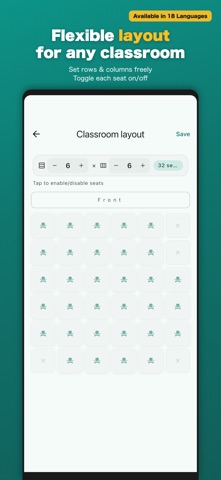
■ Classroom Layout Design
- Set rows and columns freely (1–10)
- Toggle each seat on/off
- Adapts to any classroom arrangement
■ Seating Shuffle
- Auto-generate seating considering all constraints
- Choose to adjust or accept results when violations occur
- Manually adjust results (tap to swap seats)
■ Export & Print
- Export as Excel (.xlsx) / CSV (.csv)
- Excel includes auto-added flipped sheet [NEW]
- Displays student number, reading, and name [NEW]
- Generate black-and-white seating chart images (.png)
- Choose A4 landscape or portrait orientation
- Print directly as PDF
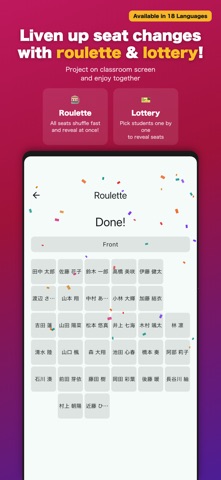
■ Reveal Animations
- Roulette mode: all seats shuffle rapidly then reveal at once
- Lottery mode: pick students one by one and reveal their seats
- Project onto the classroom screen for excitement!
■ Seating History
- All past seating results are saved
- Review or re-edit anytime
【Highlights】
- All data stored on-device (no cloud required)
- No account registration needed
- Works fully offline
- Simple and intuitive UI