

Selcall Selective Calling Tone
Selcall Selective Calling Tone is made and published by Black Cat Systems. AppBrain is an independent app data site and isn't affiliated with Black Cat Systems. The app name, icon, screenshots and description belong to Black Cat Systems and are shown as published on the App Store.
AppBrain's verdict
Established- Rating on App Store
- 3.33
- 15 ratings
- Last updated
- December 22, 2024
- Size
- 1.52 MB
It doesn't have enough ratings yet to judge what users think.
User feedback
Ratings and reviews on the App StoreComments on Selcall Selective Calling Tone for iOS
We don't have enough comments to show example comments. Please check back later.
Store listing
By Black Cat Systems, from the App Store

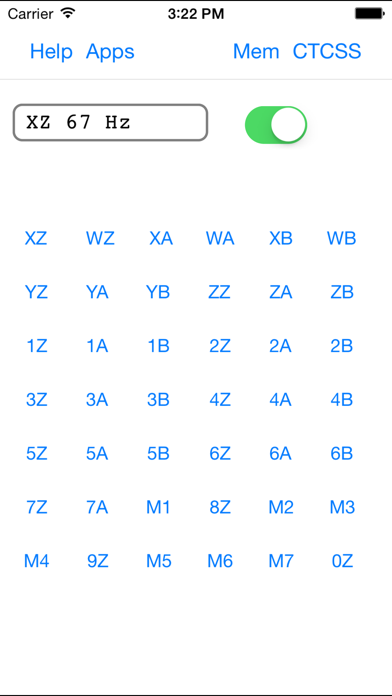

Description by Black Cat Systems Written by the developer, not by AppBrain. Click to read.
DTMF
CCIR1
CCIR7
PCCIR
EIA
EEA
CCITT
EURO
NATEL
VDEW
MODAT
ZVEI1
ZVEI2
ZVEI3
PZVEI
DZVEI
PDZVEI
ICAO
ICAO SELCALL 32
CTCSS
CODAN
Touch the button on the upper right corner to get a list of SelCall tone modes, and select the mode you wish to use.
Then touch the button for each tone you wish to generate.
If you turn the switch off, you can queue up several tones (they will be displayed to the left of the switch) and then turn the switch back on to play them.
Any tones that you played by turning the switch on can be repeated by tapping the RPT/Repeat button.
You can also store commonly used tone sequences. Tap on the Mem button to bring of the list of memory entries, which will by empty at first. To add an entry, tap the Edit button, then the green plus sign to add an entry, which will get a default name of Untitled. Tap Done, then tap on the Untitled entry to edit it. You can change the name, as well as the tone keys to be sent. To send an entry, tap the send button. It will be sent (or stored in the buffer if the switch is off). It will also be placed in the repeat buffer, so you can tap RPT/Repeat to re-send it.
The duration of tones and gap between them can be customized for most modes. Enter the values in milliseconds. The maximum allowed values are 500 milliseconds.
In CTCSS mode, touch the button for the tone that you wish to continuously generate. There is a switch which turns the tone on and off, and when on, the tone will continuously play, even when you switch to another tone mode, so you can combine CTCSS with other tone modes.
In CODAN mode, adjust the center frequency if necessary, select the priority of the message, and dial in the ID to call, and your ID. Then tap Send.
Sequence mode allows you to create sequences of arbitrary tones. First, you will see a list of your sequences. You can use Edit to add additional sequences, delete a sequence, or re-arrange them. Three sample tone sequences are created for you, as examples. To rename a sequence, tap on it and edit the text.
To edit to send a sequence, tap on the disclosure indicator at the extreme right. Each sequence is a set of lines, each of which has two numbers. The first is the frequency of the tone in Hertz, the second is the duration of the tone in milliseconds. One second is 1,000 milliseconds. Do not put an additional space between the numbers, after them, before them, or use any other characters, or the sequence will not correctly play.
You can play two tones at the same time, in that case, three numbers must be entered on each line, the first two are the tone frequencies, the third is the duration.
The first sample sequence, Seq 1, sends eight tones. The first is 1200 Hz for 550 milliseconds, then there are six more tones: 1100, 1000, 1100, 1000, 1100, 1000 Hz, each 200 milliseconds. Then a final tone of 1500 Hz for 350 milliseconds.
To play a sequence, tap Send.
To edit a line, tap on it and edit the text. You need a single space between the frequency and length. You can use Edit to add additional lines, delete a line, or re-arrange them.
Safety and technology
Found in the app by AppBrain- Price
- $2.99
- App size
- 1.52 MB
- Content rating
- Everyone
Technologies used by Selcall Selective Calling Tone
Releases
Updates seen on the App Store- Version
- 2.0
- Launched
- August 2012
No changelog data
Alternatives
Similar apps and more from Black Cat SystemsAlternatives to Selcall Selective Calling Tone





More from Black Cat Systems





Rankings
App Store top chartsApp Store Rankings for Selcall Selective Calling Tone
About the app and developer
About Selcall Selective Calling Tone
Selcall Selective Calling Tone is an utilities app developed by Black Cat Systems.
What is the rating of Selcall Selective Calling Tone?
Selcall Selective Calling Tone is rated 3.33 out of 5 stars, based on 15 ratings.
Is Selcall Selective Calling Tone free?
Selcall Selective Calling Tone costs $2.99. The app size is 1.52 MB. The latest version available is 2.0. The last update was on December 22, 2024.
What are the requirements for Selcall Selective Calling Tone?
The app has a content rating of Everyone. The app has been available on the App Store since August 2012.
Developer information for Black Cat Systems
Address:
Frequently asked questions about Selcall Selective Calling Tone
Is Selcall Selective Calling Tone free?
No. Selcall Selective Calling Tone costs $2.99 on the App Store.
Is Selcall Selective Calling Tone still available?
Yes. Selcall Selective Calling Tone is on the App Store, and the last update we saw was on December 22, 2024.
How large is Selcall Selective Calling Tone?
Selcall Selective Calling Tone is 1.52 MB.
Is Selcall Selective Calling Tone suitable for children?
App Store rates the content of Selcall Selective Calling Tone as suitable for everyone.
How do people rate Selcall Selective Calling Tone?
Selcall Selective Calling Tone scores 3.33 out of 5 stars, from 15 ratings on the App Store.
Who made Selcall Selective Calling Tone?
Selcall Selective Calling Tone was developed by Black Cat Systems. It is listed in the utilities category on the App Store.
What are the best alternatives to Selcall Selective Calling Tone?
People looking at Selcall Selective Calling Tone also look at these utilities apps: iSELCAL, Blue Box, MagicSDR: SDR Radio Receiver, Phonal Tonal, Laversab ARTS 7000.