SenCam: WebCam for PC and OBS is made and published by
SEIMA SHIBUTANI.
AppBrain is an independent app data site and isn't affiliated with SEIMA SHIBUTANI.
The app name, icon, screenshots and description belong to SEIMA SHIBUTANI and are shown as
published on the App Store.
About SenCam: WebCam for PC and OBS
SenCam: WebCam for PC and OBS is an utilities app developed by SEIMA SHIBUTANI.
What is the rating of SenCam: WebCam for PC and OBS?
SenCam: WebCam for PC and OBS has no ratings yet.
Is SenCam: WebCam for PC and OBS free?
SenCam: WebCam for PC and OBS is free. The app size is 39.16 MB. The latest version available is 2.0.1. The last update was on March 19, 2026.
What are the requirements for SenCam: WebCam for PC and OBS?
The app has a content rating of Everyone. The app has been available on the App Store since December 2025.
Description by SEIMA SHIBUTANI(from the App Store)
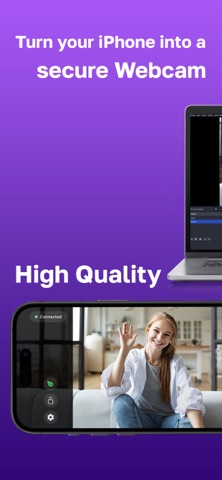
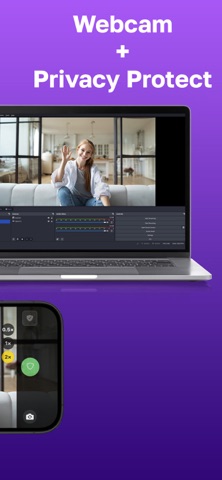
Turn your iPhone into a secure wireless webcam. SenCam automatically detects camera shake, sudden angle changes, and prevents accidental exposure to protect your privacy.
【Prevent webcam accidents before they happen】
Have you ever experienced:
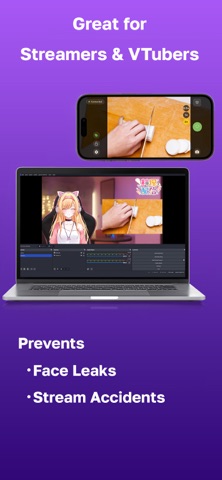
・Your webcam falling over during a video call ・An unexpected camera angle showing your room on stream ・Worrying about your Vtuber hand-cam tipping over ・A child or pet pushing the camera and revealing private spaces
SenCam protects you from unwanted exposure—instantly and automatically.
【Automatic Privacy Protection (Core Feature)】
SenCam monitors your device in real time. If it detects shake, vibration, or sudden angle changes, the video feed is immediately blocked.
・Shake Detection – reacts instantly when the camera is knocked or falls ・Tilt Detection – detects sudden angle shifts ・Sensitivity Control (3 levels) – low / medium / high ・Instant Protection – shuts the feed in a fraction of a second
Designed for streamers, remote workers, and anyone who values privacy.
【Features】
・Wireless webcam (Wi-Fi) — no cables required ・Low-latency live streaming ・High-quality video: 360p / 480p / 720p / 1080p ・Portrait & landscape orientation ・Brightness, color adjustment, mirror/flip options ・Blur & safety filters ・English & Japanese support
A single app provides both privacy protection and high-performance webcam capability.
【Perfect for】
・Remote work: Zoom, Teams, Google Meet, Slack ・Streamers: YouTube, Twitch, Kick ・Vtubers: VTube Studio, hand-cam, desk-cam protection ・Privacy-focused users: avoid showing your room, face, or environment ・Anyone who wants to prevent accidental exposure
【Easy to use】
1. Launch the free SenCam desktop app on your PC 2. Scan the QR code shown on the screen with your iPhone to connect 3. Start using it right away as a webcam
*The desktop app can be downloaded from the official website (Windows supported)
【SenCam Pro】
・HD video (720p / 1080p) ・Ultra-wide (0.5×) and Telephoto (2×) lens support ・Removes watermark ・No ads ・Includes a 7-day free trial
Stay safe during video calls and live streaming with SenCam’s automatic privacy protection. Download now and experience a safer, smarter webcam.
Terms of Use (EULA): https://inka002y.github.io/sencam-terms-and-conditions/
Each subscription will automatically renew 3 days before the expiration date for
the same time period. Subscriptions can be cancelled at any time before the renewal.