

Send to Kindle – Read Articles
Send to Kindle – Read Articles is made and published by Andrea Luciano. AppBrain is an independent app data site and isn't affiliated with Andrea Luciano. The app name, icon, screenshots and description belong to Andrea Luciano and are shown as published on the App Store.
AppBrain's verdict
- Rating on App Store
- 4.64
- 11 ratings
- Last updated
- May 12, 2026
It doesn't have enough ratings yet to judge what users think.
Rankings
App Store top chartsApp Store Rankings for Send to Kindle – Read Articles
Competitors
Similar apps and more from Andrea LucianoMore from Andrea Luciano

Also available on Google Play

Releases
Updates seen on the App Store- Version
- 13.0
- Launched
- January 2026
No changelog data
User feedback
Ratings and reviews on the App StoreComments on Send to Kindle – Read Articles for iOS
We don't have enough comments to show example comments. Please check back later.
Technology
Found in the app by AppBrain- Price
- Free
- App size
- 51.9 MB
- Content rating
- Medium
Technologies used by Send to Kindle – Read Articles
About the app and developer
About Send to Kindle – Read Articles
Send to Kindle – Read Articles is an utilities app developed by Andrea Luciano.
User Ratings
Send to Kindle – Read Articles is rated 4.64 out of 5 stars. The rating is based on 11 ratings.
App Information
Send to Kindle – Read Articles is freely available from the App Store. The app size is 51.92 MB. The latest version available is 13.0. The last update was on May 12, 2026.
Technical Requirements
The app has a content rating of Medium Maturity. The app has been available on the App Store since January 2026.
Developer information for Andrea Luciano
Address:
Store listing
By Andrea Luciano, from the App Store






Description by Andrea Luciano Written by the developer, not by AppBrain. Click to read.
Send any web page in one tap and enjoy a clean, distraction-free reading experience.
Perfect for saving and reading long articles later.
You can share any web page from your browser, select Send To Kindle, and the article will be cleaned, converted, and prepared for sending.
The content is sent to your Kindle using your personal Kindle email address.
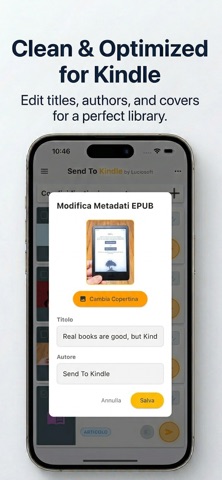
Before sending, you can customize your content.
You can edit the article title, change the author name, and replace the cover image.
You have full control over how your content appears on your Kindle.
The app allows you to merge multiple articles into a single document up to 25 MB.
You can open and manage files offline on your device.
You can import and send PDF and EPUB files from other apps.
A visual library lets you preview articles and documents with cover images.
Supported file formats include MOBI, AZW, DOC, DOCX, RTF, TXT, PDF, EPUB, JPEG, JPG, PNG, GIF, and BMP.
The maximum supported file size is 25 MB.
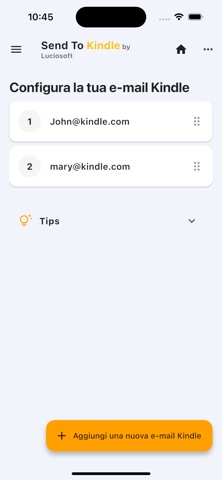
Your sending email address must match your Amazon Kindle email address such as MyEmail@kindle.com.
The email address must be added to the approved personal document email list in your Amazon account.
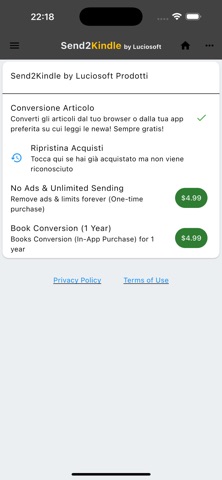
Some features require an in app purchase.
Unlimited sending allows you to send files without limits.
Book conversion allows conversion of ebook formats and requires a one year subscription.
Payment will be charged to your iTunes account at confirmation of purchase.
Subscriptions automatically renew unless auto renewal is turned off at least 24 hours before the end of the current period.
You can manage subscriptions in your account settings after purchase.
Credits
Logo Serena Romito
Translations Lavinia Luciano, Serena Romito, Adam Kwarciak, Mert Kaya
Testing and support Friends and colleagues
Disclaimer
This app is not created, affiliated with, or endorsed by Amazon.
Privacy Policy
https://sites.google.com/view/sendtokindle/home
Terms of Use
https://www.apple.com/legal/internet-services/itunes/dev/stdeula/