

SendScan: Scanner + Automation
SendScan: Scanner + Automation is made and published by Cesare Forelli. AppBrain is an independent app data site and isn't affiliated with Cesare Forelli. The app name, icon, screenshots and description belong to Cesare Forelli and are shown as published on the App Store.
AppBrain's verdict
- Rating on App Store
- 5.00
- 1 ratings
- Last updated
- September 14, 2026
It doesn't have enough ratings yet to judge what users think.
Rankings
App Store top chartsApp Store Rankings for SendScan: Scanner + Automation
Competitors
Similar apps and more from Cesare ForelliAlternatives to SendScan: Scanner + Automation


More from Cesare Forelli




Releases
Updates seen on the App Store- Version
- 1.3
- Launched
- November 2025
No changelog data
User feedback
Ratings and reviews on the App StoreComments on SendScan: Scanner + Automation for iOS
We don't have enough comments to show example comments. Please check back later.
Technology
Found in the app by AppBrain- Price
- Free
- App size
- 8.43 MB
- Content rating
- Everyone
Technologies used by SendScan: Scanner + Automation
About the app and developer
About SendScan: Scanner + Automation
SendScan: Scanner + Automation is a productivity app developed by Cesare Forelli.
User Ratings
SendScan: Scanner + Automation is rated 5.00 out of 5 stars. The rating is based on one rating ratings.
App Information
SendScan: Scanner + Automation is freely available from the App Store. The app size is 8.43 MB. The latest version available is 1.3. The last update was on September 14, 2026.
Technical Requirements
The app has a content rating of Everyone. The app has been available on the App Store since November 2025.
Developer information for Cesare Forelli
Address:
Store listing
By Cesare Forelli, from the App Store



Description by Cesare Forelli Written by the developer, not by AppBrain. Click to read.
Private iCloud sync. No accounts. No analytics. Optimized for iOS & iPadOS 27.
SCAN ONCE, AUTOMATE EVERYTHING
Stop wasting time on repetitive tasks after scanning. Create custom workflows that automatically:
• Save to specific folders: Route documents to the right place instantly
• Email directly: Send scans to clients, colleagues, or yourself with pre-filled subjects and messages *; multiple recipients are supported and you can either type in their address or pick from your device's Contacts
• Share via Messages: Like for email, add recipients and share via Messages automatically *
• Share seamlessly: Use the system share sheet to send documents anywhere
• Rename intelligently: Apply naming patterns with timestamps, dates, and custom tokens
• Chain actions: Combine multiple steps into a single tap
• Optionally delete after the workflow completes
* A confirmation tap before sending is required by iOS.
OCR & SEARCHABLE PDFs
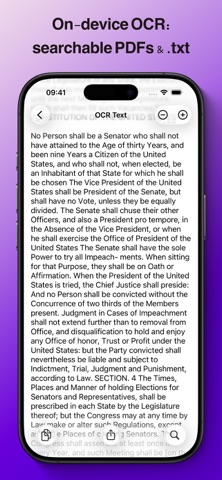
Make your scans searchable and extract text automatically, privately on-device:
• Searchable PDFs: Enable automatic OCR to create PDFs with invisible, selectable text layers with per-word accurate position in search
• Text extraction: Every OCR'd scan includes a companion .txt file for easy text access
• TXT viewer: View and search recognized text with highlighting and font controls
• Share plain text: Quickly share extracted text without the PDF
• Manual OCR: Add text recognition to existing PDFs with one tap
• Workflow integration: Automatically attach .txt files when emailing or sharing
• Quality control: Save as PDF (multi-page) or JPG (one per page) with adjustable quality and compression
WIDGETS, SHORTCUTS & QUICK ACTIONS
Scan and run workflows without opening the app:
• Home Screen widgets: One-tap access to your most-used workflows
• Recent documents widget: See thumbnails of your latest scans
• Lock Screen widgets: Scan from your Lock Screen
• Control Center: Add scanning to your quick actions
• App icon Quick Actions: Long-press the app icon to scan or run pinned workflows
• Pin workflows: Add your favorite workflow to the center toolbar button for instant access
• Shortcuts integration: Build advanced automations with Apple Shortcuts
SMART FILE MANAGEMENT
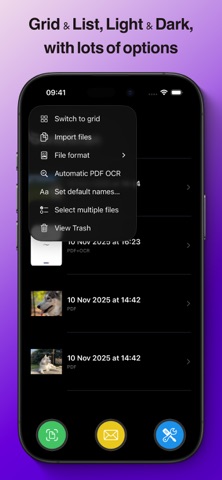
• Grid or list views: Choose your preferred browsing style
• Rename and organize: Flexible file management with naming templates
• Multi-select: Batch operations for efficiency
PRIVACY YOU CAN TRUST
Your documents belong to you, period.
• Zero analytics or tracking: No telemetry, no third-party libraries
• Local-first storage: Documents stay on your device
• Private iCloud sync: Your data syncs via your personal iCloud Drive with Apple's encryption; the developer cannot access your files
• No account required: No sign-ups, no data collection
FREE TO START, PRO WITHOUT BREAKING THE BANK
Free tier:
• Unlimited scanning
• Run each default workflow 3 times to try them out
SendScan Pro (yearly subscription or lifetime unlock):
• Create unlimited custom workflows
• Chain multiple actions in a single workflow
• Full automation power, without limits
• Lifetime unlock includes Family Sharing: Share with up to 5 family members
OPTIMIZED FOR iOS & iPadOS 27, compatible with iOS and iPadOS 26.
Designed with Apple's Liquid Glass visual language and fine-tuned for iOS & iPadOS 27, for a beautiful, modern experience on iPhone and iPad.
Terms of Use (EULA): https://www.apple.com/legal/internet-services/itunes/dev/stdeula/
Privacy Policy: https://cdf1982.com/privacy/sendscan_privacy_policy.html