

SerialSnap - Scan & Copy Codes
SerialSnap - Scan & Copy Codes is made and published by FAVOBASE. AppBrain is an independent app data site and isn't affiliated with FAVOBASE. The app name, icon, screenshots and description belong to FAVOBASE and are shown as published on the App Store.
AppBrain's verdict
- Last updated
- September 3, 2026
- Size
- 4.31 MB
User feedback
Ratings and reviews on the App StoreComments on SerialSnap - Scan & Copy Codes for iOS
We don't have enough comments to show example comments. Please check back later.
Store listing
By FAVOBASE, from the App Store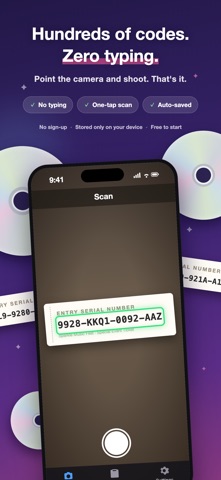



Description by FAVOBASE Written by the developer, not by AppBrain. Click to read.
SerialSnap reads the serial codes printed on CD inserts, merchandise and entry tickets, then copies them to your clipboard with a single tap. No more squinting at tiny print and typing character by character.
[ Made for people with a lot of codes to enter ]
- Typing codes from a CD insert into an entry form
- Signing up for an event or lottery that asks for a serial code
- Working through a stack of CDs, one code after another
- Reading codes printed too small to trust your eyes
- Checking a code you entered earlier
Here is how typing by hand compares with SerialSnap.
| Codes | By hand | SerialSnap | Time saved |
| 1 | ~20 sec | ~5 sec | ~15 sec |
| 50 | ~16 min | ~4 min | ~12 min |
| 100 | ~33 min | ~8 min | ~25 min |
| 200 | ~66 min | ~16 min | ~50 min |
Serial codes are slow to type and easy to get wrong. Hold the camera over one and SerialSnap recognizes it and copies it for you.
[ Main features ]
- Scan with the camera
High-accuracy OCR reads the serial code as soon as you hold the camera over it.
- Adjustable scan frame
Codes sit in different places and come in different sizes. Move and resize the scan frame to fit.
- One-tap copy
The recognized code appears at the bottom of the screen in real time. Tap the shutter and it goes to your clipboard, ready to paste into the entry form.
- History saved automatically
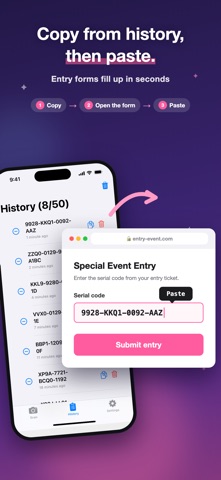
Every code you scan is kept, newest first, and copying one again takes a single tap. Up to 50 codes are stored, so you can scan a whole stack first and paste afterwards.
- Edit by hand
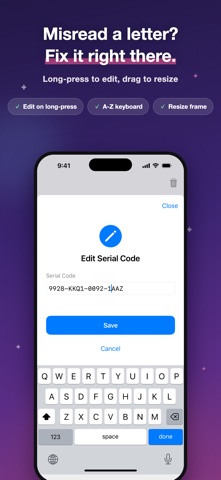
Long-press a code in the history to fix a character that was read wrong.
- Delete what you no longer need
Remove one code with the trash button, or clear the whole history from the button in the top right.
- Choose your copy format
- As is (example: ABC-123-XYZ)
- Hyphens removed (example: ABC123XYZ)
Match whatever the entry form expects.
[ The three screens ]
- Scan
The camera opens as soon as you launch the app. Line the scan frame up with the code and tap the white circle at the bottom. The code is copied to the clipboard and saved to your history.
- Frame button (top right): move and resize the scan frame.
- Ad counter (top left): scans remaining before the next ad (free version only).
- History
Every code you have scanned so far. Copy or delete from the buttons on each row, or long-press a code to edit it.
- Settings
- Scan format: with or without hyphens
- Copy format: as is, or hyphens removed
- Premium: manage your ad-free subscription
- Help: a guide to using the app
- Legal: privacy policy and terms of use
[ Premium ]
Every feature in SerialSnap is free to use. The free version shows an ad after a set number of scans.
If you would rather work through a long stack without interruptions, Premium hides every ad.
It renews monthly, and you can cancel at any time.
[ Privacy and security ]
- Photos are never saved
SerialSnap stores only the text of the serial code. The camera image is discarded right after processing and is never written to your device or to any server.
- Your data stays on your iPhone
Scanned codes are stored on your device only. Nothing is sent to an external server.
- No account needed
No sign-up and no login. Download it and start scanning.
[ How it works ]
1. Open the app
2. Line the scan frame up with the serial code
3. Tap the white circle at the bottom
4. The code is copied, so paste it into the entry form (you can also copy from the history)
Four steps, and the tedious part is over.
[ Requirements ]
- iOS 17.0 or later
- iPhone only (portrait)
- Camera access required
[ Support, terms of use and privacy policy ]
Questions and requests are always welcome.
URL: https://favobase.app
Event entries, site registrations - SerialSnap makes the code part quick.
Safety and technology
Found in the app by AppBrain- Price
- Free
- App size
- 4.31 MB
- Content rating
- Everyone
Technologies used by SerialSnap - Scan & Copy Codes
Releases
Updates seen on the App Store- Version
- 1.7
- Launched
- April 2026
No changelog data
Alternatives
Similar apps and more from FAVOBASEAlternatives to SerialSnap - Scan & Copy Codes


More from FAVOBASE

Rankings
App Store top chartsApp Store Rankings for SerialSnap - Scan & Copy Codes
About the app and developer
About SerialSnap - Scan & Copy Codes
SerialSnap - Scan & Copy Codes is an utilities app developed by FAVOBASE.
What is the rating of SerialSnap - Scan & Copy Codes?
SerialSnap - Scan & Copy Codes has no ratings yet.
Is SerialSnap - Scan & Copy Codes free?
SerialSnap - Scan & Copy Codes is free. The app size is 4.31 MB. The latest version available is 1.7. The last update was on September 3, 2026.
What are the requirements for SerialSnap - Scan & Copy Codes?
The app has a content rating of Everyone. The app has been available on the App Store since April 2026.
Developer information for FAVOBASE
Address:
Frequently asked questions about SerialSnap - Scan & Copy Codes
Is SerialSnap - Scan & Copy Codes free?
Yes. SerialSnap - Scan & Copy Codes is free on the App Store.
Is SerialSnap - Scan & Copy Codes still available?
Yes. SerialSnap - Scan & Copy Codes is on the App Store, and the last update we saw was on September 3, 2026.
How large is SerialSnap - Scan & Copy Codes?
SerialSnap - Scan & Copy Codes is 4.31 MB.
Is SerialSnap - Scan & Copy Codes suitable for children?
App Store rates the content of SerialSnap - Scan & Copy Codes as suitable for everyone.
Who made SerialSnap - Scan & Copy Codes?
SerialSnap - Scan & Copy Codes was developed by FAVOBASE. It is listed in the utilities category on the App Store.
What are the best alternatives to SerialSnap - Scan & Copy Codes?
People looking at SerialSnap - Scan & Copy Codes also look at these utilities apps: OCRでテキスト,バーコード一致確認 -OmniCheck-, S/N Scanner: OCR & Barcode, SILLAID GOLF, Seating Chart - sekigae sensei, AkuMemoLite.