It doesn't have enough ratings yet to judge what users think.
Server Manager is made and published by
Monolithic Apps.
AppBrain is an independent app data site and isn't affiliated with Monolithic Apps.
The app name, icon, screenshots and description belong to Monolithic Apps and are shown as
published on the App Store.
About Server Manager
Server Manager is an utilities app developed by Monolithic Apps.
User Ratings
Server Manager is rated 1.00 out of 5 stars. The rating is based on one rating ratings.
App Information
Server Manager is freely available from the App Store. The app size is 8.75 MB. The latest version available is 2.5.1. The last update was on May 8, 2026.
Technical Requirements
The app has a content rating of Everyone. The app has been available on the App Store since April 2022.
Description by Monolithic Apps(from the App Store)
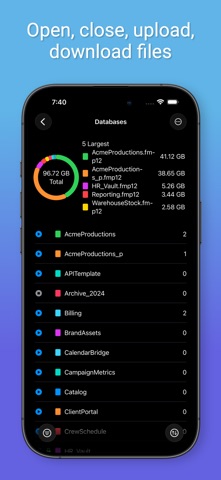
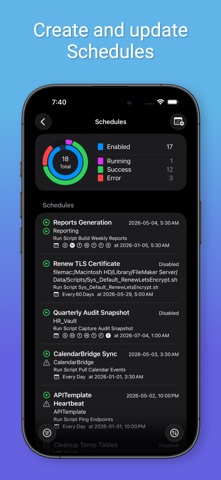
ServerManager brings FileMaker Server admin to your iPhone and iPad — fully native, beautifully designed, and automation-ready. Monitor databases, manage clients, run schedules, and put routine checks on autopilot with Shortcuts. The same app runs on Mac, where AI tools can connect directly.
FREE TIER Start with a single FileMaker server at no cost: - Connect to FileMaker Server 2020, 2021, 2025, or FileMaker Cloud - Live dashboard with server stats, clients, and databases - Monitor schedules as they run - Biometric sign-in with Face ID / Touch ID - Sync across your devices via iCloud Keychain
PREMIUM — Subscribe to unlock - Unlimited servers. Add and organize every server you manage, from a client's dev box to your production stack. - Shortcuts & App Intents. 13+ modern intents for servers, databases, clients, and schedules. Build "morning status check" workflows that run from your Home Screen, Siri, or a Focus trigger. - Full server settings editing. General, Folders, Notifications, SSL, Data API, OData, ODBC/JDBC, WPE, CWP, plugins, external auth, licensing, restrict access — every knob the Admin Console exposes, redesigned for touch. - AI integration. Let Claude, Codex, Gemini, and other MCP-compatible AI tools query your servers and databases directly. The MCP bridge runs on your Mac; your iPhone sees the live activity log, approval state, and audit trail. - AI activity log. Every AI tool call — protocol, database, account, outcome — is recorded, filterable, and syncs across your devices via iCloud. - Per-server access control. Choose which servers Shortcuts and AI can touch, with optional biometric gates on destructive actions.
DESIGNED FOR APPLE - Native SwiftUI — iPhone, iPad, and Mac - iCloud Keychain syncs servers and credentials across your devices - Biometric gates where it counts - Siri Shortcuts and App Intents throughout - Universal purchase — download on iPhone, iPad, or Mac with a single buy
WORKS WITH - FileMaker Server 20, 21, and 22 (2025) - FileMaker Cloud - Any MCP-compatible AI client
PRIVACY Your credentials live in Keychain and never leave your devices. The MCP server (when running on Mac) binds to localhost only — AI tools on the same Mac can reach it, nothing on your network can. Every AI action lands in the activity log.
Each subscription will automatically renew 3 days before the expiration date for
the same time period. Subscriptions can be cancelled at any time before the renewal.