

SetMate: Gig Sheets is made and published by Noah Davison. AppBrain is an independent app data site and isn't affiliated with Noah Davison. The app name, icon, screenshots and description belong to Noah Davison and are shown as published on the App Store.
AppBrain's verdict
- Rating on App Store
- 5.00
- 3 ratings
- Last updated
- October 2, 2026
It doesn't have enough ratings yet to judge what users think.
Rankings
App Store top chartsApp Store Rankings for SetMate: Gig Sheets
Releases
Updates seen on the App Store- Version
- 1.2.1
- Launched
- June 2026
No changelog data
User feedback
Ratings and reviews on the App StoreComments on SetMate: Gig Sheets for iOS
We don't have enough comments to show example comments. Please check back later.
Technology
Found in the app by AppBrain- Price
- Free
- App size
- 66.8 MB
- Content rating
- Medium
Technologies used by SetMate: Gig Sheets
About the app and developer
About SetMate: Gig Sheets
SetMate: Gig Sheets is a music app developed by Noah Davison.
User Ratings
SetMate: Gig Sheets is rated 5.00 out of 5 stars. The rating is based on 3 ratings.
App Information
SetMate: Gig Sheets is freely available from the App Store. The app size is 66.83 MB. The latest version available is 1.2.1. The last update was on October 2, 2026.
Technical Requirements
The app has a content rating of Medium Maturity. The app has been available on the App Store since June 2026.
Developer information for Noah Davison
Address:
Frequently asked questions about SetMate: Gig Sheets
Is SetMate: Gig Sheets free?
Yes. SetMate: Gig Sheets is free on the App Store.
Is SetMate: Gig Sheets still available?
Yes. SetMate: Gig Sheets is on the App Store, and the last update we saw was on October 2, 2026.
How large is SetMate: Gig Sheets?
SetMate: Gig Sheets is 66.83 MB.
Is SetMate: Gig Sheets suitable for children?
App Store gives SetMate: Gig Sheets a medium maturity rating, so it is not meant for young children.
How do people rate SetMate: Gig Sheets?
SetMate: Gig Sheets scores 5.00 out of 5 stars, from 3 ratings on the App Store.
Who made SetMate: Gig Sheets?
SetMate: Gig Sheets was developed by Noah Davison. It is listed in the music category on the App Store.
Store listing
By Noah Davison, from the App Store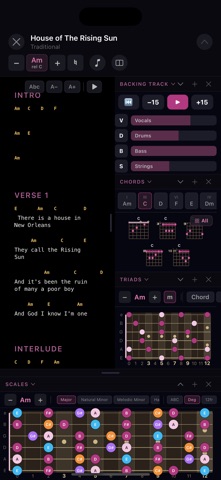





Description by Noah Davison Written by the developer, not by AppBrain. Click to read.
From learning a song at home to playing it live, SetMate keeps your charts, setlists, tabs, notes, backing tracks, and guitar tools in one place.
BACKING TRACKS & STEM SEPARATION
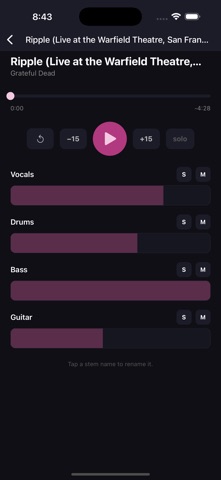
Bring the recording on stage with you. Import a song you own and SetMate splits it into parts you control separately.
• Separate any song into vocals, drums, bass, and instruments
• Mute your own part and play it live over the rest of the band
• Import from your music library, Files, or iCloud
• Already have multitracks? Upload your own — WAV, AIFF, FLAC and more
• Rename every stem to match your session
• Volume, mute, and solo on each part
• Scrubbing, restart, and 15-second skip
• Floating mixer in perform mode — drag it anywhere, shrink it to a pill
• Keeps playing in the background and from the lock screen
SETLISTS & PERFORM MODE
Turn every song into a stage-ready workspace.
• Build setlists and arrange songs in any order
• Add venue, set time, and performance notes
• Set each song's key for the gig and SetMate remembers it
• Full-screen stage view, portrait or landscape
• Hands-free auto-scroll; tap lyrics to pause
• One-tap transpose and capo display
• Large, stage-friendly song controls
• Screen stays awake throughout your set
SONG LIBRARY
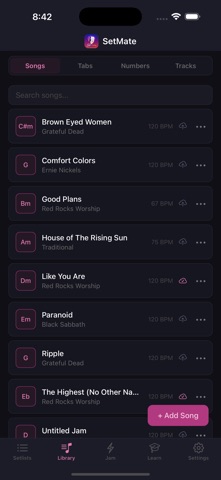
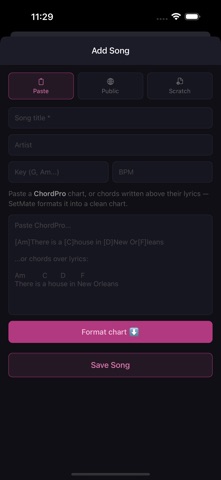
• Import chords and lyrics or ChordPro
• Create and edit chord charts
• Edit lyrics, chords, key, BPM, and capo
• Transpose any song with one tap
• Duplicate songs for alternate arrangements
• Keep your library available offline
GUITAR TOOLS
Add the widgets each song needs:
• Backing Track — play the song's stems and mute any part
• Lyrics & Chords — chords or Nashville numbers above lyrics
• Chord Shapes — visualize every chord in the song
• Scales — explore 20+ scales and modes across the fretboard
• Triads — find diatonic triad shapes across the neck
• Nashville Numbers — convert and create number charts
• Note Finder — find any note across the fretboard
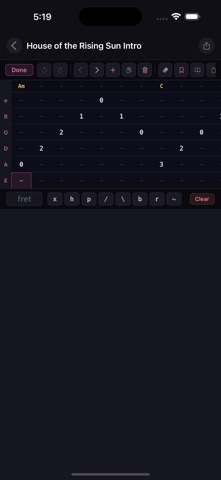
• Guitar Tabs — create tabs for riffs, solos, and parts
• Tuner — reference tones for each string
• Notes and Images — cues, reminders, and attached chord sheets
TABS & NASHVILLE NUMBERS
• Build tabs or paste existing tablature
• Hammer-ons, pull-offs, slides, bends, vibrato, and muted notes
• Convert song chords to Nashville numbers instantly
• Build number charts with a dedicated keyboard
• Save and share tabs and number charts with bandmates
WORKSHOP
Practice without creating a song. Pick any key and explore scales, modes, triads, chord shapes, Nashville numbers, and arpeggios.
LEARN
49 interactive guitar lessons designed to help you understand what you're playing — not just memorize shapes.
Six parts: Fretboard Fundamentals, Chord Anatomy, Harmony & Theory, Rhythm & Technique, Improvisation, and Jamming with Others — from the major scale and pentatonic vocabulary through chord construction, diatonic harmony, ii–V–I progressions, modes, and playing over changes.
Interactive fretboards, chord diagrams, arpeggio explorers, and ChordMorph let you see concepts in any key.
SHARING & COMMUNITY
• Export clean chord charts
• Publish charts and share them with a link
• Browse charts shared by other musicians
SETMATE PRO
Unlock unlimited songs and setlists, stem separation for your songs, all 49 lessons, every scale and mode, and cloud sync across your devices.
Pro includes 20 stem separations a month, and your stems stay in your library.
Choose monthly, annual, or lifetime access.
SetMate is free to download with up to 3 songs, 2 setlists, 2 backing tracks, one free stem separation, and 11 interactive guitar lessons.
Build your library. Make the setlist. Hit the stage.
Privacy Policy: https://setmateapp.com/privacy.html
Terms of Use (EULA): https://setmateapp.com/terms.html