

Shaper 2 : audio destroyer
Shaper 2 : audio destroyer is made and published by K-Devices. AppBrain is an independent app data site and isn't affiliated with K-Devices. The app name, icon, screenshots and description belong to K-Devices and are shown as published on the App Store.
AppBrain's verdict
Established- Rating on App Store
- 4.50
- 16 ratings
- Last updated
- July 12, 2021
- Size
- 30.1 MB
It doesn't have enough ratings yet to judge what users think.
User feedback
Ratings and reviews on the App StoreComments on Shaper 2 : audio destroyer for iOS
We don't have enough comments to show example comments. Please check back later.
Store listing
By K-Devices, from the App Store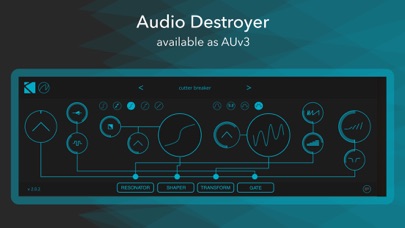
Description by K-Devices Written by the developer, not by AppBrain. Click to read.
*** Please note: Shaper 2 is an Audio Unit extension (AUv3) – it only works in an AUv3 host app like Garageband, AUM, Cubasis, etc... ***
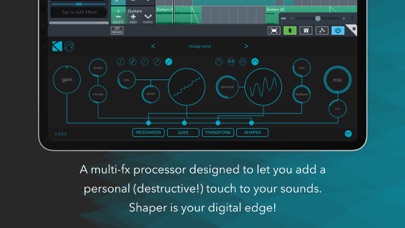
All you need to add a personal (destructive!) touch to your sounds is here. Emphasize your basslines working with waveshaper’s sections blend and color, or increasing the clip’s value (this works great also on drums and acoustic percussive sounds). Blow digital coldness to your synths going wild with S&M and Bits&Samps functions, or increasing wrap or fold values . Add unpredictable dynamic glitches thanks the exclusive gate. Shaper is your digital edge!
Shaper 2 is composed by several modules, that you can rearrange as you want:
- a glitch gate, now with a Smooth parameter
- a waveshaper with 5 inspiring functions: Muffin, Multistress, Cracker, S&M, Bits&Samps
- a transform module with Clip, Wrap, Fold, and sFold functions
- a resonator/short delay, that can act as a comb filter too
- a lopass/hipass filter lets adjust the processed sound
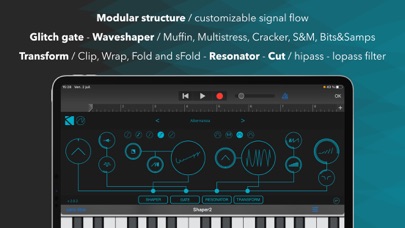
MODULAR STRUCTURE
Drag and reorder modules as you prefer and create different chains for different needs.
GRAPHICS
Beyond classic oscilloscope, two displays show the exact function you are using to process incoming sounds.
I/O
You choose how to feed Shaper 2 and how to mix it with Gain and Mix parameters.
GO BY FEEL / PRECISE EDITING
As part of encouraging more musical and creative applications of Shaper 2, in addition to using symbols for controls, the controls in Shaper 2 do not have individual readouts. We encourage you to let your ears determine the right knob positions whenever you can! If you’d like a precise readout, however, you can see/edit it by clicking on any parameter and looking in the upper-right corner of Shaper 2.
ICONS / TEXT LABELS
By default, all labels are graphical – for text labels, click the symbols/text label switch in the lower-right corner.
Safety and technology
Found in the app by AppBrain- Price
- $2.99
- App size
- 30.1 MB
- Content rating
- Everyone
Technologies used by Shaper 2 : audio destroyer
Releases
Updates seen on the App Store- Version
- 2.0.2
- Launched
- July 2021
No changelog data
Alternatives
Similar apps and more from K-DevicesAlternatives to Shaper 2 : audio destroyer




More from K-Devices







Rankings
App Store top chartsApp Store Rankings for Shaper 2 : audio destroyer
About the app and developer
About Shaper 2 : audio destroyer
Shaper 2 : audio destroyer is a music app developed by K-Devices.
User Ratings
Shaper 2 : audio destroyer is rated 4.50 out of 5 stars. The rating is based on 16 ratings.
App Information
Shaper 2 : audio destroyer costs $2.99. The app size is 30.08 MB. The latest version available is 2.0.2. The last update was on July 12, 2021.
Technical Requirements
The app has a content rating of Everyone. The app has been available on the App Store since July 2021.
Developer information for K-Devices
Address:
Frequently asked questions about Shaper 2 : audio destroyer
Is Shaper 2 : audio destroyer free?
No. Shaper 2 : audio destroyer costs $2.99 on the App Store.
Is Shaper 2 : audio destroyer still available?
Yes. Shaper 2 : audio destroyer is on the App Store, and the last update we saw was on July 12, 2021.
How large is Shaper 2 : audio destroyer?
Shaper 2 : audio destroyer is 30.08 MB.
Is Shaper 2 : audio destroyer suitable for children?
App Store rates the content of Shaper 2 : audio destroyer as suitable for everyone.
How do people rate Shaper 2 : audio destroyer?
Shaper 2 : audio destroyer scores 4.50 out of 5 stars, from 16 ratings on the App Store.
Who made Shaper 2 : audio destroyer?
Shaper 2 : audio destroyer was developed by K-Devices. It is listed in the music category on the App Store.
What are the best alternatives to Shaper 2 : audio destroyer?
People looking at Shaper 2 : audio destroyer also look at these music apps: Silo - Granulator and Reverb, SoundSaw, OtherDesertCities, lo-fi-af, Kajita - AUv3 Plug-in Effect.