

Share the Bridge
Share the Bridge is made and published by Arjun Gupta. AppBrain is an independent app data site and isn't affiliated with Arjun Gupta. The app name, icon, screenshots and description belong to Arjun Gupta and are shown as published on the App Store.
AppBrain's verdict
- Rating on App Store
- 5.00
- 9 ratings
- Last updated
- October 25, 2026
It doesn't have enough ratings yet to judge what users think.
Rankings
App Store top chartsApp Store Rankings for Share the Bridge
Competitors
Similar apps and more from Arjun GuptaAlternatives to Share the Bridge


Releases
Updates seen on the App Store- Version
- 1.4.1
- Launched
- November 2024
No changelog data
User feedback
Ratings and reviews on the App StoreComments on Share the Bridge for iOS
We don't have enough comments to show example comments. Please check back later.
Technology
Found in the app by AppBrain- Price
- Free
- App size
- 73.6 MB
- Content rating
- Everyone
Technologies used by Share the Bridge
About the app and developer
About Share the Bridge
Share the Bridge is a lifestyle app developed by Arjun Gupta.
User Ratings
Share the Bridge is rated 5.00 out of 5 stars. The rating is based on 9 ratings.
App Information
Share the Bridge is freely available from the App Store. The app size is 73.61 MB. The latest version available is 1.4.1. The last update was on October 25, 2026.
Technical Requirements
The app has a content rating of Everyone. The app has been available on the App Store since November 2024.
Developer information for Arjun Gupta
Address:
Frequently asked questions about Share the Bridge
Is Share the Bridge free?
Yes. Share the Bridge is free on the App Store.
Is Share the Bridge still available?
Yes. Share the Bridge is on the App Store, and the last update we saw was on October 25, 2026.
How large is Share the Bridge?
Share the Bridge is 73.61 MB.
Is Share the Bridge suitable for children?
App Store rates the content of Share the Bridge as suitable for everyone.
How do people rate Share the Bridge?
Share the Bridge scores 5.00 out of 5 stars, from 9 ratings on the App Store.
Who made Share the Bridge?
Share the Bridge was developed by Arjun Gupta. It is listed in the lifestyle category on the App Store.
What are the best alternatives to Share the Bridge?
People looking at Share the Bridge also look at these lifestyle apps: iEvangelize - Share the Gospel, Barabbas Road Church, SmallCircle Discipleship, EMU EagleAPP, Life in 6 Words (Li6W).
Store listing
By Arjun Gupta, from the App Store
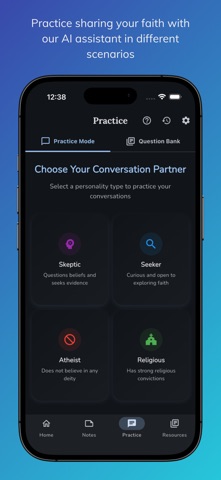
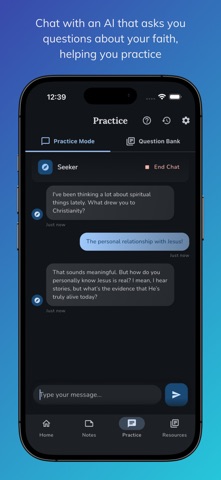





Description by Arjun Gupta Written by the developer, not by AppBrain. Click to read.
Many Christians want to talk about Jesus but don't feel ready. Share the Bridge gives you a safe place to practice first, then a clear way to present the Gospel with the Bridge illustration.
PRACTICE • AI practice partners: rehearse with a skeptic, a seeker, an atheist, or someone from another faith, at your own pace. • Question bank: answers to common questions of faith with Bible references, browsable by topic. • A new question on the Home screen each day.
PRESENT • Interactive Bridge illustration: a step-by-step, narrated and animated presentation that works in person or on a video call. • Draw and annotate on the diagram as you talk.
PREPARE • Notes: keep track of conversations, insights and prayer requests. • Resource library: guides and references to help you grow. • Share the illustration, verses and notes through your favorite messaging apps.
IN YOUR LANGUAGE Available in English, Chinese (Simplified), Hindi, Spanish and Portuguese. The app follows your device language, or you can choose one in Settings. Narration is available in each language, and AI practice partners reply in the language you choose.
FOR CHURCHES, SCHOOLS AND MINISTRIES Use Share the Bridge for a youth group practice night, a Bible class or an outreach team. Ask for the free leader kit through the contact form in the app or at sharethebridge.app/contact.
Free to download. Also available on the web at sharethebridge.app.
Share the Bridge supports real, personal faith conversations. It doesn't replace them.