AppBrain
AppBrain
  • Apps
  • Apps being viewed right now Trending apps today Most popular apps All-time most installed apps Top rated apps iPhone and iPad apps
  • Intelligence ▾
    Intelligence overview → Track any Android app or your whole market
    Track & analyze
    Keyword Tracker & OptimizerTrack & improve Play rankings App Performance ReportOne-off PDF for any app StatisticsFree Android & Play market stats
    Promote your app
    Featured Apps App Links
  • Intelligence
  • Pricing
  • Dashboard
  • Sign up
  • Log in
App Store Apps > Lifestyle > Shared Love Widget: ScrapBoard
App profile & analytics · Lifestyle · Data updated 2026-10-16
Shared Love Widget: ScrapBoard icon

Shared Love Widget: ScrapBoard

by Chi Hin Ngan · Free · Version 1.0.3
Availability On the App Store since May 2026 ↗
Rating on App Store
5.00/5
11 ratings
Rating
5.00
11 reviews
Best rank
–
not in the top lists
Last updated
June 11, 2026
1.0.3
AppBrain's verdict

It doesn't have enough ratings yet to judge what users think.

Shared Love Widget: ScrapBoard is made and published by Chi Hin Ngan. AppBrain is an independent app data site and isn't affiliated with Chi Hin Ngan. The app name, icon, screenshots and description belong to Chi Hin Ngan and are shown as published on the App Store.

About Shared Love Widget: ScrapBoard

Shared Love Widget: ScrapBoard is a lifestyle app developed by Chi Hin Ngan.

User Ratings

Shared Love Widget: ScrapBoard is rated 5.00 out of 5 stars. The rating is based on 11 ratings.

App Information

Shared Love Widget: ScrapBoard is freely available from the App Store. The app size is 57.11 MB. The latest version available is 1.0.3. The last update was on June 11, 2026.

Technical Requirements

The app has a content rating of Everyone. The app has been available on the App Store since May 2026.

Description by Chi Hin Ngan (from the App Store)
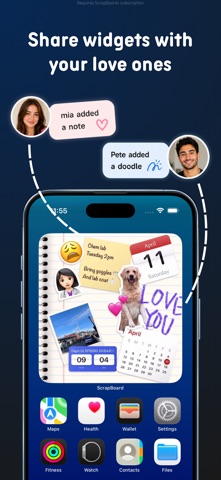
ScrapBoard is a shared Home Screen widget that keeps couples, partners, besties, close friends, roommates, and family connected through notes, photos, countdowns, count ups, doodles, stickers, memories, and updates.

Create private board with your people, add it to your Home Screen with ScrapBoard+, and see new photos, reminders, countdowns, love notes, and moments appear right where you glance.

HOW IT WORKS
1. Create a ScrapBoard for your partner, friends, family, roommate, or close circle
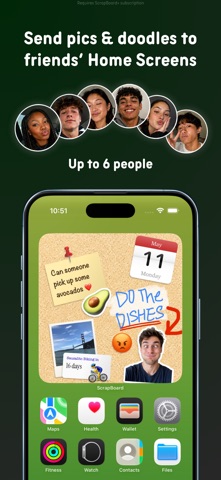
2. Invite up to 6 people to the board
3. Add notes, photos, stickers, doodles, emojis, countdowns, count ups, and memories
4. With ScrapBoard+, add the shared board as a Home Screen widget
5. When the board updates, everyone sees the latest version

FOR YOUR CLOSE PEOPLE
• Make a cute shared space with your partner, bestie, close friends, family, or roommates
• Keep memories, reminders, inside jokes, plans, love notes, photos, and daily updates in one place
• No followers, no likes, no public feed — just the people who matter
• Perfect for couples, long distance relationships, best friends, family boards, and private shared widgets

LIVE SYNCED WIDGETS
• Turn your board into a shared Home Screen widget
• See new photos, notes, doodles, countdowns, count ups, stickers, and memories from your people
• Use it as a couple widget, bestie widget, friendship widget, family widget, relationship widget, or photo widget
• Keep your favorite people close without opening another group chat

COUNTDOWNS & COUNT UPS
• Count how many days you’ve been together
• Countdown to birthdays, trips, anniversaries, parties, holidays, concerts, graduations, and reunions
• Track relationship milestones, friendship memories, family events, and important dates

NOTES, PHOTOS, STICKERS & DOODLES
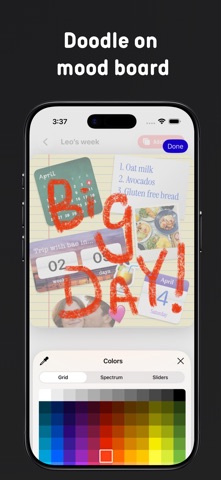
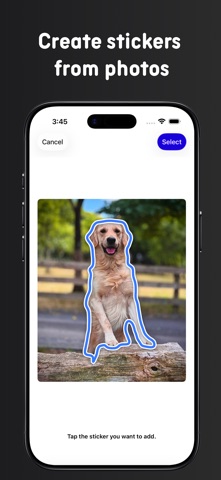
• Add shared notes, photo memories, cute reminders, stickers, emojis, captions, and doodles
• Build a mood board, memory board, sticky note board, photo widget, vision board, or mini scrapbook
• Make your board romantic, chaotic, cozy, aesthetic, funny, useful, or completely unserious

ONE BOARD, UP TO 6 PEOPLE
• Invite up to 6 people to one board
• Everyone can add, edit, decorate, and share moments together
• If one board has ScrapBoard+, everyone in that board can add the widget to their Home Screen
• One subscription unlocks the shared widget experience for everyone in the board

BOARD STYLES
• Choose from whiteboard, fridge, cork board, and color backdrops
• Create a couple board, friendship board, shared memo board, birthday countdown, memory board, private photo space, or family board
• Decorate your Home Screen with something personal instead of another boring widget
• Make your widget feel like a scrapbook, pinboard, cork board, mood board, or cozy fridge door

GREAT FOR
• Couples and partners
• Long distance relationships
• Best friends and besties
• Close friends and friend groups
• Families and roommates
• Birthday countdowns
• Anniversary count ups
• Trip planning
• Concert countdowns
• Daily reminders
• Photo memories
• Love notes
• Shared mood boards
• Private scrapbook boards
• Cute Home Screen widgets

SCRAPBOARD+
ScrapBoard+ unlocks Home Screen widgets. Adding a board to your Home Screen requires an active ScrapBoard+ subscription.

Free users can create and edit boards in the app. With ScrapBoard+, a board can be added as a widget, and everyone invited to that board can use the widget too.

Subscriptions renew automatically unless canceled at least 24 hours before the end of the current period. Payment is charged to your Apple ID. You can manage or cancel subscriptions in your Apple ID settings.

Download ScrapBoard and make a shared widget for the people you love — notes, photos, countdowns, count ups, memories, stickers, doodles, love notes, reminders, and little moments together on your Home Screen.

Website: https://scrapboard.app
Contact: support@scrapboard.app
Terms of Use: https://scrapboard.app/terms
Privacy Policy: https://scrapboard.app/privacy
Show more Show less

Screenshots

Shared Love Widget: ScrapBoard Screenshot 1 of 6
Shared Love Widget: ScrapBoard Screenshot 2 of 6
Shared Love Widget: ScrapBoard Screenshot 3 of 6
Shared Love Widget: ScrapBoard Screenshot 4 of 6
Shared Love Widget: ScrapBoard Screenshot 5 of 6
Shared Love Widget: ScrapBoard Screenshot 6 of 6
Screenshots by Chi Hin Ngan, from the the App Store listing
Official page on the App Store

More from Chi Hin Ngan

HookEngine-AI Automated Reels icon HookEngine-AI Automated Reels
Chi Hin Ngan
0.0
Free
Brush Hour - AI Cartoon Photos icon Brush Hour - AI Cartoon Photos
Chi Hin Ngan
0.0
Free

Changelog of Shared Love Widget: ScrapBoard

No changelog data

Developer information for Chi Hin Ngan

Chi Hin Ngan

Address:

Share Shared Love Widget: ScrapBoard

Comments on Shared Love Widget: ScrapBoard for iOS

We don't have enough comments to show example comments. Please check back later.

App Store Rankings for Shared Love Widget: ScrapBoard

This app is not ranked

Technologies used by Shared Love Widget: ScrapBoard

Frequently asked questions about Shared Love Widget: ScrapBoard

Is Shared Love Widget: ScrapBoard free?

Yes. Shared Love Widget: ScrapBoard is free on the App Store.

Is Shared Love Widget: ScrapBoard still available?

Yes. Shared Love Widget: ScrapBoard is on the App Store, and the last update we saw was on June 11, 2026.

How large is Shared Love Widget: ScrapBoard?

Shared Love Widget: ScrapBoard is 57.11 MB.

Is Shared Love Widget: ScrapBoard suitable for children?

App Store rates the content of Shared Love Widget: ScrapBoard as suitable for everyone.

How do people rate Shared Love Widget: ScrapBoard?

Shared Love Widget: ScrapBoard scores 5.00 out of 5 stars, from 11 ratings on the App Store.

Who made Shared Love Widget: ScrapBoard?

Shared Love Widget: ScrapBoard was developed by Chi Hin Ngan. It is listed in the lifestyle category on the App Store.

Today's trending apps Apps other people are watching Top new apps Price drops on Google Play Popular Lifestyle Apps
More hot apps 🔥
Overview Reviews Rankings Technology
AppBrain Intelligence premium content

Subscribe now to get full and unlimited access to AppBrain Intelligence. You'll have access to:

  • App Intelligence dashboard (performance timeline, competitor comparison, country rankings, insight cards)
  • Detailed ranking data per app
  • Full timeline per developer
  • Device market shares data per country
  • Unlimited keyword tracking
1 Month

$75/mo
(billed every month)

SAVE 0%
Subscribe
3 Months

$65/mo
($195 billed every 3 months)

SAVE 13%
Subscribe
1 Year

$57.50/mo
($690 billed every year)

SAVE 23%
Subscribe
Each subscription will automatically renew 3 days before the expiration date for the same time period. Subscriptions can be cancelled at any time before the renewal.

AppBrain is an app data site, we track rankings, ratings, installs for all apps and games on Google Play and the App Store. AppBrain doesn't host app files or APKs, all install links go directly to the official store. All trademarks are owned by their respective owners. As an Amazon Associate AppBrain earns from qualifying purchases.

More apps

  • Top Android apps being viewed
  • Ectonauta: Ghost Hunt
  • Kegel Exercises for Men Daily
  • Gambia Radios TV

App statistics

  • Android statistics
  • Google Play Developer stats
  • Trending Android Apps
  • Trending iOS apps
  • Top popular Apps
  • Buy the best Android phone
  • Buy & sell app businesses

About AppBrain

  • Contact
  • Privacy
  • Documentation
  • DMCA takedowns
  • Articles
  • Blog
  • Android App Marketing: Learn how to better market your Android app
© 2010-2026 - AppBrain