AppBrain
AppBrain
  • Apps
  • Apps being viewed right now Trending apps today Most popular apps All-time most installed apps Top rated apps iPhone and iPad apps
  • Intelligence ▾
    Intelligence overview → Track any Android app or your whole market
    Track & analyze
    Keyword Tracker & OptimizerTrack & improve Play rankings App Performance ReportOne-off PDF for any app StatisticsFree Android & Play market stats
    Promote your app
    Featured Apps App Links
  • Intelligence
  • Pricing
  • Dashboard
  • Sign up
  • Log in
App Store Apps > Utilities > ShareMe: File Sharing Fast
ShareMe: File Sharing Fast icon

ShareMe: File Sharing Fast

2.9
Nandini Patel
3.83
6 reviews
Free

ShareMe: File Sharing Fast Screenshot 1 of 4
ShareMe: File Sharing Fast Screenshot 2 of 4
ShareMe: File Sharing Fast Screenshot 3 of 4
ShareMe: File Sharing Fast Screenshot 4 of 4
Screenshots by Nandini Patel, from the the App Store listing
View on the App Store

About ShareMe: File Sharing Fast

ShareMe: File Sharing Fast is an utilities app developed by Nandini Patel.

User Ratings

ShareMe: File Sharing Fast is rated 3.83 out of 5 stars. The rating is based on 6 ratings.

App Information

ShareMe: File Sharing Fast is freely available from the App Store. The app size is 91.08 MB. The latest version available is 2.9. The last update was on November 21, 2026.

Technical Requirements

The app has a content rating of Everyone. The app has been available on the App Store since May 2024.

ShareMe: File Sharing Fast is made and published by Nandini Patel. AppBrain is an independent app data site and isn't affiliated with Nandini Patel. The app name, icon, screenshots and description belong to Nandini Patel and are shown as published on the App Store.

Description by Nandini Patel (from the App Store)
Move photos, videos and files between your iPhone and a computer. No cable, and nothing to install on the computer.

WEB SHARE: IPHONE ⇄ PC OR MAC
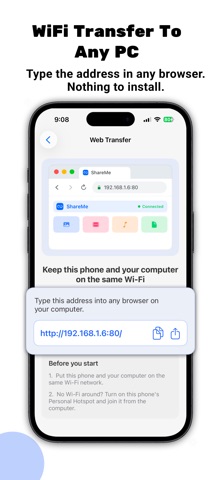
1. Open Web Share in ShareMe.
2. On your computer, open Safari, Chrome or any browser and type the address ShareMe shows. You can also send the link to yourself from the app.
3. Tap Accept on your iPhone.
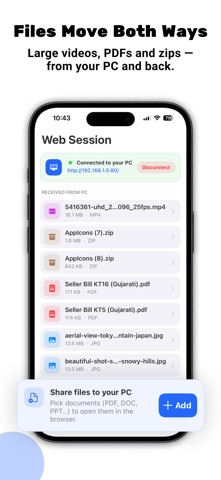
Download photos, videos and documents at full size, or drag files onto the page to send them to your iPhone. Works with Windows, Mac and Linux. No Wi-Fi? Use your iPhone's Personal Hotspot.

IPHONE TO IPHONE, NO INTERNET NEEDED
• Open ShareMe on both phones and they find each other automatically.
• Send photos, videos, music, contacts and documents (PDF, DOC, XLS, ZIP).
• No router, mobile data, QR code or sign-in.

FULL QUALITY
Nothing is compressed. A 4K video arrives as the same 4K video, and large files are fine.

PRIVATE BY DESIGN
Files go straight between your own devices over your local network. No cloud, no account, nothing stored on a server.

FREE AND PREMIUM
iPhone-to-iPhone transfer is free. Web Share includes 2 free sessions, then needs Premium (weekly, monthly or yearly; the price in your currency is shown in the app before you buy). ShareMe is free to download and supported by ads.

GOOD TO KNOW
• Keep the iPhone and the computer on the same Wi-Fi.
• Keep ShareMe open while a transfer is running.
• If the page does not open, type http:// before the address.
• Not supported: iPhone ⇄ Android, cloud backup, USB cable.

Payment is charged to your Apple Account at confirmation of purchase. The subscription renews automatically unless cancelled at least 24 hours before the end of the current period, and renewal is charged within 24 hours before the period ends. Manage or cancel it in your Apple Account settings.

Privacy Policy: https://sites.google.com/view/share-me-file-transfer/privacy-policy
Terms of Use: https://sites.google.com/view/share-me-file-transfer/terms-of-use
Show more Show less

Alternatives to ShareMe: File Sharing Fast

ShareAll: File Share &Transfer icon ShareAll: File Share &Transfer
Vishal Sorathiya
4.5
Free
456 ratings
Uniden Solo icon Uniden Solo
UNIDEN AUSTRALIA PTY. LIMITED
5.0
Free
2 ratings
Findblu: Lost Device Finder icon Findblu: Lost Device Finder
nazife ince
4.2
Free
41 ratings
Contact Transfer App icon Contact Transfer App
Mobscape
4.3
Free
143 ratings
Photo Blender - Photo Merge icon Photo Blender - Photo Merge
SHELL INFRASTRUCTURE PRIVATE LIMITED
3.0
Free
4 ratings
Data Transfer - Copy My Data icon Data Transfer - Copy My Data
Simple Health
4.8
Free
594 ratings
Val Crosshair Generator icon Val Crosshair Generator
Isaac Cabello
1.9
Free
58 ratings
tracker detect icon tracker detect
Mustafa Uz
4.6
Free
8.8K ratings

More from Nandini Patel

CineBox: Movies & TV Series icon CineBox: Movies & TV Series
Nandini Patel
4.4
Free
9 ratings
Crick Line Guru: Cricket Live icon Crick Line Guru: Cricket Live
Nandini Patel
5.0
Free
1 ratings
Arrow Puzzle Escape: Unblock icon Arrow Puzzle Escape: Unblock
Nandini Patel
0.0
Free
Expense Tracker & Budget Goals icon Expense Tracker & Budget Goals
Nandini Patel
0.0
Free

Changelog of ShareMe: File Sharing Fast

No changelog data

Developer information for Nandini Patel

Nandini Patel

Address:

Share ShareMe: File Sharing Fast

Comments on ShareMe: File Sharing Fast for iOS

We don't have enough comments to show example comments. Please check back later.

App Store Rankings for ShareMe: File Sharing Fast

This app is not ranked

Technologies used by ShareMe: File Sharing Fast

Today's trending apps Price drops on Google Play Popular Utilities Apps Top new apps Apps other people are watching
ShareAll: File Share &Transfer icon ShareAll: File Share &Transfer
Uniden Solo icon Uniden Solo
Findblu: Lost Device Finder icon Findblu: Lost Device Finder
Contact Transfer App icon Contact Transfer App
Photo Blender - Photo Merge icon Photo Blender - Photo Merge
Data Transfer - Copy My Data icon Data Transfer - Copy My Data
Val Crosshair Generator icon Val Crosshair Generator
tracker detect icon tracker detect
AppBrain Intelligence premium content

Subscribe now to get full and unlimited access to AppBrain Intelligence. You'll have access to:

  • App Intelligence dashboard (performance timeline, competitor comparison, country rankings, insight cards)
  • Detailed ranking data per app
  • Full timeline per developer
  • Device market shares data per country
  • Unlimited keyword tracking
  • AI assistant access via MCP (Claude, Cursor or any MCP client)
1 Month

$75/mo
(billed every month)

SAVE 0%
Subscribe
3 Months

$65/mo
($195 billed every 3 months)

SAVE 13%
Subscribe
1 Year

$57.50/mo
($690 billed every year)

SAVE 23%
Subscribe
Each subscription will automatically renew 3 days before the expiration date for the same time period. Subscriptions can be cancelled at any time before the renewal.

AppBrain is an app data site, we track rankings, ratings, installs for all apps and games on Google Play and the App Store. AppBrain doesn't host app files or APKs, all install links go directly to the official store. All trademarks are owned by their respective owners.

More apps

  • Top Android apps being viewed
  • View Suzy Says!
  • View fctv 33 tv
  • Turbo Slope for Android

App statistics

  • Android statistics
  • Google Play Developer stats
  • Trending Android Apps
  • Trending iOS apps
  • Top popular Apps
  • Buy the best Android phone
  • Buy & sell app businesses

About AppBrain

  • Contact
  • Privacy
  • Documentation
  • DMCA takedowns
  • Blog
  • Free online games · play instantly
© 2010-2026 - AppBrain