

SheetCollector:xlsx ods...pdf
SheetCollector:xlsx ods...pdf is made and published by 维 艾. AppBrain is an independent app data site and isn't affiliated with 维 艾. The app name, icon, screenshots and description belong to 维 艾 and are shown as published on the App Store.
AppBrain's verdict
- Last updated
- October 18, 2026
- Size
- 20.9 MB
User feedback
Ratings and reviews on the App StoreComments on SheetCollector:xlsx ods...pdf for iOS
We don't have enough comments to show example comments. Please check back later.
Store listing
By 维 艾, from the App Store


Description by 维 艾 Written by the developer, not by AppBrain. Click to read.
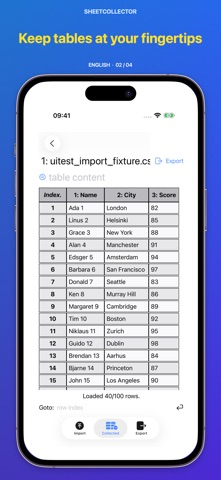
Instead of acting like a generic spreadsheet viewer, SheetCollector is built for turning files, image files, and databases into clean PDF, CSV, or JPG outputs.
Camera capture and scan intake are available on iPhone and iPad. On Mac, image intake is limited to image files imported from disk.
Use it when you need to:
• collect tables from CSV, TSV, JSON, XLSX, ODS, HTML, PDF, XML, Markdown, databases, or image files
• keep imported data independent from the original source
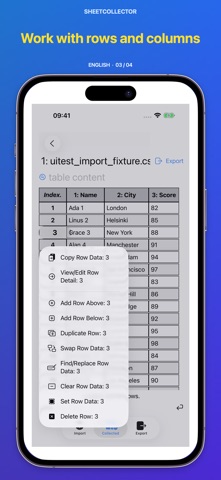
• clean up rows and columns before delivery
• export polished PDF, CSV, or JPG outputs while keeping collected data on your device
Why SheetCollector is different
• Collected data stays on your device after import.
• Multi-source intake: import from CSV, TSV, JSON, XLSX, ODS, HTML, PDF, XML, Markdown, SQLite3, MySQL, MariaDB, PostgreSQL, and image files, with camera capture on iPhone and iPad.
• Structured editing: add, modify, clear, reorder, and swap rows or columns after import.
• Publish-ready export: generate CSV, PDF, or JPG output for sharing, reporting, archiving, or compliance workflows.
• Output control: customize page size, orientation, long-page JPG output, borders, headers, footers, fonts, colors, and backgrounds.
• Business-ready documents: add logos, private statements, and PDF protection with separate read and edit passwords.
Typical workflows
• Turn a database table into a client-ready PDF report.
• Collect table data from an image file, or use camera scan on iPhone or iPad, then export a cleaner structured output.
• Reformat spreadsheets into branded deliverables while keeping collected data on device.
• Prepare audit, archive, and documentation outputs on iPhone, iPad, or Mac.
Privacy Policy
• Data stays on your device
• No ads
• No tracking
Unlocks
• The formats listed below and single image files are free to import. Editing and default CSV/PDF/JPEG export are free.
CSV, TSV, PSV, JSON, XML, HTML, Markdown, PDF, SQLite.
• A subscription unlocks all features. Photos on iPhone/iPad and image imports via Multiple Files require a subscription, including for one image.
• One-time purchases unlock listed XLSX, ODS, MySQL/MariaDB, PostgreSQL and custom-style features, individually or in eligible bundles. They do not unlock subscription-only entries.
• Device, file and processing limits apply. Review recognized data; recognition may fail and large exports have safety limits.
Subscription Terms
• Payment is charged to your App Store account.
• Subscriptions renew automatically unless canceled at least 24 hours before the end of the current period.
• Manage subscriptions in App Store settings.
• Privacy Policy: https://h53d.github.io/eTable/policy.html
• Terms of Use (EULA): https://www.apple.com/legal/internet-services/itunes/dev/stdeula/
Support: danjian42@gmail.com
Safety and technology
Found in the app by AppBrain- Price
- Free
- App size
- 20.9 MB
- Content rating
- Everyone
Technologies used by SheetCollector:xlsx ods...pdf
Releases
Updates seen on the App Store- Version
- 1.2.5
- Launched
- November 2024
No changelog data
Alternatives
Similar apps and more from 维 艾Alternatives to SheetCollector:xlsx ods...pdf







More from 维 艾





Rankings
App Store top chartsApp Store Rankings for SheetCollector:xlsx ods...pdf
About the app and developer
About SheetCollector:xlsx ods...pdf
SheetCollector:xlsx ods...pdf is a productivity app developed by 维 艾.
User Ratings
The app has no ratings yet.
App Information
SheetCollector:xlsx ods...pdf is freely available from the App Store. The app size is 20.94 MB. The latest version available is 1.2.5. The last update was on October 18, 2026.
Technical Requirements
The app has a content rating of Everyone. The app has been available on the App Store since November 2024.
Developer information for 维 艾
Address: