

SheetPlanner
SheetPlanner is made and published by SheetPlanner Software LLC. AppBrain is an independent app data site and isn't affiliated with SheetPlanner Software LLC. The app name, icon, screenshots and description belong to SheetPlanner Software LLC and are shown as published on the App Store.
AppBrain's verdict
Established- Rating on App Store
- 5.00
- 4 ratings
- Last updated
- May 1, 2026
- Size
- 54.7 MB
It doesn't have enough ratings yet to judge what users think.
User feedback
Ratings and reviews on the App StoreComments on SheetPlanner for iOS
We don't have enough comments to show example comments. Please check back later.
Store listing
By SheetPlanner Software LLC, from the App Store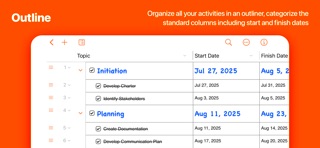

Description by SheetPlanner Software LLC Written by the developer, not by AppBrain. Click to read.
FREE OUTLINER; advanced features available via 21 day in-app trial:
SheetPlanner's outliner supporting multiple columns, styles, notes, links, and more is available completely free forever. Try advanced features including timeline and calendar views, multiple sheets, smart filters, and more, free for 21 days. At the end of the trial, purchase to unlock those features, or continue with the free outliner.
Get organized:
Organize all your activities in an outliner, categorize them using the standard columns including progress, start and finish dates. Create your own date, text, number, symbol or drop down list columns. Auto enter cell values. Link to documents and web sites.
Make a plan:
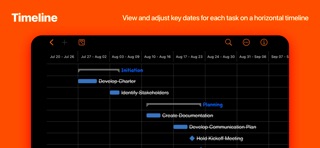
Plan and visualize your goals, project tasks and schedule in the timeline view. View task duration and sequence. View timeline by days, weeks, months, quarters or years. Create dependencies between rows. View predecessors and successors.
Get things done:
Use filters or focus to concentrate on whats important, due today, due tomorrow, or whatever criteria you decide. View tasks in a month or year calendar or both.
Features:
Outliner with columns:
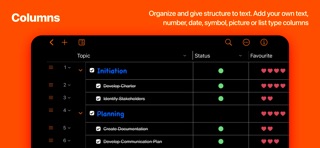
Organize and give structure to text. Add your own text, number, date, symbol or list type columns.
Sync
Syncing via iCloud Drive is now supported. Edit a document on multiple Macs, and the changes will periodically sync.
Collaboration
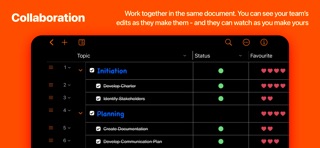
Collaborate with other people. Share a document, and see their changes highlighted, and even their selection.
Notes:
Notes inline below row topic and in own tab with full text editor.
Row Styles:
Custom fonts, size, color at each row level or specific to individual rows.
Focus:
Focus on a row or a row and its children. Transverse hierarchy via path bar.
Search:
Search the outline across columns from the toolbar with an option to save as a Smart Filter.
Sorting:
Sort the outline by any column, by ascending, descending order or by the order of values in a ‘List’ type column.
Smart filters (in-app purchase):
Create Smart Filters with simple or complex criteria and save them for future use via the Filter Bar.
Link files, folders & webpages.
Link to web pages, documents and folders on your Mac or in the cloud, or view them via Quick Look or tabs.
Multiple Tabs:
View sheets in multiple tabs at once in any combination of views: month view, outline, timeline or year view.
Monthly Calendar (in-app purchase):
View outline rows with assigned dates in a monthly view.
Yearly Calendar (in-app purchase):
Heat-mapped year view indicating number of activities commencing and/or finishing on each day.
Timeline (in-app purchase):
View and adjust key dates for each task on a horizontal timeline. Create dependencies between rows. Dependencies can be of the following types: Finish to start, start to finish, start to start, finish to finish.
Board View (in-app purchase):
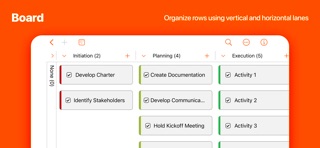
View Outline rows on a board. Organize cards by Topic, column list values, symbol list values, people. Organize by vertical and horizontal lanes. Drag to move cards between lanes.
Multiple Sheets:
A document can now include multiple sheets, each with their own columns, rows, styles, filters, etc. Organize and access multiple sheets using the sidebar and folders.
Printing:
See a preview of what will be printed, including printing the outline and timeline together.
Properties:
Customize cell, column, row, calendar and timeline settings.
Import & Export:
Import & export in CSV or OPML format.
Copy & Paste:
Copy and Paste from/to Excel & Numbers.
Themes:
Personalize Outline view with green-bar, yellow notepad or green notepad themes.
Templates:
Ready to go templates for business, education and personal use. Save templates for future use via the template chooser.
Safety and technology
Found in the app by AppBrain- Price
- Free
- App size
- 54.7 MB
- Content rating
- High
Technologies used by SheetPlanner
Releases
Updates seen on the App Store- Version
- 5.3.1
- Launched
- November 2018
No changelog data
Rankings
App Store top chartsApp Store Rankings for SheetPlanner
About the app and developer
About SheetPlanner
SheetPlanner is a productivity app developed by SheetPlanner Software LLC.
User Ratings
SheetPlanner is rated 5.00 out of 5 stars. The rating is based on 4 ratings.
App Information
SheetPlanner is freely available from the App Store. The app size is 54.72 MB. The latest version available is 5.3.1. The last update was on May 1, 2026.
Technical Requirements
The app has a content rating of High Maturity. The app has been available on the App Store since November 2018.
Developer information for SheetPlanner Software LLC
Address: