

Shell Keyboard
Shell Keyboard is made and published by Nguyen Nguyen. AppBrain is an independent app data site and isn't affiliated with Nguyen Nguyen. The app name, icon, screenshots and description belong to Nguyen Nguyen and are shown as published on the App Store.
AppBrain's verdict
New- Rating on App Store
- 5.00
- 1 ratings
- Last updated
- October 16, 2026
- Size
- 2.69 MB
Shell Keyboard came out 52 days ago. It doesn't have enough ratings yet to judge what users think.
User feedback
Ratings and reviews on the App StoreComments on Shell Keyboard for iOS
We don't have enough comments to show example comments. Please check back later.
Store listing
By Nguyen Nguyen, from the App Store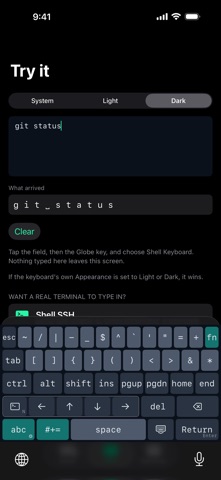



Description by Nguyen Nguyen Written by the developer, not by AppBrain. Click to read.
Working over SSH or in a local shell needs Ctrl, Esc, Tab, arrow keys, and function keys, none of which exist on the standard iOS keyboard. Shell Keyboard is a custom keyboard built specifically for terminal apps like Blink, Termius, Prompt, a-Shell and iSH — it sends the exact ASCII control codes and ANSI/VT escape sequences your terminal expects, the same bytes a physical keyboard would send.
NEW ON IPAD: A REAL KEYBOARD
Choose a 60% or 75% layout, the compact keyboards terminal users already type on. The 75% layout puts Esc, F1–F12, a number row, Caps Lock, Home, End, Page Up, Page Down and inverted-T arrow keys on one screen, and Shift types the symbol printed on each key, just like a physical keyboard. The 60% layout keeps the function keys, navigation and arrows one fn press away. iPad opens in the 75% layout; the original ShellKey layout is one tap away in Settings.
WHAT'S INCLUDED
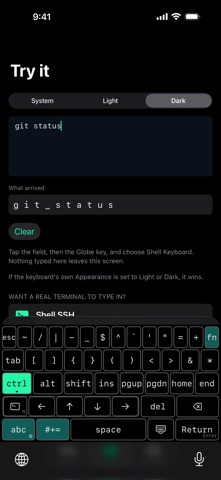
• A dedicated terminal layer: Ctrl, Alt, Esc, Tab, arrow keys, Home/End/PgUp/PgDn, and the punctuation a shell prompt uses constantly
• Ctrl and Alt as proper modifiers — latch one for a single keypress, or double-tap to lock it on, like a hardware keyboard
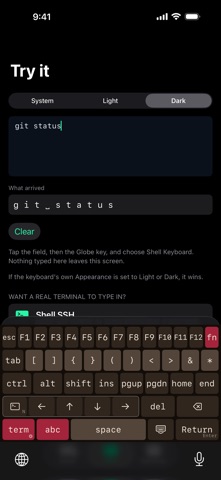
• A full function-key layer: tap fn and the top row becomes F1 through F12, while every other row stays exactly where it was
• Arrow keys that match the app you're in — Normal for shells, Application for vim, tmux, less and htop, or Move the Cursor for ordinary text fields
• Return or Enter: long-press the Return key to switch between a carriage return and a line feed
• A plain QWERTY layer and a complete symbols layer, for ordinary text — hostnames, paths, commit messages — without leaving the keyboard
• Seven themes — Shell, Ember, Glacier, Dusk, Moss, Void (pure black) and High Contrast — each in light and dark, and an Appearance option to keep the keyboard light or dark everywhere
• On iPad, 60% and 75% layouts (75% by default), described above
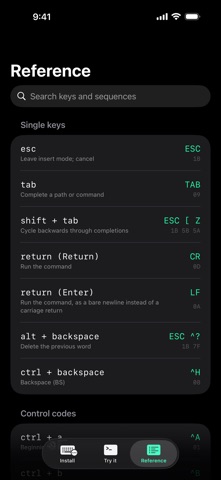
• A searchable reference inside the app, listing every key alongside the exact escape sequence and hex bytes it sends
• Every key emits the exact byte sequence a real terminal expects
SETTINGS LIVE IN THE KEYBOARD
Touch and hold the key with the small gear (or tap the gear key on the iPad's 60% and 75% layouts) for Haptic feedback, Theme, Appearance and, on iPad, Layout. They live in the keyboard itself because, without Full Access, iOS keeps a keyboard and its app apart, and Shell Keyboard never asks for Full Access.
BUILT FOR PRIVACY
Shell Keyboard never asks for Full Access. It cannot reach the network. It never reads, stores, or transmits anything you type — every key it sends is decided from the key you tapped, and nothing else. No analytics, no crash reporting, no account.
GOOD TO KNOW
In a terminal or editor running inside a web browser — code-server, Jupyter and the like — the keys that send a multi-character escape sequence don't get through: the arrow keys, F1 through F12, Home, End, Page Up, Page Down, Shift+Tab and Alt combinations. Everything that sends a single byte works there normally, including every Ctrl combination, Esc, Tab, Return and ordinary typing. Web pages listen for key press events and iOS only lets a keyboard extension insert text, so this is an iOS limitation that applies to every third-party keyboard, not something an app can work around.
WHO IT'S FOR
Anyone who SSHes from an iPhone or iPad — sysadmins, developers, and anyone tired of missing Ctrl+C.
Safety and technology
Found in the app by AppBrain- Price
- $0.99
- App size
- 2.69 MB
- Content rating
- Everyone
Technologies used by Shell Keyboard
Releases
Updates seen on the App Store- Version
- 1.2.0
- Launched
- September 2026
No changelog data
Alternatives
Similar apps and more from Nguyen NguyenAlternatives to Shell Keyboard





More from Nguyen Nguyen


Rankings
App Store top chartsApp Store Rankings for Shell Keyboard
About the app and developer
About Shell Keyboard
Shell Keyboard is an overall app developed by Nguyen Nguyen.
What is the rating of Shell Keyboard?
Shell Keyboard is rated 5.00 out of 5 stars, based on one rating ratings.
Is Shell Keyboard free?
Shell Keyboard costs $0.99. The app size is 2.69 MB. The latest version available is 1.2.0. The last update was on October 16, 2026.
What are the requirements for Shell Keyboard?
The app has a content rating of Everyone. The app has been available on the App Store since September 2026.
Developer information for Nguyen Nguyen
Address:
Frequently asked questions about Shell Keyboard
Is Shell Keyboard free?
No. Shell Keyboard costs $0.99 on the App Store.
Is Shell Keyboard still available?
Yes. Shell Keyboard is on the App Store, and the last update we saw was on October 16, 2026.
How large is Shell Keyboard?
Shell Keyboard is 2.69 MB.
Is Shell Keyboard suitable for children?
App Store rates the content of Shell Keyboard as suitable for everyone.
How do people rate Shell Keyboard?
Shell Keyboard has one rating of 5.00 stars on the App Store.
Who made Shell Keyboard?
Shell Keyboard was developed by Nguyen Nguyen. It is listed in the overall category on the App Store.
What are the best alternatives to Shell Keyboard?
People looking at Shell Keyboard also look at these overall apps: Built With for Safari, Lua for Games : Learn and Code, Link Check Pro, TypeTab: Coding Keyboard, Device Insight Dashboard Pro.