

ShellAccess is made and published by KTMLABS LLC. AppBrain is an independent app data site and isn't affiliated with KTMLABS LLC. The app name, icon, screenshots and description belong to KTMLABS LLC and are shown as published on the App Store.
AppBrain's verdict
- Last updated
- March 23, 2026
- Size
- 18.7 MB
User feedback
Ratings and reviews on the App StoreComments on ShellAccess for iOS
We don't have enough comments to show example comments. Please check back later.
Store listing
By KTMLABS LLC, from the App Store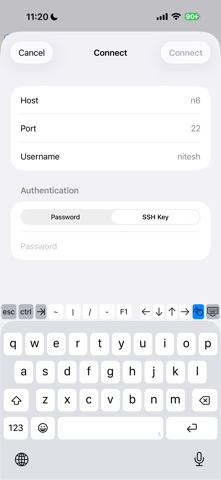
Description by KTMLABS LLC Written by the developer, not by AppBrain. Click to read.
Full Terminal Emulation
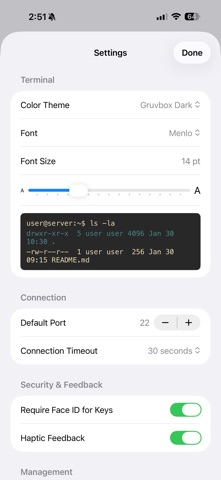
A complete terminal experience with support for interactive applications, color output, and customizable themes. Choose from Pro Dark, Dracula, Nord, Monokai, Solarized, Gruvbox, and more. Adjust font size and family to suit your workflow.
Secure Authentication
Connect using password or SSH key authentication. Generate Ed25519 and RSA keys directly in the app, or import your existing keys. Passwords can be saved securely with Face ID or Touch ID protection using the iOS Keychain.
Host Key Verification
ShellAccess verifies server identity on every connection, just like OpenSSH. Unknown hosts prompt for confirmation, and changed host keys trigger clear warnings to protect against man-in-the-middle attacks. Manage your known hosts list from Settings.
SFTP File Browser
Browse, download, and manage files on your remote servers without leaving the app. Access the built-in SFTP browser from the terminal toolbar with a single tap.
Multi-Session Support
Work across multiple servers simultaneously. Each connection runs in its own tab with independent terminal state. Switch between sessions instantly.
Server Management
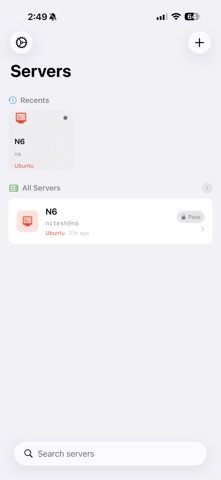
Save your frequently used servers with host, port, username, and preferred authentication method. Organize servers into folders. Quick Connect lets you jump into a one-off session without saving anything.
Port Forwarding
Set up local and remote port forwarding tunnels to securely access services behind firewalls.
Terminal Toolbar
A purpose-built accessory bar gives you quick access to Escape, Tab, Ctrl, arrow keys, and common shortcuts like Ctrl+C, Ctrl+D, and Ctrl+Z — keys that are difficult to type on a touchscreen keyboard.
Built for iOS
Native SwiftUI interface. Designed to work with the iOS keyboard, multitasking, and system security features. No web views, no Electron — a real native app.
Safety and technology
Found in the app by AppBrain- Price
- Free
- App size
- 18.7 MB
- Content rating
- Everyone
Technologies used by ShellAccess
Releases
Updates seen on the App Store- Version
- 1.0
- Launched
- March 2026
No changelog data
Alternatives
Similar apps and more from KTMLABS LLCAlternatives to ShellAccess




Rankings
App Store top chartsApp Store Rankings for ShellAccess
About the app and developer
About ShellAccess
ShellAccess is an utilities app developed by KTMLABS LLC.
User Ratings
The app has no ratings yet.
App Information
ShellAccess is freely available from the App Store. The app size is 18.66 MB. The latest version available is 1.0. The last update was on March 23, 2026.
Technical Requirements
The app has a content rating of Everyone. The app has been available on the App Store since March 2026.
Developer information for KTMLABS LLC
Address: