

Shift Day Work Calendar: Spoke
Shift Day Work Calendar: Spoke is made and published by PIXO Incorporation. AppBrain is an independent app data site and isn't affiliated with PIXO Incorporation. The app name, icon, screenshots and description belong to PIXO Incorporation and are shown as published on the App Store.
AppBrain's verdict
EstablishedLoved by users- Rating on App Store
- 4.71
- 14,345 ratings
- Last updated
- October 2, 2026
Users love it: 4.7 stars from 14,345 ratings.
Rankings
App Store top chartsApp Store Rankings for Shift Day Work Calendar: Spoke
Competitors
Similar apps and more from PIXO IncorporationAlternatives to Shift Day Work Calendar: Spoke




More from PIXO Incorporation






Releases
Updates seen on the App Store- Version
- 3.4.5
- Launched
- July 2015
No changelog data
User feedback
Ratings and reviews on the App StoreComments on Shift Day Work Calendar: Spoke for iOS
We don't have enough comments to show example comments. Please check back later.
Technology
Found in the app by AppBrain- Price
- Free
- App size
- 242.8 MB
- Content rating
- Everyone
Technologies used by Shift Day Work Calendar: Spoke
About the app and developer
About Shift Day Work Calendar: Spoke
Shift Day Work Calendar: Spoke is a productivity app developed by PIXO Incorporation.
What is the rating of Shift Day Work Calendar: Spoke?
Shift Day Work Calendar: Spoke is rated 4.71 out of 5 stars, based on 14 thousand ratings.
Is Shift Day Work Calendar: Spoke free?
Shift Day Work Calendar: Spoke is free. The app size is 242.83 MB. The latest version available is 3.4.5. The last update was on October 2, 2026.
What are the requirements for Shift Day Work Calendar: Spoke?
The app has a content rating of Everyone. The app has been available on the App Store since July 2015.
Developer information for PIXO Incorporation
Address:
Frequently asked questions about Shift Day Work Calendar: Spoke
Is Shift Day Work Calendar: Spoke free?
Yes. Shift Day Work Calendar: Spoke is free on the App Store.
Is Shift Day Work Calendar: Spoke still available?
Yes. Shift Day Work Calendar: Spoke is on the App Store, and the last update we saw was on October 2, 2026.
How large is Shift Day Work Calendar: Spoke?
Shift Day Work Calendar: Spoke is 242.83 MB.
Is Shift Day Work Calendar: Spoke suitable for children?
App Store rates the content of Shift Day Work Calendar: Spoke as suitable for everyone.
How do people rate Shift Day Work Calendar: Spoke?
Shift Day Work Calendar: Spoke scores 4.71 out of 5 stars, from 14,345 ratings on the App Store.
Who made Shift Day Work Calendar: Spoke?
Shift Day Work Calendar: Spoke was developed by PIXO Incorporation. It is listed in the productivity category on the App Store.
What are the best alternatives to Shift Day Work Calendar: Spoke?
People looking at Shift Day Work Calendar: Spoke also look at these productivity apps: WorkTime: Shift Work Calendar, My Shift Planner - Calendar, Shift Work Calendar Planner, Supershift - Shift Calendar, Shift Calendar - Work Schedule.
Store listing
By PIXO Incorporation, from the App Store


Description by PIXO Incorporation Written by the developer, not by AppBrain. Click to read.
Tracking your shifts has never been easier!
With Spoke, you can see at a glance when you’re working. Suitable for your iPhone and/or iPad, the clear, easily readable calendar allows you to track your working days and hours with minimal effort – you can add or remove a shift with a single tap.
Designed with shift workers in mind, Spoke enables you to see a full month of shifts on the screen, making it easier than ever to manage your working life.
Key features:
- Color-code your shifts and assign short-names for at-a-glance insights
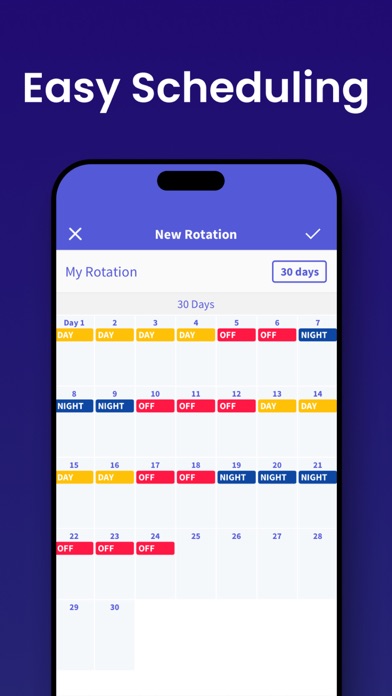
- Intuitive rota interface for quick rotation application
- Add multiple memos for quick reminders of each day’s events
- Shift widget enables you to see upcoming shifts without even opening the app
- Share your schedule easily with friends and family
- Sync with iCloud for real-time updates across your iPad and iPhone
Additional benefits:
- See up to two shifts per day.
- Add unlimited shifts to your calendar.
- Change your shift schedule just by tapping on the calendar.
- Copy and paste shifts for rapid diary updates.
- Add your rotation and automatically fill the calendar in a few simple steps.
- Get push notifications for shift events.
- Week number with four different patterns (1-2, 2-1, 1-52, 0-51).
- Set the start day of your week to any day.
- Email your shift events.
- Share your monthly shift view (via email/SMS/print/photo album)
The intuitive shift managing interface makes Spoke suitable for anyone who wants to take the pain out of their diary management. The app is perfect for those working random hours and days, as well as individuals working fixed shifts on rotation.
People already benefitting from Shift Days include:
- Nurses
- Doctors
- Emergency workers
- Police- Firefighters
- Military- Paramedics
- Security Guards
- Cleaners
- Bartenders
- Reporters
- Students and part timers
- Taxi or Uber drivers
- Waiters and waitresses
- Truckers
- Construction workers
- Men of the Night’s Watch
---
-SUBSCRIPTION PRICING & TERMS
Spoke is free to download. Spoke Subscription gives you unlimited access to our premium content and features.
- Spoke's auto-renewing subscription options are $2.99 monthly or $24.99 annually
- This price is for United States customers. Pricing in other countries may vary, and actual charges may be converted to your local currency depending on the country of residence.
- Payment will be charged to your iTunes Account at confirmation of your subscription
- Subscription automatically renews unless auto-renew is turned off at least 24-hours before the end of the current period
- The account will be charged for renewal within 24-hours prior to the end of the current period, and at the cost of the chosen package
- Any unused portion of a free trial period, if offered, will be forfeited when the user purchases a subscription to that publication, where applicable.
- Your subscription automatically renews unless you turn if off in Account Settings 24+ hours before the end of the billing period.
- You can turn off auto-renew at any time from your iTunes account settings, but refunds will not be provided for any unused portion of the term.
[ Privacy Policy ]https://www.iubenda.com/privacy-policy/77398254
[ Terms of Service ]https://www.iubenda.com/terms-and-conditions/77398254
[ Support ]Contact at 'support@pixo.co'