

Shift Planner: Work Calendar
Shift Planner: Work Calendar is made and published by Dmitriy Menyakin. AppBrain is an independent app data site and isn't affiliated with Dmitriy Menyakin. The app name, icon, screenshots and description belong to Dmitriy Menyakin and are shown as published on the App Store.
AppBrain's verdict
- Last updated
- July 20, 2026
Rankings
App Store top chartsApp Store Rankings for Shift Planner: Work Calendar
Competitors
Similar apps and more from Dmitriy MenyakinAlternatives to Shift Planner: Work Calendar


Releases
Updates seen on the App Store- Version
- 1.2
- Launched
- June 2026
No changelog data
User feedback
Ratings and reviews on the App StoreComments on Shift Planner: Work Calendar for iOS
We don't have enough comments to show example comments. Please check back later.
Technology
Found in the app by AppBrain- Price
- Free
- App size
- 5.20 MB
- Content rating
- Everyone
Technologies used by Shift Planner: Work Calendar
About the app and developer
About Shift Planner: Work Calendar
Shift Planner: Work Calendar is a productivity app developed by Dmitriy Menyakin.
User Ratings
The app has no ratings yet.
App Information
Shift Planner: Work Calendar is freely available from the App Store. The app size is 5.20 MB. The latest version available is 1.2. The last update was on July 20, 2026.
Technical Requirements
The app has a content rating of Everyone. The app has been available on the App Store since June 2026.
Developer information for Dmitriy Menyakin
Address:
Store listing
By Dmitriy Menyakin, from the App Store


Description by Dmitriy Menyakin Written by the developer, not by AppBrain. Click to read.
The app helps you plan work shifts, days off, vacations, and personal events in one clear calendar. Create your shift cycle once—for example, day shift, night shift, recovery day, and day off—and the app will automatically build your schedule for the selected period.
Features:
• create custom shift cycles;
• generate schedules based on repeating patterns;
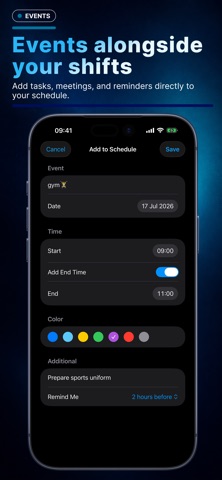
• add personal events to your schedule;
• set shift start and end times;
• choose colors for different shift types;
• receive notifications and reminders;
• account for breaks;
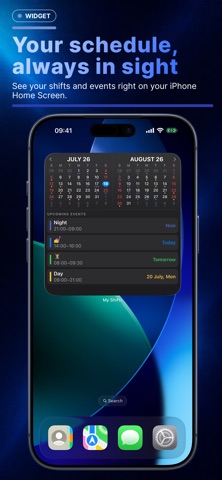
• view upcoming shifts and events;
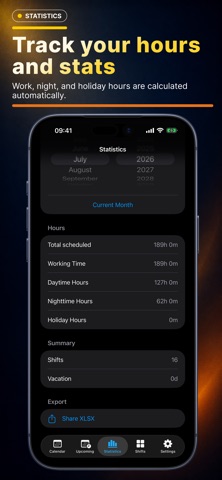
• track total, day, night, and holiday work hours;
• add vacations, days off, and empty days;
• view shifts and events in a Home Screen widget;
• use light and dark appearance modes.
The app is suitable for doctors, nurses, security staff, drivers, manufacturing and retail employees, service workers, and anyone who does not follow a standard Monday-to-Friday schedule.
Shift Schedule helps you stay in control: see upcoming workdays, plan vacations in advance, add personal events, and quickly check how many hours are scheduled for the month.
Plan your shifts without the chaos—everything important is always in sight.