

Shift Work Calendar
Shift Work Calendar is made and published by App Star Family. AppBrain is an independent app data site and isn't affiliated with App Star Family. The app name, icon, screenshots and description belong to App Star Family and are shown as published on the App Store.
AppBrain's verdict
- Last updated
- February 11, 2026
Rankings
App Store top chartsApp Store Rankings for Shift Work Calendar
Competitors
Similar apps and more from App Star FamilyAlternatives to Shift Work Calendar


More from App Star Family


Releases
Updates seen on the App Store- Version
- 1.0
- Launched
- February 2026
No changelog data
User feedback
Ratings and reviews on the App StoreComments on Shift Work Calendar for iOS
We don't have enough comments to show example comments. Please check back later.
Technology
Found in the app by AppBrain- Price
- Free
- App size
- 41.6 MB
- Content rating
- Everyone
Technologies used by Shift Work Calendar
About the app and developer
About Shift Work Calendar
Shift Work Calendar is a productivity app developed by App Star Family.
User Ratings
The app has no ratings yet.
App Information
Shift Work Calendar is freely available from the App Store. The app size is 41.62 MB. The latest version available is 1.0. The last update was on February 11, 2026.
Technical Requirements
The app has a content rating of Everyone. The app has been available on the App Store since February 2026.
Developer information for App Star Family
Address:
Frequently asked questions about Shift Work Calendar
Is Shift Work Calendar free?
Yes. Shift Work Calendar is free on the App Store.
Is Shift Work Calendar still available?
Yes. Shift Work Calendar is on the App Store, and the last update we saw was on February 11, 2026.
How large is Shift Work Calendar?
Shift Work Calendar is 41.62 MB.
Is Shift Work Calendar suitable for children?
App Store rates the content of Shift Work Calendar as suitable for everyone.
Who made Shift Work Calendar?
Shift Work Calendar was developed by App Star Family. It is listed in the productivity category on the App Store.
What are the best alternatives to Shift Work Calendar?
People looking at Shift Work Calendar also look at these productivity apps: FamDay: Shared Family Calendar, ShiftWave - Repeating Schedule, Bloc: ADHD Planner & Todo, Nurse Duty Calendar, Ask Adalbert.
Store listing
By App Star Family, from the App Store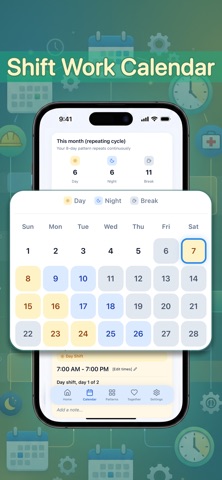


Description by App Star Family Written by the developer, not by AppBrain. Click to read.
Whether you work rotating schedules, night shifts, or irregular hours, this app makes it easy to see your time clearly, stay organized, and coordinate with the people who matter most.
Designed for shift workers, couples, and families, Shift Work Calendar turns complex schedules into something simple, visual, and stress-free.
Key Features
• Create and manage shift patterns with flexible start and end times
• Visual calendar overview that clearly shows workdays, nights, and days off
• Easily switch between multiple shift patterns
• Plan time together and see overlapping free time at a glance
• Partner syncing to share schedules with someone you care about
• Shared calendars that stay updated automatically
• Scheduled reminders so you never miss a shift or important moment
• Downloadable PDF calendars for easy sharing or printing
• Clean, distraction-free design made for everyday use
• Built for individuals, couples, and families managing shift-based life
Whether you are planning quality time, coordinating childcare, or just trying to understand your week, Shift Work Calendar helps you stay aligned and in control.
Make your schedule work for you.
Download Shift Work Calendar and start planning with clarity today.
SUBSCRIPTION PRICING & TERMS
Shift Work Calendar is free to download. Access to premium features, such as unlimited shift patterns, downloadable PDF calendar, scheduled reminders, partner syncing, shared schedules, and advanced planning features requires a purchase.
Premium access is available as a weekly subscription ($4.99), a yearly subscription ($49.99), depending on the option you choose.
Payment will be charged to your Apple Account at confirmation of purchase. Subscriptions automatically renew unless auto-renew is turned off at least 24 hours before the end of the current period. You can manage your subscription and turn off auto-renewal in your Account Settings after purchase.
Links to our Terms of Service and Privacy Policy can be found below.
Privacy Policy:
https://www.appstarfamily.com/privacy-policy.html
Terms of Service:
https://www.appstarfamily.com/terms-of-use.html
Prices are equal to the value that "Apple's App Store Pricing Matrix" determines as the equivalent of the subscription price in $ USD