

Shop Card Manager
Shop Card Manager is made and published by SHUJI FUKUNAGA. AppBrain is an independent app data site and isn't affiliated with SHUJI FUKUNAGA. The app name, icon, screenshots and description belong to SHUJI FUKUNAGA and are shown as published on the App Store.
AppBrain's verdict
- Best rank
- #14
- Top Paid, Japan
- Last updated
- December 24, 2025
Rankings
App Store top charts- Highest rank
- #14
- Chart
- Top Paid
- Food & Drink
- Country
- Japan
App Store Rankings for Shop Card Manager
Top rankings
| Rank | Country | Category | List |
|---|---|---|---|
| 14 | Japan | Food & Drink | Top Paid |
Ranking history in Japan
Competitors
Similar apps and more from SHUJI FUKUNAGAAlternatives to Shop Card Manager



More from SHUJI FUKUNAGA


Releases
Updates seen on the App Store- Version
- 2.1.0
- Launched
- August 2013
No changelog data
User feedback
Ratings and reviews on the App StoreComments on Shop Card Manager for iOS
We don't have enough comments to show example comments. Please check back later.
Technology
Found in the app by AppBrain- Price
- $0.99
- App size
- 1.45 MB
- Content rating
- Everyone
Technologies used by Shop Card Manager
About the app and developer
About Shop Card Manager
Shop Card Manager is a food & drink app developed by SHUJI FUKUNAGA.
What is the rating of Shop Card Manager?
Shop Card Manager has no ratings yet.
Is Shop Card Manager free?
Shop Card Manager costs $0.99. The app size is 1.45 MB. The latest version available is 2.1.0. The last update was on December 24, 2025.
What are the requirements for Shop Card Manager?
The app has a content rating of Everyone. The app has been available on the App Store since August 2013.
Developer information for SHUJI FUKUNAGA
Address:
Frequently asked questions about Shop Card Manager
Is Shop Card Manager free?
No. Shop Card Manager costs $0.99 on the App Store.
Is Shop Card Manager still available?
Yes. Shop Card Manager is on the App Store, and the last update we saw was on December 24, 2025.
How large is Shop Card Manager?
Shop Card Manager is 1.45 MB.
Is Shop Card Manager suitable for children?
App Store rates the content of Shop Card Manager as suitable for everyone.
Who made Shop Card Manager?
Shop Card Manager was developed by SHUJI FUKUNAGA. It is listed in the food & drink category on the App Store.
What are the best alternatives to Shop Card Manager?
People looking at Shop Card Manager also look at these food & drink apps: DreamCocktail, ショップカードミー, 三代目けむり家猿吉 公式アプリ, お席 みきち, グランダミ/ソロミーナ.
Store listing
By SHUJI FUKUNAGA, from the App Store

Description by SHUJI FUKUNAGA Written by the developer, not by AppBrain. Click to read.
Key Features
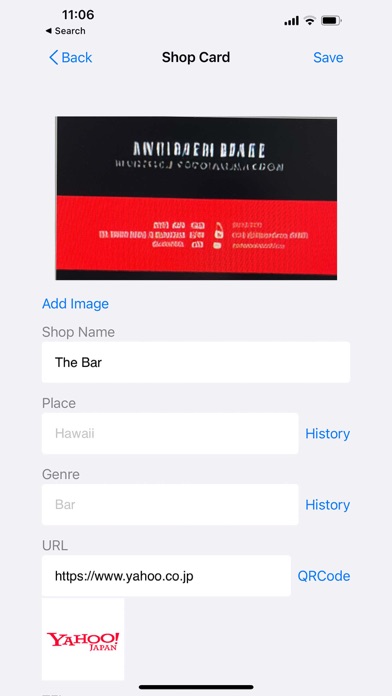
Photograph and register cards
• Register multiple images via camera or photo library
• Save as many images as needed, including front and back sides
• Freely crop image areas for optimal size storage
• Easily reorder, rotate, edit, or delete images
Text extraction via OCR
• Automatically recognises and extracts text from card images
• Easily copy information like phone numbers, addresses, and opening hours
• Significantly reduces manual input effort
QR code scanning
• Scan printed QR codes on cards to automatically save URL information
• Access websites with a single tap
Automatic OGP retrieval
• Automatically retrieves website titles and images when registering URLs
• Displays visually clear link previews
Detailed information management
• Save shop name, location, category, URL, phone number, and notes
• Easily input location and category by selecting from history
• Displays icons in input fields for intuitive operation
Powerful search functionality
• Quickly search registered cards
• Filter by multiple criteria such as shop name, location, or category
Modern design
• Simple and beautiful interface
• Supports light mode and dark mode
• High visibility with card preview display
Recommended for
• Those who have many cards for favourite shops
• Those wishing to organise cards in their wallet
• Those wanting to keep shop cards collected while travelling as mementos
• Those wishing to digitise business cards or loyalty cards
How to Use
1. Take a photo of the card with your camera or select one from your photo library
2. Trim as needed to adjust the saved area
3. Use OCR to extract text information from the image (optional)
4. Enter details such as shop name and location
5. If there's a QR code, scan it to automatically save the URL information
6. Save and you're done!
Open the app anytime to instantly check details for your favourite shops.