

Shortcut Keeper
Shortcut Keeper is made and published by Minas Giannekas. AppBrain is an independent app data site and isn't affiliated with Minas Giannekas. The app name, icon, screenshots and description belong to Minas Giannekas and are shown as published on the App Store.
AppBrain's verdict
- Last updated
- September 24, 2026
Rankings
App Store top chartsApp Store Rankings for Shortcut Keeper
Competitors
Similar apps and more from Minas GiannekasMore from Minas Giannekas


Releases
Updates seen on the App Store- Version
- 2.4.0
- Launched
- September 2021
No changelog data
User feedback
Ratings and reviews on the App StoreComments on Shortcut Keeper for iOS
We don't have enough comments to show example comments. Please check back later.
Technology
Found in the app by AppBrain- Price
- $3.99
- App size
- 24.4 MB
- Content rating
- Everyone
Technologies used by Shortcut Keeper
About the app and developer
About Shortcut Keeper
Shortcut Keeper is a reference app developed by Minas Giannekas.
What is the rating of Shortcut Keeper?
Shortcut Keeper has no ratings yet.
Is Shortcut Keeper free?
Shortcut Keeper costs $3.99. The app size is 24.37 MB. The latest version available is 2.4.0. The last update was on September 24, 2026.
What are the requirements for Shortcut Keeper?
The app has a content rating of Everyone. The app has been available on the App Store since September 2021.
Developer information for Minas Giannekas
Address:
Store listing
By Minas Giannekas, from the App Store


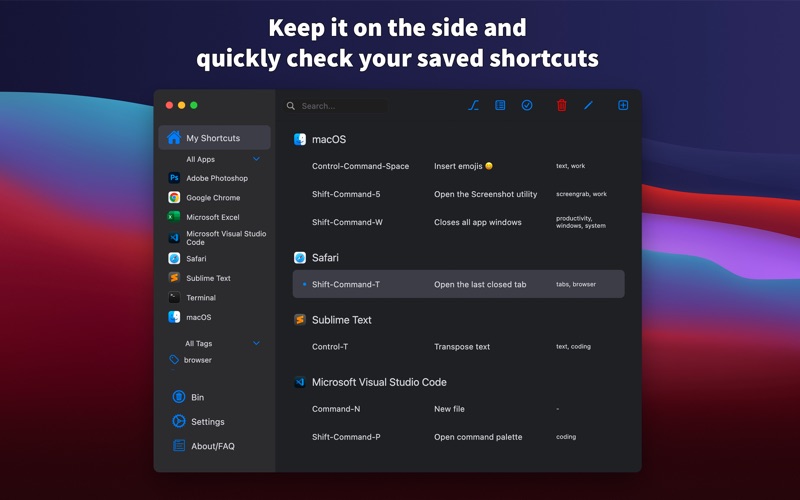


Description by Minas Giannekas Written by the developer, not by AppBrain. Click to read.
With Shortcut Keeper, you can easily keep the hotkeys you frequently use in one place.
Instead of searching around for the same keyboard shortcuts every once in a while, you can:
- Add the keyboard shortcut in Shortcut Keeper.
- Check it out quickly whenever you need to remember the shortcut.
- Keep until you have memorized it.
Especially useful if:
- You are coming to macOS from another OS and want to learn its hotkeys.
- You are using an app for the first time.
Keep it on the side or use the menu bar icon while using your apps and immediately check your saved shortcuts.
Features include:
- Bring it to the front with Command-Option-K (or your own hotkey combination).
- A lightweight app for your Mac.
- Intuitive design.
- Menu bar icon to instantly access saved shortcuts for the app you are currently on.
- Dark theme available.
- Filtering and layout options.
- Support for chord shortcuts (e.g. Command-K Command-T) and custom apps.
Be more productive with your daily tasks with Shortcut Keeper!