AppBrain
AppBrain
  • Apps
  • Apps being viewed right now Trending apps today Most popular apps All-time most installed apps Top rated apps iPhone and iPad apps
  • Intelligence ▾
    Intelligence overview → Track any Android app or your whole market
    Track & analyze
    Keyword Tracker & OptimizerTrack & improve Play rankings App Performance ReportOne-off PDF for any app StatisticsFree Android & Play market stats
    Promote your app
    Featured Apps App Links
  • Intelligence
  • Pricing
  • Dashboard
  • Sign up
  • Log in
App Store Apps > Photo & Video > ShotKeep: Screenshot Cleaner
ShotKeep: Screenshot Cleaner icon

ShotKeep: Screenshot Cleaner

by 慧玲 周 · Photo & Video · Free
On the App Store since March 2026 · Data updated 2026-11-07

ShotKeep: Screenshot Cleaner is made and published by 慧玲 周. AppBrain is an independent app data site and isn't affiliated with 慧玲 周. The app name, icon, screenshots and description belong to 慧玲 周 and are shown as published on the App Store.

AppBrain's verdict

Last updated
March 25, 2026
Size
1.56 MB
Official page on the App Store

User feedback

Ratings and reviews on the App Store

Comments on ShotKeep: Screenshot Cleaner for iOS

We don't have enough comments to show example comments. Please check back later.

Store listing

By 慧玲 周, from the App Store
ShotKeep: Screenshot Cleaner Screenshot 1 of 6
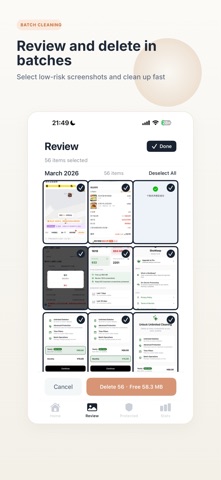
ShotKeep: Screenshot Cleaner Screenshot 2 of 6
ShotKeep: Screenshot Cleaner Screenshot 3 of 6
ShotKeep: Screenshot Cleaner Screenshot 4 of 6
ShotKeep: Screenshot Cleaner Screenshot 5 of 6
ShotKeep: Screenshot Cleaner Screenshot 6 of 6
Screenshots by 慧玲 周, from the the App Store listing
Description by 慧玲 周 Written by the developer, not by AppBrain. Click to read.
ShotKeep helps you clean up iPhone screenshots safely — so you can free up space without accidentally deleting the ones that matter.

Your screenshot library is full of clutter. Some screenshots are junk. Others contain receipts, payment details, order confirmations, verification codes, tracking info, or addresses you may need later.

ShotKeep scans your screenshot library, detects important content using on-device OCR, and separates everything into two simple groups:

Protected — Screenshots that may contain sensitive or valuable information. These stay safe.
Safe to Review — Low-risk screenshots you can confidently review and delete in batches.

FEATURES

• Smart Detection — Identifies payments, orders, tracking info, verification codes, addresses, QR codes, and more
• Batch Cleanup — Select and delete low-risk screenshots in batches
• Quick Review — Review screenshots one by one with full control
• Clear Protection Reasons — See why a screenshot was protected
• On-Device OCR — Analysis happens locally on your device
• Privacy First — No uploads. No cloud processing. No tracking.

WHY SHOTKEEP?

Unlike generic photo cleaners, ShotKeep is built specifically for screenshots. It doesn’t just help you delete — it helps you delete safely.

Every protected screenshot comes with a clear reason, so you always know why it was kept safe.

Deleted screenshots go to iOS Recently Deleted and can be restored within 30 days.

SHOTKEEP PRO

The free version includes full scanning, protection, and deletion of up to 20 screenshots per batch.

Upgrade to ShotKeep Pro for unlimited batch deletion and future Pro features.

Auto-Renewable Subscription Terms:

Subscription plans:
a) ShotKeep Pro Monthly
b) ShotKeep Pro Yearly

Payment: Charged to your Apple ID account upon confirmation of purchase.

Auto-Renewal: Your subscription automatically renews unless cancelled at least 24 hours before the end of the current billing period. Your account will be charged for renewal within 24 hours prior to the end of the current period.

Manage Subscriptions: You can manage or cancel your subscription in Settings → Apple ID → Subscriptions. Cancellation takes effect at the end of the current billing period.

Privacy Policy: https://www.getshotkeep.com/privacy
Terms of Service: https://www.getshotkeep.com/terms
Subscription Terms: https://www.getshotkeep.com/subscription-terms
Official page on the App Store

Safety and technology

Found in the app by AppBrain
Price
Free
App size
1.56 MB
Content rating
Everyone

Technologies used by ShotKeep: Screenshot Cleaner

Releases

Updates seen on the App Store
Version
1.2
Launched
March 2026

No changelog data

Alternatives

Similar apps and more from 慧玲 周

Alternatives to ShotKeep: Screenshot Cleaner

Rolli: Long Screenshot icon Rolli: Long Screenshot
毅 林
0.0
Free
Screenshot Stitcher icon Screenshot Stitcher
Temperstone
5.0
Free
1 ratings
Cullour icon Cullour
Edward Schultz
5.0
Free
2 ratings
AI Trending Image Generator icon AI Trending Image Generator
Dadhaniya Gaurang
0.0
Free
Screenshot To PDF icon Screenshot To PDF
Riadh Daoued
0.0
Free
linger - Photo Review & Clean icon linger - Photo Review & Clean
Shanghai Happiness Creation Technology Co., Ltd
4.4
Free
26 ratings
Crop Kit: AI Photo Expander icon Crop Kit: AI Photo Expander
Programacion Viktor Seraleev EIRL
4.3
Free
6 ratings
Scroll Cleaner:  Photo Cleaner icon Scroll Cleaner: Photo Cleaner
Hleb Kuznetsov
5.0
Free
15 ratings

More from 慧玲 周

戒烟助手Pro icon 戒烟助手Pro
慧玲 周
5.0
Free
1 ratings

Rankings

App Store top charts

App Store Rankings for ShotKeep: Screenshot Cleaner

This app is not ranked

About the app and developer

About ShotKeep: Screenshot Cleaner

ShotKeep: Screenshot Cleaner is a photo & video app developed by 慧玲 周.

User Ratings

The app has no ratings yet.

App Information

ShotKeep: Screenshot Cleaner is freely available from the App Store. The app size is 1.56 MB. The latest version available is 1.2. The last update was on March 25, 2026.

Technical Requirements

The app has a content rating of Everyone. The app has been available on the App Store since March 2026.

Developer information for 慧玲 周

慧玲 周

Address:

Share ShotKeep: Screenshot Cleaner

Popular Photo & Video Apps Price drops on Google Play Apps other people are watching Today's trending apps Top new apps
Rolli: Long Screenshot icon Rolli: Long Screenshot
Screenshot Stitcher icon Screenshot Stitcher
Cullour icon Cullour
AI Trending Image Generator icon AI Trending Image Generator
Screenshot To PDF icon Screenshot To PDF
linger - Photo Review & Clean icon linger - Photo Review & Clean
Crop Kit: AI Photo Expander icon Crop Kit: AI Photo Expander
Scroll Cleaner:  Photo Cleaner icon Scroll Cleaner: Photo Cleaner
Overview Alternatives Reviews Rankings Technology
AppBrain Intelligence premium content

Subscribe now to get full and unlimited access to AppBrain Intelligence. You'll have access to:

  • App Intelligence dashboard (performance timeline, competitor comparison, country rankings, insight cards)
  • Detailed ranking data per app
  • Full timeline per developer
  • Device market shares data per country
  • Unlimited keyword tracking
1 Month

$75/mo
(billed every month)

SAVE 0%
Subscribe
3 Months

$65/mo
($195 billed every 3 months)

SAVE 13%
Subscribe
1 Year

$57.50/mo
($690 billed every year)

SAVE 23%
Subscribe
Each subscription will automatically renew 3 days before the expiration date for the same time period. Subscriptions can be cancelled at any time before the renewal.

AppBrain is an app data site, we track rankings, ratings, installs for all apps and games on Google Play and the App Store. AppBrain doesn't host app files or APKs, all install links go directly to the official store. All trademarks are owned by their respective owners.

More apps

  • Top Android apps being viewed
  • Baby Shark Pizza Game for Kids
  • S-ADB: Wireless Debug
  • Scribbly Sketch Pad Draw Paint

App statistics

  • Android statistics
  • Google Play Developer stats
  • Trending Android Apps
  • Trending iOS apps
  • Top popular Apps
  • Buy the best Android phone
  • Buy & sell app businesses

About AppBrain

  • Contact
  • Privacy
  • Documentation
  • DMCA takedowns
  • Blog
  • Android Interstitial Ads: Best practices to optimize your app's earnings
© 2010-2026 - AppBrain