

ShowShark: Stream Your Media
ShowShark: Stream Your Media is made and published by ACGAO. AppBrain is an independent app data site and isn't affiliated with ACGAO. The app name, icon, screenshots and description belong to ACGAO and are shown as published on the App Store.
AppBrain's verdict
- Rating on App Store
- 4.50
- 4 ratings
- Last updated
- October 15, 2026
It doesn't have enough ratings yet to judge what users think.
Rankings
App Store top chartsApp Store Rankings for ShowShark: Stream Your Media
Competitors
Similar apps and more from ACGAOAlternatives to ShowShark: Stream Your Media


More from ACGAO


Releases
Updates seen on the App Store- Version
- 2026.10.12
- Launched
- February 2026
No changelog data
User feedback
Ratings and reviews on the App StoreComments on ShowShark: Stream Your Media for iOS
We don't have enough comments to show example comments. Please check back later.
Technology
Found in the app by AppBrain- Price
- Free
- App size
- 58.5 MB
- Content rating
- Everyone
Technologies used by ShowShark: Stream Your Media
About the app and developer
About ShowShark: Stream Your Media
ShowShark: Stream Your Media is an entertainment app developed by ACGAO.
What is the rating of ShowShark: Stream Your Media?
ShowShark: Stream Your Media is rated 4.50 out of 5 stars, based on 4 ratings.
Is ShowShark: Stream Your Media free?
ShowShark: Stream Your Media is free. The app size is 58.48 MB. The latest version available is 2026.10.12. The last update was on October 15, 2026.
What are the requirements for ShowShark: Stream Your Media?
The app has a content rating of Everyone. The app has been available on the App Store since February 2026.
Developer information for ACGAO
Address:
Store listing
By ACGAO, from the App Store
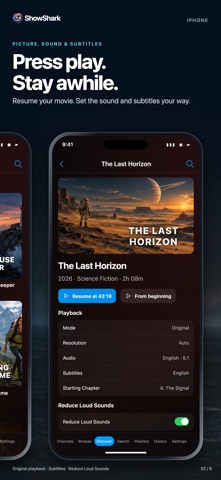


Description by ACGAO Written by the developer, not by AppBrain. Click to read.
ShowShark turns the movies, TV shows, music, photos, and videos you already own into a private streaming service made for Apple devices. Browse anything on demand, get recommendations, or turn your collection into custom 24/7 channels and watch what is already playing.
ShowShark has two parts: this player app and ShowShark Server for Mac.
STOP SCROLLING. START WATCHING.
A large library can create a new problem: too many choices. ShowShark brings back channel surfing with your own media.
Create a channel for action movies, classic sitcoms, cartoons, science fiction, family videos, or any mix you want. ShowShark builds the schedule and a live programming guide. Open a channel and join what is playing.
YOUR MEDIA, ORGANIZED
Install ShowShark Server on a Mac, then add folders, external drives, and SMB or NAS shares. The Server indexes files in place and adds artwork, descriptions, cast details, genres, and other useful metadata.
Search by title, actor, artist, album, genre, year, mood, and more. Browse recent additions, continue where you stopped, rediscover old favorites, or play any item directly. Channels are an option, not a restriction.
WATCH AT HOME, AWAY, OR OFFLINE
Use native ShowShark apps on iPhone, iPad, Apple TV, Mac, Apple Watch, and Apple Vision Pro.
Stream over your home network or use built-in remote access when you travel. You do not need router port forwarding or a separate VPN.
Download movies, episodes, complete TV seasons, YouTube videos, albums, and tracks for offline playback.
ShowShark can adjust video quality for the connection and device. Compatible files can use Original playback to preserve source video, HDR, and supported audio.
MORE THAN A MOVIE SERVER
Bring more of your media life into one app:
• Movies, TV shows, home videos, music, and photos
• Podcast subscriptions and Internet Radio
• YouTube channels and live broadcasts
• IPTV playlists and program guides
• Embedded and external subtitles
• Profiles, history, favorites, playlists, and recommendations
• Skip Intro, AirPlay, and Picture in Picture
PRIVATE BY DESIGN
Your personal library stays on hardware you control. ShowShark has no ads and no tracking. Core playback does not require a hosted media library or cloud account.
HOW TO START
1. Install this ShowShark player app on your Apple devices.
2. Download ShowShark Server from ShowShark.app on a Mac running macOS 14 or later.
3. Add your media folders or NAS shares.
4. Connect, press play, and enjoy your library again.