

ShredCam: Skate Camera
ShredCam: Skate Camera is made and published by Luis Calvillo. AppBrain is an independent app data site and isn't affiliated with Luis Calvillo. The app name, icon, screenshots and description belong to Luis Calvillo and are shown as published on the App Store.
AppBrain's verdict
Established- Rating on App Store
- 4.29
- 17 ratings
- Last updated
- September 18, 2026
It doesn't have enough ratings yet to judge what users think.
Rankings
App Store top chartsApp Store Rankings for ShredCam: Skate Camera
Competitors
Similar apps and more from Luis CalvilloAlternatives to ShredCam: Skate Camera


More from Luis Calvillo


Releases
Updates seen on the App Store- Version
- 2.0.1
- Launched
- May 2020
No changelog data
User feedback
Ratings and reviews on the App StoreComments on ShredCam: Skate Camera for iOS
We don't have enough comments to show example comments. Please check back later.
Technology
Found in the app by AppBrain- Price
- Free
- App size
- 4.23 MB
- Content rating
- Everyone
Technologies used by ShredCam: Skate Camera
About the app and developer
About ShredCam: Skate Camera
ShredCam: Skate Camera is a sports app developed by Luis Calvillo.
What is the rating of ShredCam: Skate Camera?
ShredCam: Skate Camera is rated 4.29 out of 5 stars, based on 17 ratings.
Is ShredCam: Skate Camera free?
ShredCam: Skate Camera is free. The app size is 4.23 MB. The latest version available is 2.0.1. The last update was on September 18, 2026.
What are the requirements for ShredCam: Skate Camera?
The app has a content rating of Everyone. The app has been available on the App Store since May 2020.
Developer information for Luis Calvillo
Address:
Frequently asked questions about ShredCam: Skate Camera
Is ShredCam: Skate Camera free?
Yes. ShredCam: Skate Camera is free on the App Store.
Is ShredCam: Skate Camera still available?
Yes. ShredCam: Skate Camera is on the App Store, and the last update we saw was on September 18, 2026.
How large is ShredCam: Skate Camera?
ShredCam: Skate Camera is 4.23 MB.
Is ShredCam: Skate Camera suitable for children?
App Store rates the content of ShredCam: Skate Camera as suitable for everyone.
How do people rate ShredCam: Skate Camera?
ShredCam: Skate Camera scores 4.29 out of 5 stars, from 17 ratings on the App Store.
Who made ShredCam: Skate Camera?
ShredCam: Skate Camera was developed by Luis Calvillo. It is listed in the sports category on the App Store.
What are the best alternatives to ShredCam: Skate Camera?
People looking at ShredCam: Skate Camera also look at these sports apps: Game of SKATE or ANYTHING, SkateApp +, Skate Tricks: Learn & Ride, Loke: Skate spots & challenges, ShredSpots: Find Skate Spots.
Store listing
By Luis Calvillo, from the App Store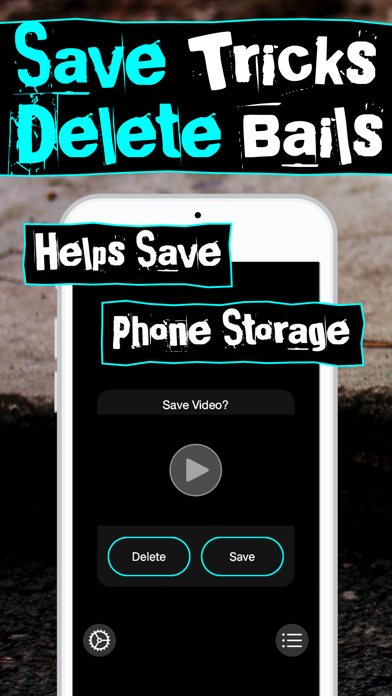

Description by Luis Calvillo Written by the developer, not by AppBrain. Click to read.
The Goal:
ShredCam was built to help skaters save phone storage by allowing them to Delete or Save their footage after filming a skate clip. There are features for people filming their friends skating and for those filming themselves skate.
Features:
- Save/Delete prompt after filming a skate clip.
- Preview skate clip
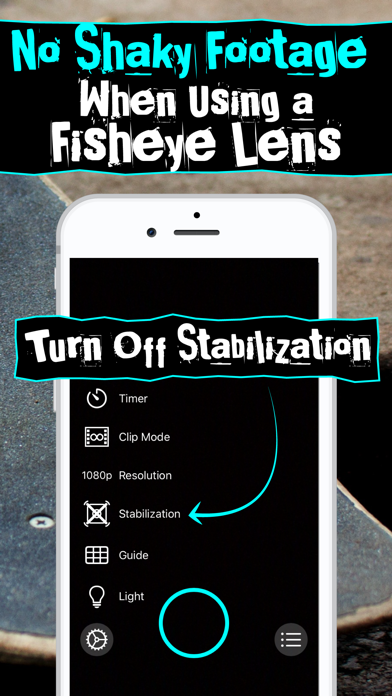
- Option to turn off Stabilization when using a Fisheye Lens Attachment
Camera Options:
- Timer
- Clip Mode
- Stabilization
- Resolution
- Guide
- Light
Settings:
- Clear Cache
How to Use ShredCam:
- Filming -
Tap the Camera Button in the bottom middle of the screen to start recording. Press again to stop. Then a Save/Delete prompt will pop up. Watch the preview to view your skate footage. Then choose to Delete the clip or Save to your phone.
- Timer Mode -
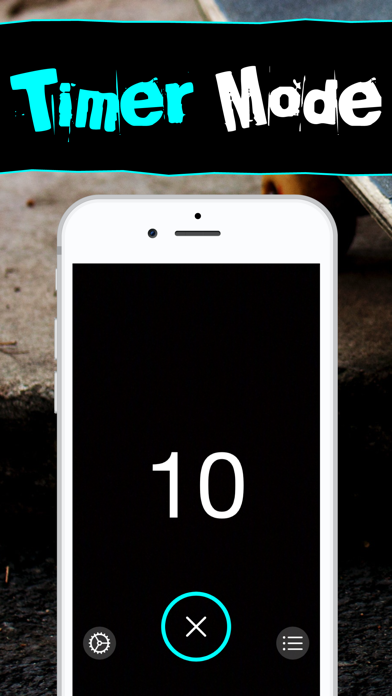
Select the Timer option to get a countdown before recording. Perfect when using a phone stand to film some solo skating. The phone also alerts skaters when it's about to record by flashing its light.
- Clip Mode -
Use the Clip Mode to record short clips so they can be easily shared in social media.
- Stabilization (Using a Fisheye Lens Attachment) -
When using a Fisheye Lens attachment for the iPhone, attach the lens and turn off the Stabilization by tapping Gear button and then the Stabilization option. The stabilization icon should have an "X" to indicate that the Stabilization is turned off. For most long shots set at the default (Stabilization On).
- Resolution -
Select a video resolution. 1080p is the default. To save more phone storage or if sharing to social media choose 720p.
- Guide -
Use the grid or bullseye guide to help frame your shot.
- Light -
Trigger the light for some night skating!