

Shutter Line
Shutter Line is made and published by Mark Tran. AppBrain is an independent app data site and isn't affiliated with Mark Tran. The app name, icon, screenshots and description belong to Mark Tran and are shown as published on the App Store.
AppBrain's verdict
- Last updated
- November 2, 2026
- Size
- 2.11 MB
User feedback
Ratings and reviews on the App StoreComments on Shutter Line for iOS
We don't have enough comments to show example comments. Please check back later.
Store listing
By Mark Tran, from the App Store


Description by Mark Tran Written by the developer, not by AppBrain. Click to read.
Shutter Line is free. Every feature, on iPhone, iPad and Mac, with no subscriptions, no ads, no daily limit and no watermark.
FULL RESOLUTION, NO GUESSWORK
• Your photo is placed pixel for pixel on the frame — never resampled, never cropped.
• HEIC, JPEG and ProRAW originals, with their EXIF carried over to the saved copy.
• Files stay under 24 MB: quality is lowered only as much as needed, and resolution only as a last resort.
• Location stays out of the file unless you turn it on.
MAKE IT YOURS
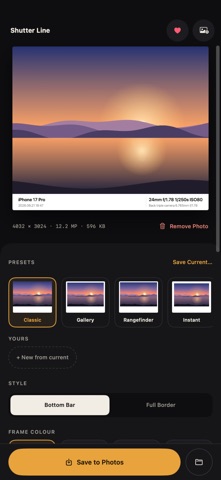
• Bottom bar or full border, with adjustable padding.
• Frame colours — white, black, cream and a blurred-photo background.
• Every caption font — Helvetica Neue, Avenir Next, Futura, Didot, SF Mono and more.
• Caption layouts — split, centered and single-line minimal.
• Signature line — "Shot by @you" on every photo.
• Social canvases — 4:5, 1:1 and 9:16, never cropped.
• Presets — Rangefinder, Instant, Film Strip, Dark, Cream Serif, Story Blur and more, plus your own saved looks.
• Edit every caption line, per photo, or reset it from EXIF.
PHOTOS, VIDEOS AND LIVE PHOTOS
• Frame a whole batch of up to 50 photos at once.
• Frame videos and Live Photos, with sound and HDR kept (video up to 4K).
• Works on iPhone, iPad and Mac, with drag and drop and Save to Files on the bigger screens.
• Share photos to Shutter Line from Photos, and use the Shortcuts actions "Frame Latest Photo" and "Frame Photos".
TIP JAR
Shutter Line is free. If you enjoy it, leave a tip — we donate 50% of tip proceeds to public schools, starting with University Place School District No. 83. Tips go to the developer and aren't tax-deductible donations. They are optional, one-time and unlock nothing.
Safety and technology
Found in the app by AppBrain- Price
- Free
- App size
- 2.11 MB
- Content rating
- Everyone
Technologies used by Shutter Line
Releases
Updates seen on the App Store- Version
- 1.0.2
- Launched
- November 2026
No changelog data
Rankings
App Store top chartsApp Store Rankings for Shutter Line
About the app and developer
About Shutter Line
Shutter Line is a photo & video app developed by Mark Tran.
User Ratings
The app has no ratings yet.
App Information
Shutter Line is freely available from the App Store. The app size is 2.11 MB. The latest version available is 1.0.2. The last update was on November 2, 2026.
Technical Requirements
The app has a content rating of Everyone. The app has been available on the App Store since November 2026.
Developer information for Mark Tran
Address: