

ShutterMeter is made and published by 正平 孙. AppBrain is an independent app data site and isn't affiliated with 正平 孙. The app name, icon, screenshots and description belong to 正平 孙 and are shown as published on the App Store.
AppBrain's verdict
- Last updated
- September 6, 2026
- Size
- 3.19 MB
User feedback
Ratings and reviews on the App StoreComments on ShutterMeter for iOS
We don't have enough comments to show example comments. Please check back later.
Store listing
By 正平 孙, from the App Store


Description by 正平 孙 Written by the developer, not by AppBrain. Click to read.
Repeat each speed three times
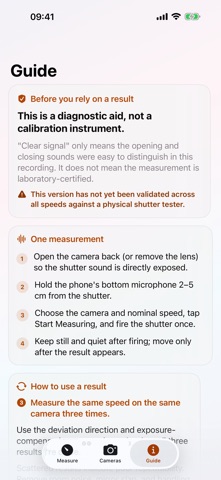
Choose a camera and speed, then follow the measurement flow. Save three Clear signal results before moving to the next speed. Results with complex signals are marked separately and do not count toward the health map.
Shutter health map
See the median deviation and spread of the latest three clear results at each speed, along with how many speeds you have tested. Find gaps or speeds that need another check, then share a text report through the system share sheet. The report is a shooting and maintenance reference, not a calibration certificate.
Archive backup and CSV export
Export camera details and measurements as a JSON backup. On another iPhone, choose the file, preview new and duplicate items, then confirm the merge. Items with the same identifiers keep their local versions; existing records are not overwritten. Export CSV files to view raw timings, UTC timestamps and signal grades in a spreadsheet. Exported measurements are diagnostic references, not calibration certificates.
For an offline export, choose On My iPhone > this app's folder > Exports in Files. The folder may be named ShutterMeter or 快门测速仪, depending on language. This app folder is part of the app's sandbox and is deleted when you delete the app. Save important backups to iCloud Drive or another location outside this app folder; those independent copies survive deletion of ShutterMeter.
Camera log
Search by camera name or notes, and edit details without losing measurements. Create a profile for each camera and browse measurements and deviation trends by speed. Save results without a camera to Unfiled and assign them later. Clear signal results include exposure compensation guidance. Your local records remain available to view.
Supported speeds
This version provides microphone measurement for 11 nominal speeds from 1 second to 1/60 second, including the vintage 1/5, 1/10, 1/25 and 1/50 settings. Camera mode is not enabled. Measurement at 1/100 and faster is not supported.
ShutterMeter is an audio analysis aid. Its accuracy across all supported speeds has not been validated against a physical shutter tester. Clear signal describes how well the sound events can be distinguished in that recording; it is not an accuracy certification. Mirror slap, background noise and shutter design can affect the result. Repeat the test before using a result as a shooting reference. Not every mechanical shutter will produce a usable result.
Designed for iPhone
The colorful interface supports Dark Mode, Dynamic Type and VoiceOver, with clear controls to save, repeat, finish a test run and close sheets.
Data and purchase
Audio recording and analysis take place on your iPhone. The app does not automatically upload measurement data. When you share a report or export a file, the selected data goes to the app or file service you choose. System device backups may also include local records. Archive backups do not include audio, purchase receipts or free-measurement counts. Use Restore Purchases to recover an existing purchase on another phone. Purchases and restoring purchases require an App Store connection.
Your first 10 measurements that produce a result are free. Attempts that do not detect usable shutter sounds do not use a free measurement. A one-time purchase unlocks unlimited measurements, with no subscription or ads.
Safety and technology
Found in the app by AppBrain- Price
- Free
- App size
- 3.19 MB
- Content rating
- Everyone
Technologies used by ShutterMeter
Releases
Updates seen on the App Store- Version
- 1.2
- Launched
- September 2026
No changelog data
Alternatives
Similar apps and more from 正平 孙Alternatives to ShutterMeter


More from 正平 孙


Rankings
App Store top chartsApp Store Rankings for ShutterMeter
About the app and developer
About ShutterMeter
ShutterMeter is a photo & video app developed by 正平 孙.
User Ratings
The app has no ratings yet.
App Information
ShutterMeter is freely available from the App Store. The app size is 3.19 MB. The latest version available is 1.2. The last update was on September 6, 2026.
Technical Requirements
The app has a content rating of Everyone. The app has been available on the App Store since September 2026.
Developer information for 正平 孙
Address:
Frequently asked questions about ShutterMeter
Is ShutterMeter free?
Yes. ShutterMeter is free on the App Store.
Is ShutterMeter still available?
Yes. ShutterMeter is on the App Store, and the last update we saw was on September 6, 2026.
How large is ShutterMeter?
ShutterMeter is 3.19 MB.
Is ShutterMeter suitable for children?
App Store rates the content of ShutterMeter as suitable for everyone.
Who made ShutterMeter?
ShutterMeter was developed by 正平 孙. It is listed in the photo & video category on the App Store.
What are the best alternatives to ShutterMeter?
People looking at ShutterMeter also look at these photo & video apps: FilmArchive-Film Photography, ShuttR: Shutter Speed Tester, Thea — Light Meter + Film Log, Photographer’s Companion, mySpotMeter.