Download Android Apps and Games
AppBrain
  • Apps
  • Apps being viewed right now Trending apps today Most popular apps All-time most downloaded apps Top rated apps iPhone and iPad apps
  • Intelligence ▾
    Intelligence overview → Track any Android app or your whole market
    Track & analyze
    Keyword Tracker & OptimizerTrack & improve Play rankings App Performance ReportOne-off PDF for any app StatisticsFree Android & Play market stats
    Promote your app
    Featured Apps App Links
  • Intelligence
  • Pricing
  • Dashboard
  • Sign up
  • Log in
Last updated on: 2026-09-22
App Store Apps > Utilities > Sidekey: Wireless Keyboard
Sidekey: Wireless Keyboard icon

Sidekey: Wireless Keyboard

1.0
Kaihong Chen
5.00
1 reviews
Free

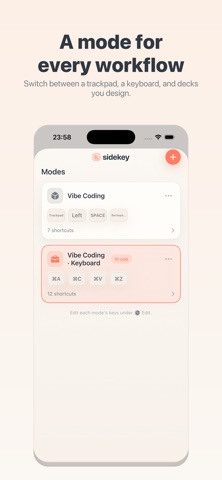
Sidekey: Wireless Keyboard Screenshot 1 of 6
Sidekey: Wireless Keyboard Screenshot 2 of 6
Sidekey: Wireless Keyboard Screenshot 3 of 6
Sidekey: Wireless Keyboard Screenshot 4 of 6
Sidekey: Wireless Keyboard Screenshot 5 of 6
Sidekey: Wireless Keyboard Screenshot 6 of 6
5.00 · 1 reviews
Download from the App Store

About Sidekey: Wireless Keyboard

Sidekey: Wireless Keyboard is an utilities app developed by Kaihong Chen.

User Ratings

Sidekey: Wireless Keyboard is rated 5.00 out of 5 stars. The rating is based on one rating ratings.

App Information

Sidekey: Wireless Keyboard is FREE to download. The download size is 4.32 MB. The latest version available is 1.0. The last update was on July 9, 2026.

Technical Requirements

The app has a content rating of Everyone. The app has been available on App Store July 2026.

Description
Sidekey turns your iPhone into a customizable wireless keyboard and shortcut pad for your own computer. Tap keys on your phone and they type on your Mac or Windows PC over your local Wi‑Fi — no extra hardware, no cables.

Design the keyboard you actually want: add keys, build shortcuts (including combos like Cmd/Ctrl, and left/right modifiers), arrange them on a grid, and switch between layers and modes. Keep your most-used shortcuts one tap away.

HOW IT WORKS
Sidekey works together with a small, free desktop helper you run on the computer you want to control. Put both devices on the same Wi‑Fi, scan a QR code once to pair, and you're connected. Pairing is secured with a token, and your keystrokes travel directly to your own computer — never through us.

FEATURES
• Custom key designer — make your own keys, shortcuts, and layouts
• Shortcuts & combos — Cmd/Ctrl/Alt/Shift, function keys, media keys, and left/right‑specific modifiers
• Multiple layers & modes — flip between a full keyboard, a shortcut deck, a trackpad, and more
• Trackpad mode — use your phone as a touchpad with left/right buttons
• Voice typing — dictate with the system keyboard and send the text to your computer
• Quick pairing — scan a QR code; reconnects automatically afterward
• Works with Mac and Windows
• Private by design — no account, no tracking, nothing sent to the developer

REQUIRES THE FREE DESKTOP HELPER
Sidekey needs the free Sidekey helper running on your Mac or Windows computer. Download it from the link on our support page.

Questions or ideas? We'd love to hear from you.
Show more Show less

More data about Sidekey: Wireless Keyboard

Price Free to download
Rating 5.00 based on a single rating
Ranking Not ranked
Version 1.0
App download size 4.32 MB
Suitable for Everyone

Changelog of Sidekey: Wireless Keyboard

No changelog data

Developer information for Kaihong Chen

Kaihong Chen

Address:

Share Sidekey: Wireless Keyboard

Comments on Sidekey: Wireless Keyboard for iOS

We don't have enough comments to show example comments. Please check back later.

App Store Rankings for Sidekey: Wireless Keyboard

This app is not ranked

Technologies used by Sidekey: Wireless Keyboard

Frequently asked questions about Sidekey: Wireless Keyboard

Is Sidekey: Wireless Keyboard free?

Yes. Sidekey: Wireless Keyboard is free to download from App Store.

Is Sidekey: Wireless Keyboard still available?

Yes. Sidekey: Wireless Keyboard is on App Store, and the last update we saw was on July 9, 2026.

How large is the Sidekey: Wireless Keyboard download?

Sidekey: Wireless Keyboard is 4.32 MB to download.

Is Sidekey: Wireless Keyboard suitable for children?

App Store rates the content of Sidekey: Wireless Keyboard as suitable for everyone.

How do people rate Sidekey: Wireless Keyboard?

Sidekey: Wireless Keyboard has one rating of 5.00 stars on App Store.

Who made Sidekey: Wireless Keyboard?

Sidekey: Wireless Keyboard was developed by Kaihong Chen. It is listed in the utilities category on App Store.

Apps on sale Today's trending apps Apps other people are watching Popular Utilities Apps Top new apps
More hot apps 🔥
Overview Reviews Rankings Technology
AppBrain Intelligence premium content

Subscribe now to get full and unlimited access to AppBrain Intelligence. You'll have access to:

  • App Intelligence dashboard (performance timeline, competitor comparison, country rankings, insight cards)
  • Detailed ranking data per app
  • Full timeline per developer
  • Device market shares data per country
  • Unlimited keyword tracking
1 Month

$75/mo
(billed every month)

SAVE 0%
Subscribe
3 Months

$65/mo
($195 billed every 3 months)

SAVE 13%
Subscribe
1 Year

$57.50/mo
($690 billed every year)

SAVE 23%
Subscribe
Each subscription will automatically renew 3 days before the expiration date for the same time period. Subscriptions can be cancelled at any time before the renewal.

AppBrain is a directory focused on discovering great apps and games. We give statistics, rankings and search options that Google Play and the App Store don't have. All trademarks are owned by their respective owners. AppBrain doesn't offer APKs or binaries, and always lets users install the official version from Google Play or the App Store.

More apps

  • Top Android apps being viewed
  • Roz Cash Win Cash Android App
  • RollShort
  • Kids puzzles, feed the animals

App statistics

  • Android statistics
  • Google Play Developer stats
  • Trending Android Apps
  • Trending iOS apps
  • Top popular Apps
  • Buy the best Android phone

About AppBrain

  • Contact
  • Privacy
  • Documentation
  • DMCA takedowns
  • Articles
  • Blog
  • Monetization tips: Understanding your eCPM
© 2010-2026 - AppBrain