

SiestaTime - Keep PC Awake
SiestaTime - Keep PC Awake is made and published by Jan David. AppBrain is an independent app data site and isn't affiliated with Jan David. The app name, icon, screenshots and description belong to Jan David and are shown as published on the App Store.
AppBrain's verdict
- Best rank
- #30
- Top Paid, Denmark
- Last updated
- October 19, 2026
Rankings
App Store top charts- Highest rank
- #30
- Chart
- Top Paid
- Utilities
- Country
- Denmark
App Store Rankings for SiestaTime - Keep PC Awake
Top rankings
| Rank | Country | Category | List |
|---|---|---|---|
| 30 | Denmark | Utilities | Top Paid |
Ranking history in Denmark
Releases
Updates seen on the App Store- Version
- 1.0.1
- Launched
- October 2026
No changelog data
User feedback
Ratings and reviews on the App StoreComments on SiestaTime - Keep PC Awake for iOS
We don't have enough comments to show example comments. Please check back later.
Technology
Found in the app by AppBrain- Price
- $1.99
- App size
- 1.28 MB
- Content rating
- Everyone
Technologies used by SiestaTime - Keep PC Awake
About the app and developer
About SiestaTime - Keep PC Awake
SiestaTime - Keep PC Awake is an utilities app developed by Jan David.
User Ratings
The app has no ratings yet.
App Information
SiestaTime - Keep PC Awake costs $1.99. The app size is 1.28 MB. The latest version available is 1.0.1. The last update was on October 19, 2026.
Technical Requirements
The app has a content rating of Everyone. The app has been available on the App Store since October 2026.
Developer information for Jan David
Address:
Frequently asked questions about SiestaTime - Keep PC Awake
Is SiestaTime - Keep PC Awake free?
No. SiestaTime - Keep PC Awake costs $1.99 on the App Store.
Is SiestaTime - Keep PC Awake still available?
Yes. SiestaTime - Keep PC Awake is on the App Store, and the last update we saw was on October 19, 2026.
How large is SiestaTime - Keep PC Awake?
SiestaTime - Keep PC Awake is 1.28 MB.
Is SiestaTime - Keep PC Awake suitable for children?
App Store rates the content of SiestaTime - Keep PC Awake as suitable for everyone.
Who made SiestaTime - Keep PC Awake?
SiestaTime - Keep PC Awake was developed by Jan David. It is listed in the utilities category on the App Store.
Store listing
By Jan David, from the App Store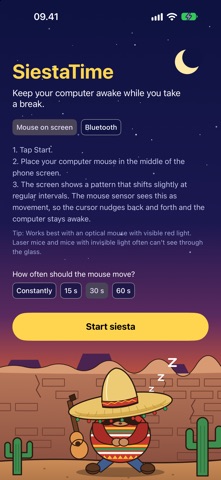


Description by Jan David Written by the developer, not by AppBrain. Click to read.
SiestaTime fixes that. Your phone gently nudges the mouse cursor every now and then, so your computer stays wide awake while you enjoy a well-deserved siesta.
No software on the computer. No admin rights. No suspicious USB gadgets. Just your phone.
TWO WAYS TO STAY AWAKE
BLUETOOTH MOUSE (recommended)
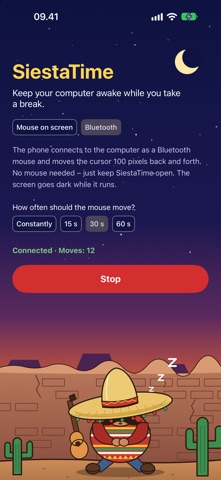
Your phone pairs with the computer as an ordinary Bluetooth mouse and glides the cursor smoothly back and forth – then puts it right back where it was. Pair once, and SiestaTime reconnects by itself next time. Just keep SiestaTime open – the screen goes dark while it works. Works with Windows, Mac and Linux.
MOUSE ON SCREEN
Old school, but charming. Put your computer mouse on top of the phone. SiestaTime shows a moving high-contrast pattern, the mouse sensor thinks it's being moved, and the cursor wiggles. Choose between fine, medium, coarse and striped patterns. Works best with optical mice that have a visible red light.
WHAT YOU GET
• Choose how often the cursor moves: constantly, or every 15, 30 or 60 seconds
• Smooth, gentle movements – the cursor always returns to its starting point
• No internet access, no ads, no tracking, no account
• One-time purchase – no subscription. A siesta should never come with a monthly fee
• Available in 26 languages
PERFECT FOR
• Long downloads, renders, backups and builds that die when the computer sleeps
• Presentations and dashboards that must stay on screen
• Remote desktops and sessions that log you out after a few idle minutes
• Lunch breaks that turned into "lunch breaks"
• Anyone who is tired of wiggling the mouse every five minutes
The sombrero is included. The nap is up to you.
Please follow your workplace's rules for computer use. SiestaTime keeps your computer awake – not your boss asleep.